

Share
Turn PowerPoint slides into AI-narrated videos. Automatically generate scripts and lifelike voices to export your presentations in MP4 format.
What is OralSlides?
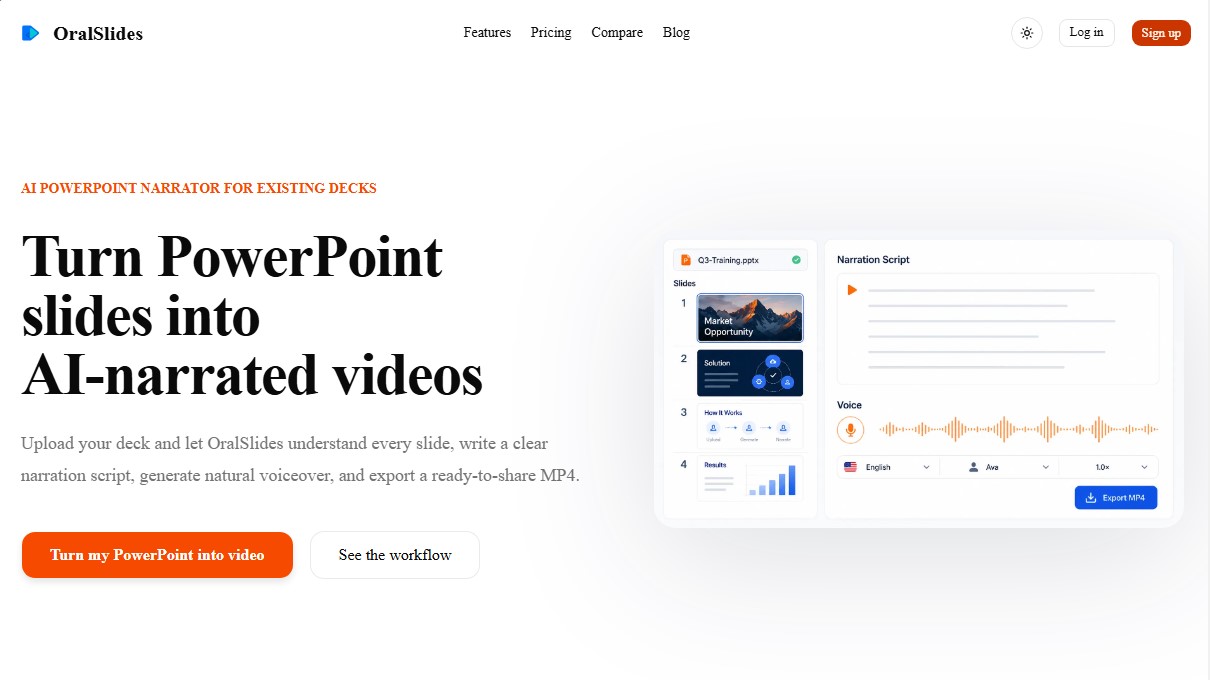
OralSlides is an AI tool designed to transform PowerPoint presentations into automatically narrated videos. Unlike traditional video editors or avatar platforms, this application focuses on converting PPTX or PDF files into MP4 audiovisual content without the need to rebuild slides from scratch or manually record voiceovers. Its primary purpose is to streamline the creation of training materials, sales presentations, and corporate updates using realistic synthetic voices and AI-generated scripts.
The operation of OralSlides is based on multimodal AI technology. When a document is uploaded, the system analyzes not only the text but also the visual composition, graphics, diagrams, and the hierarchy of each slide to understand the overall context of the deck. Once the information is processed, the tool drafts a coherent narration script that the user can review and edit for each individual page. Subsequently, an automated voiceover is generated and synchronized with the images from the original presentation, delivering a ready-to-share video in just a few minutes.
Its most notable technical and functional capabilities include:
- Direct PPT-to-video conversion: Preserves the original design and aesthetics of the slides, using them as the visual track for the final file.
- Modular script editing: Allows users to manually modify the narration text or request the AI to rewrite it to adjust the tone without affecting the rest of the project.
- Multilingual support: Capable of generating voiceovers in 10 languages, including Spanish, English, French, German, and Mandarin.
- High-quality export: Resulting videos can be downloaded in 720p or 1080p resolutions, with the option to include burned-in subtitles.
- Selective regeneration: If a single slide is updated, the user can regenerate only 그 specific audio and video segment, optimizing production time.
This solution is especially useful for Sales Enablement professionals, Customer Education teams, and L&D (Learning and Development) departments. By eliminating the need for complex editing software or manual voice recordings on a computer, OralSlides makes training manuals and sales proposals more accessible and easier to consume. It is an ideal AI presentation tool for those who already have high-quality PowerPoint content and are looking to convert it into a professional video format quickly and efficiently. It should be noted that the tool uses static images of the slides, so it does not transfer original PowerPoint animations or transitions to the final MP4 file.
OralSlides features and use cases
How to use OralSlides
OralSlides FAQ
What exactly is OralSlides, and what is it used for?
OralSlides is an AI tool that automatically converts your PowerPoint presentations into narrated videos, generating the script and voiceover based on the content of your slides.
What file types can I upload to the platform?
You can upload PowerPoint presentations in PPTX format as well as PDF documents for the tool to process and convert into audiovisual content.
How does OralSlides analyze the information on my slides?
The system uses multimodal AI to examine the text, graphics, and layout of each slide, creating a narrative script that maintains the context of the entire presentation.
Can I edit the automatically generated voiceover script?
Yes, you have full control to manually review and modify the narration text or ask the AI to make specific changes before generating the final audio.
What languages are available for narration in OralSlides?
The tool supports ten different languages, including Spanish, English, French, German, Italian, Portuguese, Chinese, Japanese, Korean, and Russian.
Are the animations from my original slides preserved?
No, exported videos use static images of your slides to ensure visual fidelity; therefore, internal PowerPoint transitions and animations are not reproduced.
How does the tool’s credit system work?
Each slide selected to generate a script and audio consumes one page credit. You receive three free credits upon registration, and subscription plans are available for more.
What is the quality of the videos exported with OralSlides?
Depending on your plan, you can download videos in MP4 format at 720p or 1080p resolution, with options to add subtitles and remove the watermark.
OralSlides pricing and plans
Free Plan ($0):
3 page credits (one credit equals one slide).
Includes OralSlides watermark.
MP4 video export in 720p resolution.
Access to 1 default voice.
Subtitles not included.
Starter Plan ($6/month - Early Bird Price):
100 page credits per month.
No watermark on exports.
MP4 video export in 1080p resolution.
Access to 15 built-in voices.
Option to include subtitles in the video.
Plus Plan ($14.5/month - Early Bird Price):
400 page credits per month.
No watermark on exports.
MP4 video export in 1080p resolution.
Access to 15 built-in voices.
Option to include subtitles in the video.
OralSlides Screenshots
OralSlides alternatives


Osmo Studio
AI animation studio for professional motion graphics and videos. Control every detail, collaborate with teams, and export with transparent backgrounds.

Victoria Secret Runway
Create fashion show videos by integrating your face into real scenes. Just upload a photo to replace professional models and walk the runway.


VideoWeb Video Generator
Generate professional AI videos from text or images. Features realistic avatars, automated scripts, and optimized formats for marketing and social media.

Motion Transfer AI Video Generator
Animate character photos using reference videos. Precisely transfer gestures, dances, and body movements from a clip to an image for realistic results.