Share
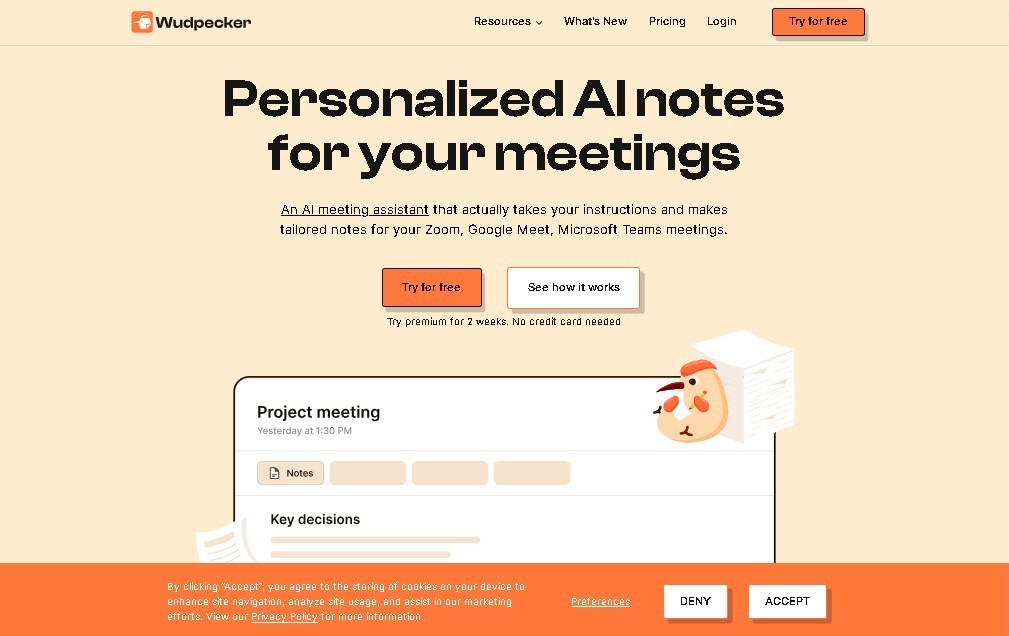
Record, transcribe, and summarize Zoom, Meet, and Teams meetings. Generate custom notes, extract action items, and query specific conversation details.
What is Wudpecker?
Wudpecker is an AI-powered meeting assistant designed to optimize video call management and data collection. Its primary function is to serve as an automated transcriber and note-taker that integrates directly with leading platforms like Zoom, Google Meet, and Microsoft Teams. This software allows users to delegate information capture to AI, ensuring no critical details are missed while they focus fully on the conversation from their computer.
Wudpecker's technology utilizes advanced natural language processing algorithms to deliver accurate real-time recordings and transcriptions. One of its most innovative features is Ask Wudpecker, an intelligent query system that allows users to ask specific questions about the content discussed during the meeting. Thanks to this approach, users can extract specific data, clarify doubts, or request summaries of agreements reached without having to manually review the entire recording or the full transcript.
Key functional capabilities and practical benefits include:
- Automatic audio and video recording and transcription with multi-language support and speaker identification.
- Custom note generation, allowing users to adapt the format, technical vocabulary, and summary structure (including tables or lists) to their specific preferences.
- Identification of key points, strategic decisions, and pending tasks, facilitating the follow-up of commitments made during the session.
- Integration with productivity and CRM tools, such as Notion, Slack, HubSpot, and other customer management systems, streamlining the workflow between departments.
This solution is especially valuable for sales teams, project managers, and professionals who manage a high volume of digital meetings. By automating documentation, Wudpecker ensures that the knowledge generated in each session is easily accessible and shareable. The AI's ability to synthesize complex information and transform it into clear action items makes this application an essential resource for improving operational efficiency and information organization in both corporate and remote work environments.
Wudpecker features and use cases
How to use Wudpecker
Wudpecker FAQ
What is Wudpecker, and what are its main features?
It’s an AI assistant that automatically records, transcribes, and creates customized notes for your meetings.
Which video conferencing platforms is the system compatible with?
The tool works seamlessly with Zoom, Google Meet, and Microsoft Teams to capture all the content from your calls.
Can I customize the format of the notes Wudpecker generates?
Yes, you can configure the summary structure, vocabulary, and layout of the resulting information.
What is the "Ask Wudpecker" feature used for?
This feature lets you ask the AI specific questions about any detail mentioned during the recording.
What does the free version of Wudpecker include?
The free plan includes ten meetings per month, three AI assistant questions per recording, and access to transcription editing.
Can I integrate the tool with apps like Slack or Notion?
Yes, paid plans allow you to connect with external productivity tools like Notion, Slack, and various CRM systems.
How does the platform handle speaker identification?
The system is designed to automatically recognize participants and supports multiple languages to make organizing the text easier.
Is there a trial available for Wudpecker's advanced features?
The platform typically offers a 14-day free trial of its premium plans with no credit card required.
Wudpecker pricing and plans
Free Plan – 0 € per month
- Up to 10 monthly meetings with the assistant bot.
- Limit of 3 AI questions per recording.
- Transcription and note editing.
- Integrations with Zoom, Google Meet, and Microsoft Teams.
- Sharing functionality.
Plus Plan – Approx. 16 $ per month (approx. 13 $/month billed annually)
- Up to 30 monthly meetings with the bot.
- Unlimited AI questions ("Ask Wudpecker").
- Advanced bot configuration (auto-join, custom names, and messages).
- Integrations with productivity tools and CRMs like Notion, Slack, and HubSpot.
- Includes a 14-day free trial of premium features.
Pro Plan – Approx. 30 $ per month (approx. 25 $/month billed annually)
- Up to 100 monthly meetings with the bot.
- All features included in the Plus Plan.
- Expanded limits designed for power users.
- Includes a 14-day free trial of premium features.
Wudpecker Screenshots
Wudpecker user reviews
Write a review
Checking your session...
Wudpecker Reviews
Loading reviews...
Wudpecker alternatives


Chap by ChatPanel
Chap by ChatPanel is an AI agent for browser, desktop and terminal that takes meeting notes, works with any model or agent and anonymizes sensitive data locally.