Share
Create layered knowledge maps to organize complex ideas. Navigate between the big picture and details with integrated external sources and AI assistance.
What is ZoomMap?
ZoomMap is an advanced knowledge management platform designed to organize complex information through layered knowledge maps. Unlike linear notes or traditional outlines, this tool allows you to structure ideas both vertically and horizontally, making it easier for users to maintain a global perspective without losing sight of specific details. It is a solution geared toward researchers, academics, writers, and professionals who need to synthesize large volumes of data in a visual, structured, and highly navigable environment from their desktop.
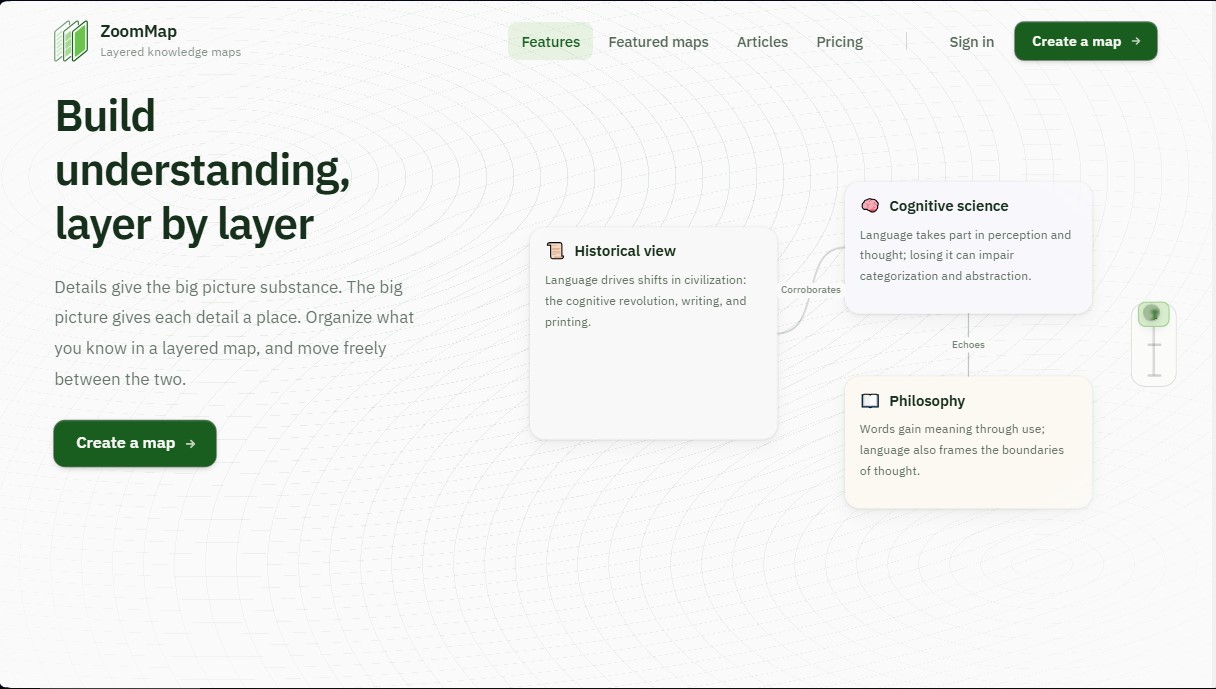
ZoomMap operates on an open canvas where nested cards are organized. Each card can contain additional layers inside, allowing complex concepts to be broken down into manageable levels of depth. Users can adjust the view to see only a general summary or expand all layers to analyze detailed information. This hierarchical structure helps preserve the logical relationship between ideas, preventing key points from getting lost—a common problem in conventional text processing.
The tool integrates the ZoomMap Agent, an AI assistant capable of processing multiple information sources simultaneously. Using state-of-the-art language models, such as Claude Sonnet and various versions of GPT, this agent can analyze EPUB books, PDF documents, Markdown files, images, and web links. The assistant not only helps identify gaps in the user's reasoning but also performs critical operational tasks:
- Automated card generation and text drafting based on precise instructions.
- Identification of connections and logical relationships (causality, contrast, or support) between different information nodes.
- Direct quote extraction and bibliographic references automatically linked to source materials.
- Cross-source analysis, allowing users to read and cross-reference data from several lengthy documents in a single pass.
One of its most notable capabilities is the ability to ground each card in evidentiary material. By selecting a fragment of a document or an image, the user can link it as direct evidence to a specific idea. This ensures that any concept placed on the map can be instantly verified, allowing for a direct jump to the original source to retrieve context.
ZoomMap optimizes knowledge mapping by allowing ideas to move freely across the workspace. When diving deep into a card, the parent cards transform into visual guides that keep the hierarchy ever-present. This workflow facilitates the creation of theoretical frameworks, complex project planning, and the study of dense academic fields, transforming raw information into a deep and scalable structure of understanding.
ZoomMap features and use cases
How to use ZoomMap
ZoomMap FAQ
What exactly is ZoomMap, and what is it used for?
ZoomMap is a layered knowledge-mapping tool that lets you visually organize ideas and move seamlessly between the big picture and technical details.
How do layers work within ZoomMap?
The structure is organized through nested cards, where each element can contain a deeper level of information that expands or collapses as needed.
Can I use my own documents as information sources?
Yes, you can upload PDFs, EPUBs, images, or web links to your materials library to back up each card with direct evidence.
What are the benefits of the ZoomMap Agent assistant?
This smart assistant reads your sources and analyzes your map to identify key ideas, suggest new connections, and generate automatic citations based on your documents.
Is it possible to connect ideas that are on the same level?
Yes, the open canvas allows you to organize cards horizontally and draw connection lines to define relationships such as cause, support, or contrast.
What is included in the ZoomMap free plan?
The free plan allows you to create up to five different maps with a one-gigabyte storage limit and access to basic AI models for information processing.
How can I quickly reorganize my map’s structure?
To change the information hierarchy, simply drag one card into another or manually move it to a different position on the workspace canvas.
What file types does the materials library support?
The platform accepts PDF and EPUB documents, Markdown files, plain text, and images to document your research.
ZoomMap pricing and plans
Free
0 $
200 points (one-time payment, no expiration).
5-map limit.
1 GB storage.
Access to Economy models: GPT-6 Luna, DeepSeek V4 Flash, and Claude Haiku 4.5.
Standard
10 $ per month (or 100 $ per year)
3,000 points per month plus a 20-point daily bonus.
Unlimited maps.
Unlimited storage.
Access to Economy and Standard models (includes GPT-6 Sol, Claude Sonnet 5, and GPT-5.6 Terra).
Pro
100 $ per month (or 1,000 $ per year)
30,000 points per month plus a 400-point daily bonus.
Unlimited maps.
Unlimited storage.
Access to Economy, Standard, and Advanced models (includes GPT-6 Astra, Claude Opus 5.5, and Claude Fable 5.1).
ZoomMap Screenshots
ZoomMap alternatives

ReferenceChecker.ai
Verify academic citations and DOIs against scientific databases. Detect errors or fake references and correct bibliographies in multiple professional formats.
Ask BONBON
AI assistant for electricians that answers NEC and CEC code questions with official citations. Includes calculation tools, blueprint analysis, and a voice assistant.


Lumenology
AI tool for deep Bible study. Features text analysis, historical commentary, and original word study with cited sources and cross-references.

BookRecall
Capture and organize book highlights with AI to never forget what you learn. Scan text, get reminders, and consult your notes through an intelligent chat.