

Share
Create photorealistic renders from sketches or CAD designs. Edit materials, virtually furnish spaces, and enhance image quality with AI.
What is Rendershop?
Rendershop is an advanced AI-powered architectural visualization platform designed to transform sketches, elevation plans, and CAD designs into high-quality photorealistic images. This tool allows architects, developers, and designers to optimize their workflow, eliminating the need for slow and complex traditional rendering processes. The system uses generative AI algorithms to interpret architectural structures and apply textures, lighting, and styles automatically or through descriptive prompts.
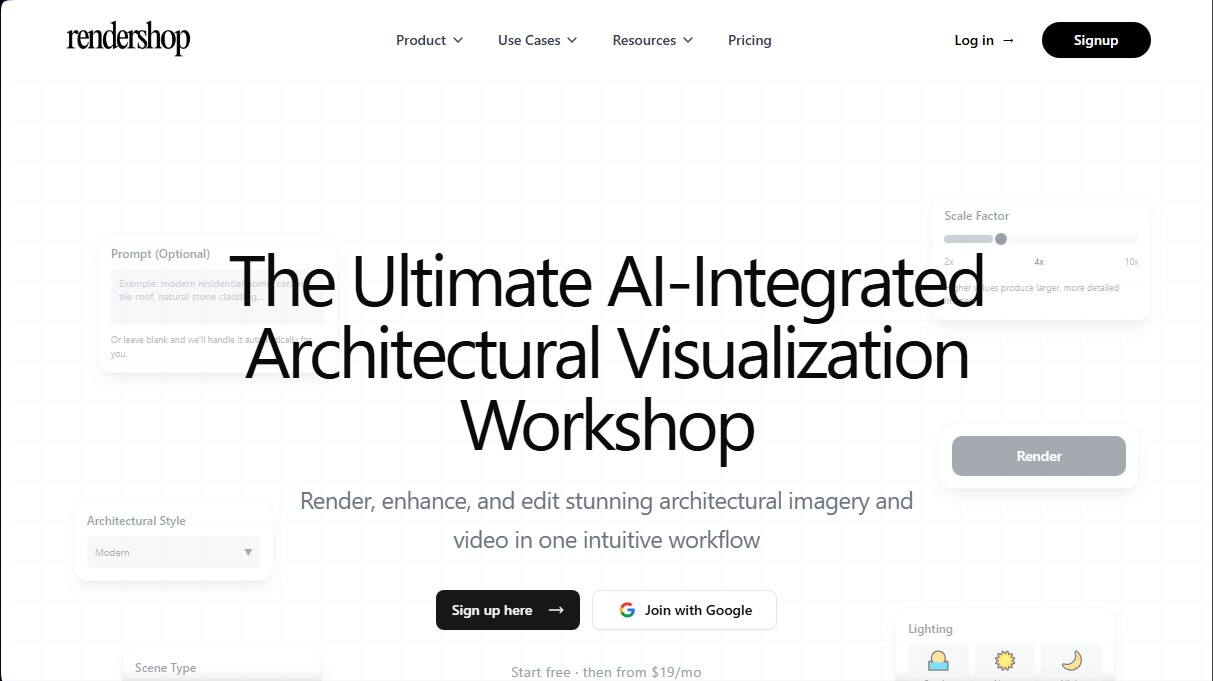
Using Rendershop is intuitive and follows a structured process: upload the design, configure parameters, and generate the render. Users can adjust the upscaling factor (2x, 4x, or 10x) to achieve superior levels of detail and resolution. Among the customization options, the ability to define the scene type (interior or exterior), lighting conditions (sunrise, midday, or night), and architectural style stands out, allowing for total control over the project's atmosphere.
The tool’s functional capabilities are divided into several specialized modules covering the entire design cycle:
- Sketch-to-Render: Converts freehand drawings into professional renders in seconds, allowing for instant iteration across different perspectives and times of day.
- Precision Editing (Edit Tool): Using a marker-point system, the AI allows for changing specific materials and textures (wood, stone, concrete, or glass) with surgical precision without altering the rest of the image.
- Virtual Home Staging: Makes it possible to realistically furnish empty rooms or photos of construction sites, a key feature for real estate marketing and property sales.
- Image Enhancement (Enhance Tool): The AI engine refines textures, reduces visual noise, and increases the sharpness of low-resolution renders through intelligent upscaling.
- Real Photo Editing: Facilitates modifying colors and finishes in existing photos, allowing for accurate previews of renovations.
- Video Generation: Capable of creating cinematic walkthroughs from the generated renders.
This AI solution for architecture facilitates technical and commercial decision-making, allowing results to be exported in 4K resolution ready for professional presentations on any device, whether a computer or a mobile device. By automating post-production and rendering tasks, Rendershop positions itself as a comprehensive visualization studio that improves productivity and visual communication with the end client.
Rendershop features and use cases
How to use Rendershop
Rendershop FAQ
What is Rendershop and what is it used for?
Rendershop is an AI platform that allows architects and designers to create high-quality photorealistic visualizations from sketches, blueprints, or CAD files.
Does Rendershop offer a free trial?
Yes, when you sign up, you receive free credits to test all the rendering, editing, and virtual staging features before subscribing to a paid plan.
How long does it take to generate an image with Rendershop?
The rendering process usually takes between two and five minutes, while editing and enhancement tasks are typically completed in under three minutes.
Can I modify specific materials in my projects?
Yes, the editing tool allows you to select specific surfaces to change textures, adjust colors, or accurately replace materials like stone, wood, and glass.
What is the virtual staging feature?
This feature allows you to automatically furnish empty rooms or photos of construction in progress with realistic furniture to show clients a space's final potential.
What file formats are compatible with the platform?
You can upload your designs, sketches, or elevations in the most common image formats, specifically JPG, PNG, and WEBP files.
Is it possible to increase the resolution of my images?
Yes, the upscaling tool allows you to increase detail up to ten times the original size, removing noise and perfecting textures in low-resolution renders.
Do I have commercial rights to the images created in Rendershop?
Yes, you maintain full ownership and commercial rights to all generated renders for use in professional presentations, advertising, or portfolios.
What does the Rendershop Basic plan include?
The Basic plan offers 500 monthly credits, access to all editing and rendering tools, and the ability to export images in 4K resolution.
Rendershop pricing and plans
Upload the design in CAD, sketch, or elevation format to the platform.
Select the scale factor from the options of two, four, or ten times magnification to determine the level of detail and image size.
Choose the scene type by specifying whether it is an interior or exterior space.
Configure the project lighting by selecting from sunrise, noon, or night options.
Determine the desired architectural style for the visualization.
Enter an optional text prompt with specific details about materials and finishes, or leave the field blank for the system to generate them automatically.
Click the render button to get the photorealistic image in just a few seconds.
Download the final high-resolution result for use in professional presentations.
Use the editing tool to mark specific points on the image and describe exact material changes like stone, wood, or concrete.
Use the erase function to cleanly remove unwanted objects, furniture, or details.
Draw regions over large areas of the image to transform entire sections in a single pass.
Upload reference images to apply specific textures or finishes to selected surfaces.
Upload photos of empty rooms to the virtual staging tool to furnish and decorate the space instantly.
Use the enhancement tool to increase the resolution of existing renders, reduce noise, and better define architectural details.
Modify real photographs by changing wall colors, furniture materials, or lighting settings using AI photo editing.
Generate cinematic virtual tour videos from the renders created on the platform.
Rendershop Screenshots
Rendershop user reviews
Write a review
Checking your session...
Rendershop Reviews
Loading reviews...
Rendershop alternatives

Planner 5D
Planner 5D is home and interior design software for drawing 2D and 3D floor plans, furnishing rooms from a large catalog, rendering and using AI design tools.




InstantVisualizer
Visualize exterior paint colors with AI. Upload a photo to test real color schemes and see the final result with professional brand codes before painting your home.