AI Jewelry Model
Share
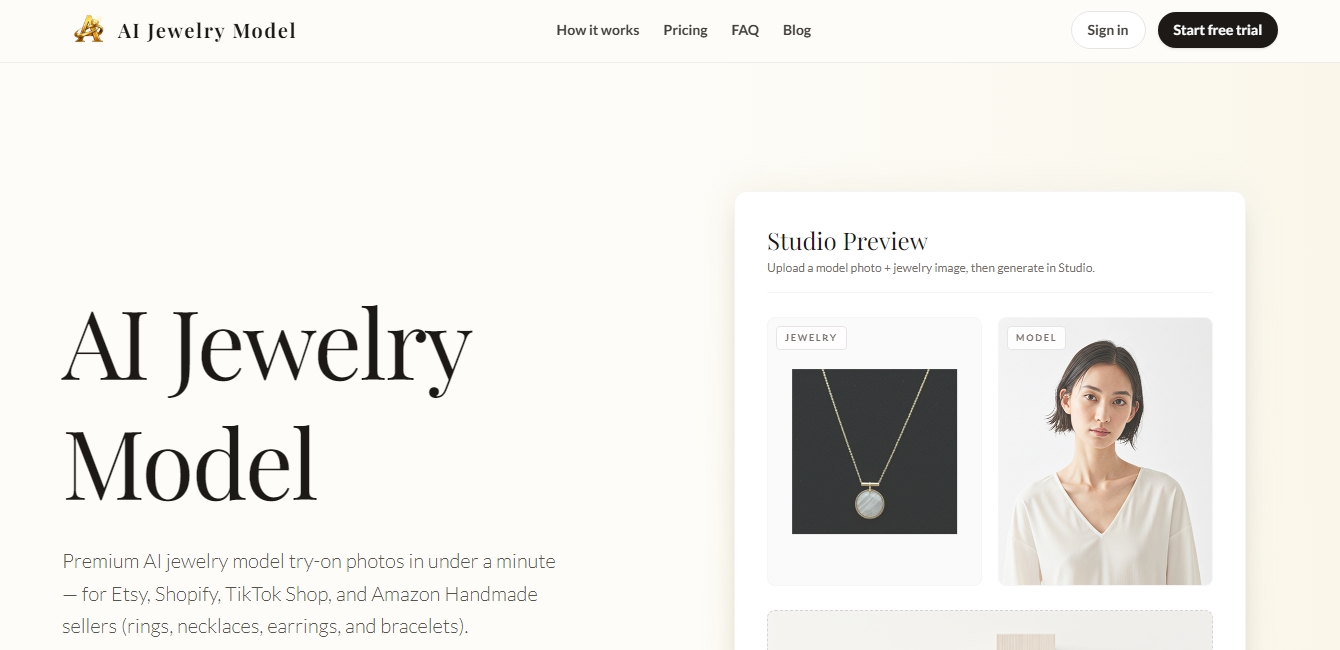
Generate realistic AI jewelry images on models. Showcase rings, necklaces, and earrings on people for online stores without the need for photoshoots.
What is AI Jewelry Model?
AI Jewelry Model is an advanced generative AI solution designed specifically for the jewelry and e-commerce sectors. Its primary function is to transform static product photographs into professional images of real models wearing the pieces using virtual try-on technology. This tool is geared toward sellers on platforms like Etsy, Shopify, Amazon Handmade, and TikTok Shop who need high-quality visual content without the costs and logistics of a traditional photo shoot with models and photographers in a studio.
The platform operates through a simplified three-step process that guarantees professional results in approximately 25 seconds. The user uploads a clear image of the jewelry—whether it is a ring, necklace, earrings, or bracelet—against a solid background and selects a profile from an extensive library of available AI models. Physically Based Rendering (PBR) technology accurately captures the brilliance of gemstones and the luster of precious metals, ensuring the final result is indistinguishable from a real photograph.
The tool stands out for its ability to handle different types of accessories with exceptional technical realism:
Ring Modeling: Achieves precise positioning on fingers while respecting skin texture and natural occlusion, allowing the jewelry to appear as if it is actually encircling the finger.
Necklace Generator: The AI correctly interprets gravity and the drape of chains over the collarbone, creating editorial-quality compositions.
Earrings and Perspective: Automatically adjusts the orientation and light interaction in portraits or profile shots, properly managing studs, hoops, or dangle earrings.
Bracelets and Bangles: Adapts each piece to the curvature of the wrist with precise scaling and realistic metallic reflections.
From a functional standpoint, AI Jewelry Model generates images with a 4:5 aspect ratio, optimized for product listings and social media campaigns. Its utility extends to creating ad creatives for Meta, Pinterest, or TikTok, enabling mass catalog production through batch processing. By making it easy to test different models, angles, and skin tones on the same piece, it becomes a strategic resource for A/B testing and optimizing conversion at the digital point of sale.
The platform guarantees high-resolution output and allows marketing teams to scale their visual production predictably. By integrating these AI jewelry tools, businesses can maintain a consistent, professional, and attractive aesthetic across their entire online inventory, enhancing the end customer's shopping experience through realistic product visualization.
AI Jewelry Model features and use cases
How to use AI Jewelry Model
AI Jewelry Model FAQ
What exactly is AI Jewelry Model?
It is a tool that generates photorealistic images of models wearing your jewelry based on a product photograph.
How many credits does it cost to generate a photo with AI Jewelry Model?
Each successfully generated photo consumes ten credits, and you will not be charged if the generation process fails.
Can I use these images for my Etsy or Shopify listings?
Yes, the photos are optimized and ready for commercial use in online stores and on social media with any paid plan.
What happens if I’m not satisfied with the AI Jewelry Model result?
If the system fails to place the jewelry correctly, no credits will be deducted from your account, and you can try again by selecting a different model.
How long does it take to generate a virtual try-on image?
The image creation process typically takes about twenty-five seconds per photo.
What types of accessories can I process with AI Jewelry Model?
The platform is specifically designed to work with rings, necklaces, earrings, and bracelets in various materials and styles.
Can I cancel my paid subscription at any time?
You can cancel your subscription through the dashboard whenever you like, and any remaining credits will stay active until the end of your billing cycle.
What file formats are supported for uploading my photos?
You can upload your jewelry images in JPG, PNG, or WEBP formats, preferably with a resolution of at least 1080 pixels.
AI Jewelry Model pricing and plans
Free Plan
Price: 0 $.
10 credits to claim once a month.
Approximately 1 virtual try-on photo per month.
Standard quality and basic processing queue (slower).
Watermarked downloads.
Community support.
Starter Plan
Price: 19,00 $/mo.
600 monthly credits (approx. 60 try-on photos).
Faster processing queue.
No watermarks and full-resolution downloads.
Basic history for saving results.
Email support.
Limit: 10 credits per photo (failed generations are not charged).
Pro Plan
Price: 49,00 $/mo.
2,000 monthly credits (approx. 200 try-on photos).
Priority processing queue.
No watermarks and batch downloads (ZIP).
Advanced refining for better edge and shadow blending.
Extended history and redownload option.
Limit: 10 credits per photo (failed generations are not charged).
Studio Plan
Price: 99,00 $/mo.
4,500 monthly credits (approx. 450 try-on photos).
Top-priority processing queue.
No watermarks and bulk processing tools.
Early access to new features.
Includes up to 3 team seats.
Priority support.
Limit: 10 credits per photo (failed generations are not charged).
AI Jewelry Model Screenshots