AI Photo Editor Free
Share
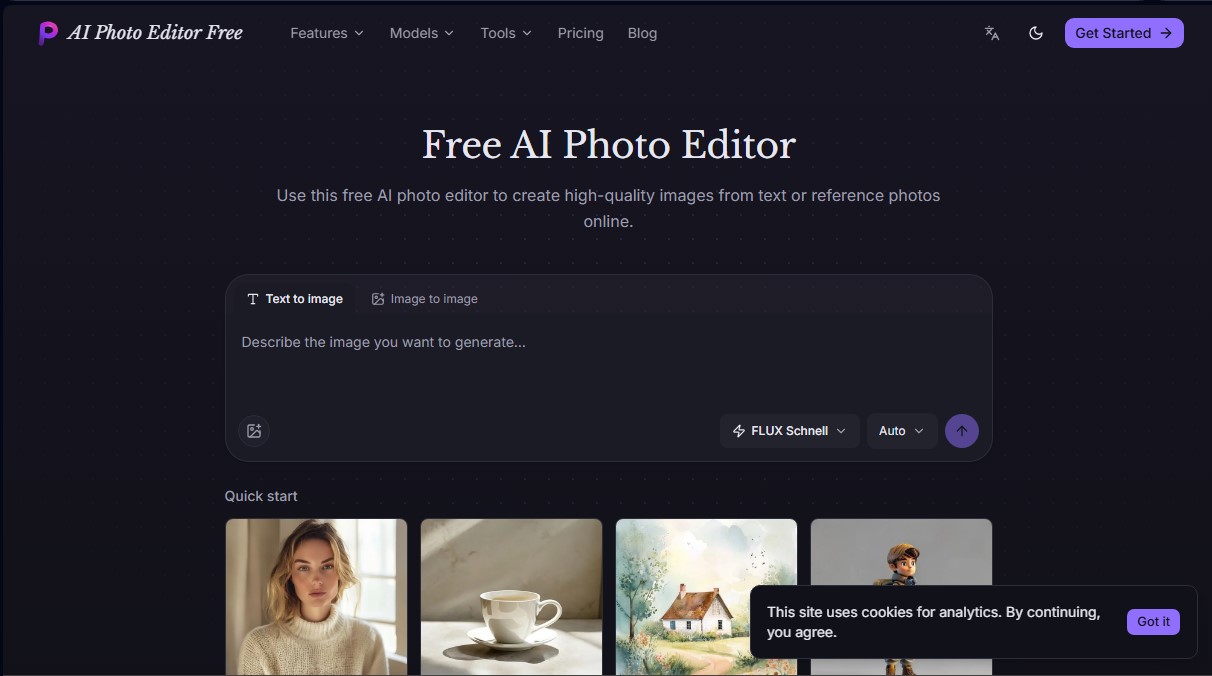
Generate images from text, upscale resolution, remove backgrounds, and expand frames. Access various AI models for high-quality illustrations, designs, and portraits.
What is AI Photo Editor Free?
AI Photo Editor Free is an advanced AI image generation platform designed to create high-quality visual content directly from your browser. This tool allows you to transform text descriptions into detailed graphics or modify existing files using image-to-image techniques, facilitating a creative workflow for both casual users and design professionals seeking fast and precise results.
The system stands out by integrating four specialized AI models into a single interface, allowing users to choose the technology that best fits their project. FLUX Schnell is optimized for generating quick drafts and multiple variations of an idea; Nano Banana Pro focuses on technical detail and legible text generation; GPT Image 2 offers superior control over design and prompt fidelity; and Seedream 5.0 Pro is the recommended choice for production-level results, featuring high photorealism and the ability to manage multiple visual references.
Among its core capabilities, AI Photo Editor Free includes specific functional editing tools:
- Background Remover: Automatically extract subjects to immediately obtain PNG files with transparent backgrounds.
- Image Upscaler: Increase the size of a photo (2x or 4x) by improving resolution without losing sharpness or over-smoothing the image.
- Image Expansion: Uses AI algorithms to extend the canvas beyond the original frame, coherently completing the scene in different aspect ratios.
- Style Transformation: Turn a real photograph into an illustration or piece of art while maintaining the original structure and subject.
A key advantage of this online AI tool is its ability to render legible text within compositions, which is essential for creating posters, magazine covers, or packaging prototypes. By entering the desired text in quotation marks within the prompt, the models process the typography as an integral part of the design. Additionally, users have full control over the aspect ratio (1:1, 16:9, 9:16, 4:3, or 3:4), ensuring the AI composes the scene natively for the chosen format.
The application runs entirely in the cloud, requiring no installation or specialized hardware; it is fully accessible via browser on a computer or mobile device. All creations are saved in a private library that links each image to its prompt and the model used, allowing you to download high-resolution files or reuse them as a base for new iterations, thus optimizing any AI photo editing workflow.
AI Photo Editor Free features and use cases
How to use AI Photo Editor Free
AI Photo Editor Free FAQ
What is AI Photo Editor Free, and what features does it offer?
It is an online platform for creating high-quality images using text prompts or reference photos, featuring tools to remove backgrounds, expand frames, and upscale resolution.
Is it free to use AI Photo Editor Free?
The tool offers a free tier that provides welcome credits upon registration, allowing you to generate your first images without having to enter any payment information.
How does the platform's credit system work?
Each creation consumes credits based on the selected model and the number of requested variations; the exact cost is always displayed before you confirm the generation.
Can I include specific words in the generated images?
Yes, you can type the desired text in quotation marks within your description, and models like Nano Banana Pro or GPT Image 2 will render it legibly.
Do I need to install any software to use AI Photo Editor Free?
No installation or external API keys are required, as it runs directly in the browser of any computer or smartphone.
What types of AI models are available?
You can choose from FLUX Schnell for speed, Nano Banana Pro for complex details, GPT Image 2 for text-accurate compositions, and Seedream 5.0 Pro for realistic results.
Are the images I design with this tool private?
Yes, all results are saved in a private personal library where you can view your creation history, the models used, and the prompts employed.
Can I use images from AI Photo Editor Free for commercial purposes?
Paid subscriptions grant a commercial license that allows for the professional use of all images downloaded at full resolution.
AI Photo Editor Free pricing and plans
Free Plan
Price: $0
Free welcome credits to generate a limited number of images.
No credit card required.
Access to editing tools (background remover, upscaling, expansion, and style transfer).
Private image history.
Lite Plan
Price: $6.90 per month (or $4.83 per month with $57.90 annual billing)
100 monthly credits valid for 1 month.
Text-to-image and image-to-image generation.
Access to all AI models (FLUX Schnell, Nano Banana Pro, GPT Image 2, and Seedream 5.0 Pro).
Free downloads and commercial license.
API access.
Pro Plan
Price: $16.90 per month (or $11.83 per month with $141.90 annual billing)
250 monthly credits valid for 1 month.
Text-to-image and image-to-image generation.
Access to all AI models (FLUX Schnell, Nano Banana Pro, GPT Image 2, and Seedream 5.0 Pro).
Free downloads and commercial license.
API access.
Ultra Plan
Price: $32.90 per month (or $23.03 per month with $276.40 annual billing)
500 monthly credits valid for 1 month.
Text-to-image and image-to-image generation.
Access to all AI models (FLUX Schnell, Nano Banana Pro, GPT Image 2, and Seedream 5.0 Pro).
Free downloads and commercial license.
API access.
Credit Packs (One-time payment)
50 Credits: $5.00 (valid for 1 year).
200 Credits: $17.90 (valid for 1 year).
400 Credits: $33.90 (valid for 1 year).
Add extra credits without a monthly subscription.
AI Photo Editor Free Screenshots
AI Photo Editor Free alternatives

ColorCraft
Create Amazon KDP books. Generate coloring pages, stories, puzzles, and print-ready full covers, plus promotional mockups in a single workflow.

Tesla Wrap Generator
Tesla Wrap Generator uses AI to paint designs onto the official UV template of each Tesla model for Paint Shop, with a 3D preview before you download.