AI Product Photography.app
Share
AI Product Photography.app
Generate professional e-commerce images from a single photo. Create studio backgrounds, model scenes, and infographics for Amazon, Shopify, and ads.
General Information about AI Product Photography.app
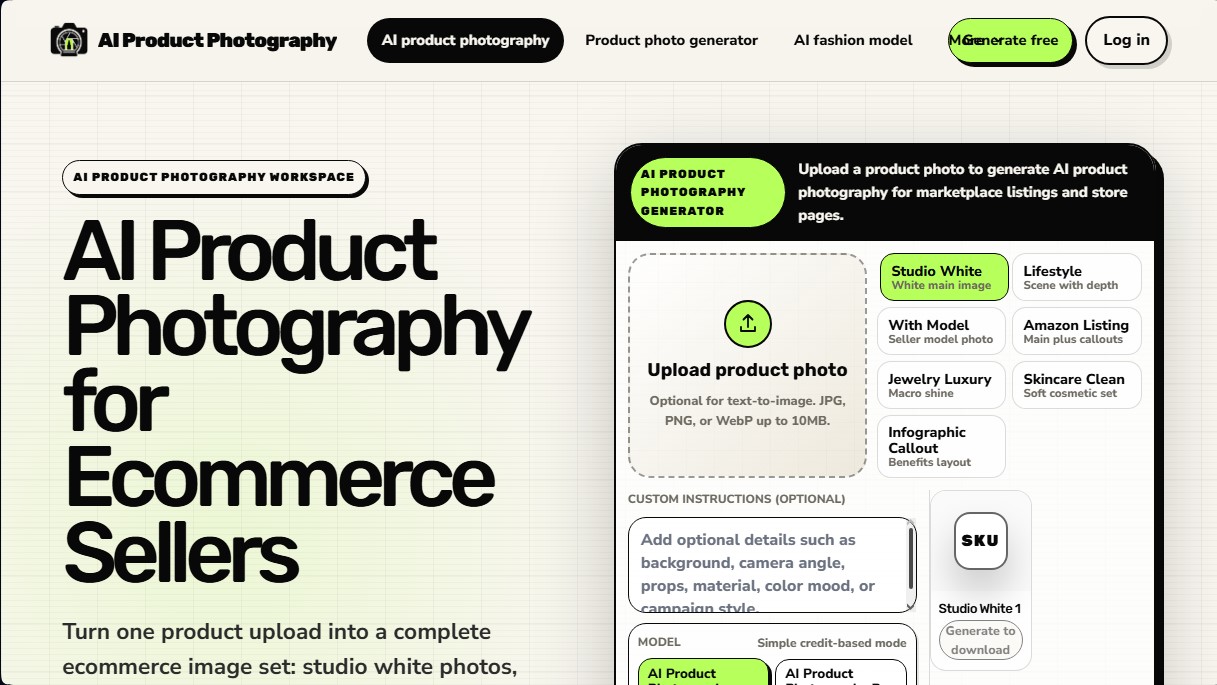
AI Product Photography.app is an advanced tool specifically designed for e-commerce sellers to transform a single product photograph into a complete set of professional images. Through generative AI technology, the platform enables the creation of high-quality visual content for online stores, eliminating the need for recurring traditional photoshoots. Its primary focus is creating marketplace-ready assets while ensuring product fidelity in every generation.
The process begins by uploading a real image of the SKU, which serves as the system's base reference. Unlike generic background editors, this AI product photo generator respects critical details such as logos, labels, packaging shapes, and reflective surfaces. Users can choose from various predefined workflows to achieve specific results quickly and efficiently:
- Studio White: Creates hero images with a pure white background, essential for meeting the requirements of platforms like Amazon.
- Lifestyle: Generates ambient scenes with depth of field that place the product in everyday contexts.
- AI Fashion Model: Allows for the integration of garments or accessories onto AI models, enhancing presentation in fashion catalogs.
- Infographics: Designs compositions with callouts that highlight the technical benefits of the item.
- Macro Views: Optimized for demanding sectors like luxury jewelry or cosmetics, where detail and brilliance are fundamental.
The utility of AI Product Photography.app lies in its ability to scale content production. It maintains absolute visual consistency in terms of lighting, framing, and color palette across entire product collections. This is especially beneficial for managing large catalogs on Shopify or launching seasonal social media campaigns with ad-optimized images.
In addition to scene creation, the tool offers advanced configuration settings to adjust camera angles, materials, and campaign styles through custom prompts. Results can be exported in various resolutions, including 4K quality, ensuring that graphic material is suitable for the web, mobile, or large-format digital displays. It is a practical solution for sellers looking to professionalize their brand image with an automated, conversion-focused workflow.
Features and Use Cases of AI Product Photography.app
How AI Product Photography.app Works
Frequently Asked Questions about AI Product Photography.app
What is AI Product Photography.app and what is it used for?
It is an AI-powered tool designed to transform a single product photo into a complete set of professional e-commerce images, including lifestyle scenes and infographics.
What kinds of images can I create with AI Product Photography?
You can create white-background photos for catalogs, lifestyle scenes with realistic depth, images featuring human models, macro shots for jewelry, and graphics with text callouts for Amazon.
How do I use the tool to get the best results?
Simply upload a real photo of your product, choose a template like Studio White or Lifestyle, and review the detail accuracy before downloading the final image.
Do I need design skills to use AI Product Photography?
No, the platform uses automated workflows that allow you to generate high-quality images simply by selecting the type of scene you need.
Does AI Product Photography allow me to create photos with human models?
Yes, the tool features a specific AI model function that lets you place your product in realistic scenes where it is being worn or used by people to help boost conversions.
What should I check before publishing the generated images?
It is essential to perform an accuracy check to ensure that logos, labels, fine print, and reflective surfaces remain identical to the original product.
What resolutions are available for photos on AI Product Photography.app?
Depending on the credits used, you can generate and download images in 1K, 2K, and up to 4K resolution for maximum clarity on your online store.
How does the platform's credit system work?
The service operates on a credit model where each generation consumes a specific amount based on your chosen resolution and the complexity of the selected AI model.
AI Product Photography.app Pricing
Free Plan
Price: Free.
1 image generation per session.
Resolution limited to 1K (equivalent to 1 credit).
Access to basic AI product photography tools.
AI Product Photography Basic
Price: Check official website (available via monthly or annual subscription).
Credit-based consumption system by resolution: 1 credit (1K), 3 credits (2K), and 5 credits (4K).
Full e-commerce set generation: white studio shots, lifestyle scenes, and infographics.
Tools for Amazon listings and Shopify visuals.
Product fidelity control to preserve logos, labels, and fine details.
Custom prompts (background, camera angle, props, and color).
AI Product Photography Pro
Price: Check official website.
Access to official models (AI Fashion Model).
Credit usage based on high-quality output.
Batch-ready catalog workflows.
Advanced features for jewelry (Luxury) and cosmetics (Skincare Clean).
Support for multiple formats and aspect ratios (1:1, etc.).
AI Product Photography.app Screenshots