
Share
Transform images into HD videos with realistic motion. Animate portraits and landscapes instantly using advanced models and text prompts.
What is AIImageToVideo?
AIImageToVideo is an advanced platform designed for AI video generation, allowing users to transform static images into high-definition dynamic clips. This tool is positioned as a comprehensive solution for content creators, marketing professionals, and e-commerce owners looking to bring their visual files to life without needing technical editing skills. By using this AI video generator, users can automatically convert simple photos into cinematic pieces, product demonstrations, or social media content.
The application’s architecture is based on a multi-model approach, integrating some of the most powerful AI engines currently on the market, such as Veo, Kling, Runway, Hailuo, and Wan 2.5. This versatility allows users to choose the technology that best fits their creative vision; for example, the Veo model excels at cinematic camera movements, while Kling offers highly realistic natural motion and fluid physics. The tool processes files in JPG, PNG, and WebP formats, providing video output of up to 1080p in MP4 format, compatible with any computer or mobile device.
Key capabilities and functional benefits include:
- Image-to-Video Conversion: Transform any photograph into an animated sequence of up to 15 seconds.
- Text Prompt Control: Combine an image with written instructions to precisely define the type of movement, atmosphere, or desired action.
- AI Avatar Generator: Animate portraits by analyzing facial features and body movements to achieve realistic results.
- Object and Landscape Animation: Ideal for bringing nature scenes, moving vehicles, or animals to life with striking visual consistency.
- Commercial Usage Rights: Generated videos can be used in advertising campaigns, product listings, or client projects without licensing restrictions.
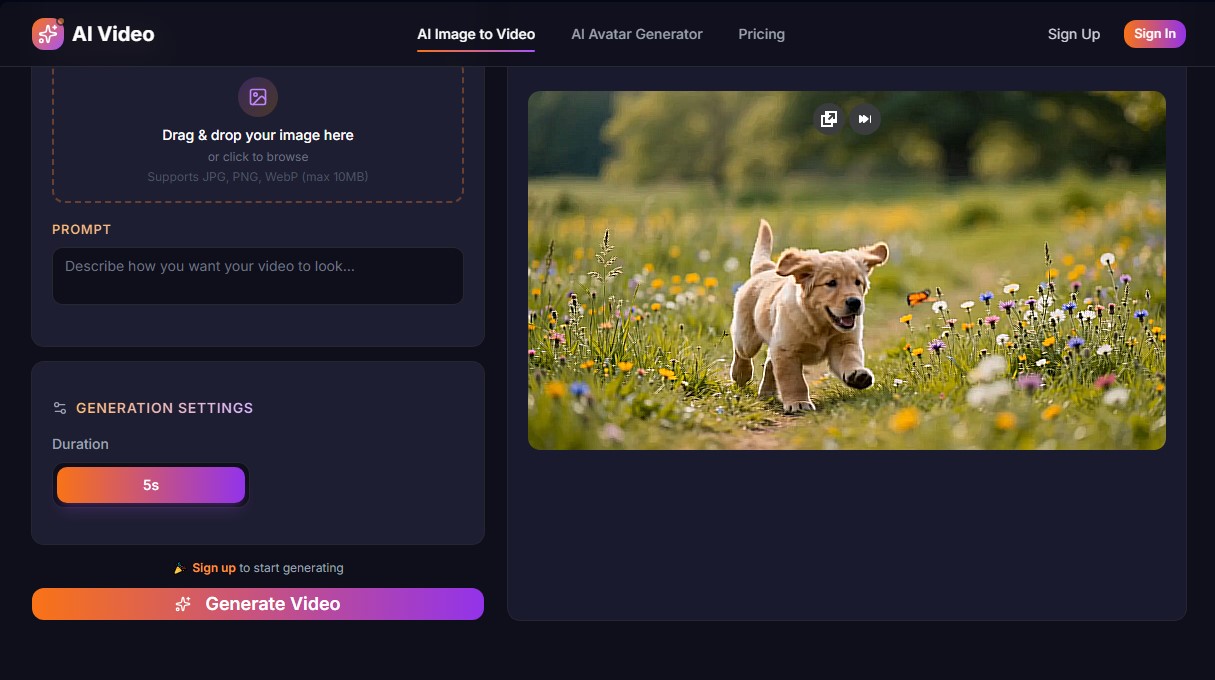
The workflow at AIImageToVideo is intuitive and fast. Users simply drag their image into the interface, describe how they want the video to look, and wait between 30 and 120 seconds for the result. This efficiency eliminates the need for complex animation software or powerful graphics cards, as all processing occurs in the cloud.
The tool is especially useful for optimizing digital marketing, enabling the creation of dynamic ads from still photos, which typically generates higher engagement on platforms like Instagram Reels, TikTok, and YouTube Shorts. Additionally, its ability to generate artistic and 3D styles makes it a valuable resource for artists and designers looking to prototype ideas quickly and professionally.
AIImageToVideo features and use cases
How to use AIImageToVideo
AIImageToVideo FAQ
What is AIImageToVideo and what features does it offer?
It is an advanced platform that transforms static images into high-definition videos using industry-leading artificial intelligence models.
Can I try AIImageToVideo for free?
Yes, all new users receive five free credits upon registration to start generating content at no initial cost.
Which AI models does the tool use?
The platform integrates cutting-edge models such as Veo, Kling, Runway, Hailuo, and Wan to offer various animation and motion styles.
Which image formats are compatible with AIImageToVideo?
You can upload your photos in JPG, PNG, and WebP formats, as long as the file size does not exceed 10 megabytes.
Do videos generated on AIImageToVideo have a watermark?
Videos created with the free plan may include a watermark, but it is completely removed once you subscribe to any paid plan.
Can I use the videos for commercial purposes?
Yes, every video generated through our platform includes commercial usage rights for use on social media, advertising, or business projects.
What is the resolution of the final videos?
The system allows you to generate and download high-definition videos with a resolution of up to 1080p to ensure a professional finish.
How long does it take AIImageToVideo to create a clip?
The process is very fast, and most videos are generated in under sixty seconds, depending on the selected model.
AIImageToVideo pricing and plans
Free Plan
Price: 0 $ (at signup).
- 5 free welcome credits.
- Access to leading AI models (Veo, Kling, Runway, Hailuo, Wan).
- Image-to-video and text-to-video generation.
- Videos may include a small watermark.
Hobby
Price: 9,99 $ per month (7,99 $/mo billed annually).
- 290 monthly credits.
- Access to all included AI models.
- Watermark-free downloads.
- Up to 1080P HD resolution.
- Video duration up to 15 seconds.
- Community support.
Creator
Price: 29,99 $ per month (22,99 $/mo billed annually).
- 950 monthly credits.
- Access to all included AI models.
- Watermark-free downloads.
- Up to 1080P HD resolution.
- Video duration up to 15 seconds.
- Priority rendering.
- Priority support.
Starter (Flexible Credits)
Price: 19,99 $ (one-time payment).
- 560 credits that never expire.
- No monthly commitment (pay-as-you-go).
- Watermark-free downloads.
- Access to all included AI models.
- Up to 1080P HD resolution.
AIImageToVideo Screenshots
AIImageToVideo alternatives
Tesla Wrap Generator
Tesla Wrap Generator uses AI to paint designs onto the official UV template of each Tesla model for Paint Shop, with a 3D preview before you download.

Triverse AI
Triverse AI generates 3D models from an image or a text prompt, adds AI PBR textures and produces assets ready for games, 3D printing and XR.

NeotypeLab
NeotypeLab uses AI to plan paint schemes for Gunpla, mecha girls and Zoids, with real hobby paint codes, a spraying sequence, a shopping list and an HD preview.