Share
A platform bringing together the best AI models for video and image creation. Generate content from text, edit, create avatars, and enhance visual quality.
What is Anyvids?
Anyvids is a centralized AI video generation platform that brings together the most advanced models on the market into a single, functional interface. This tool allows users to access cutting-edge technologies without the need to manage multiple subscriptions, facilitating an efficient workflow for content creators, marketing teams, designers, and filmmakers. Its primary function is to transform ideas, text, or static images into high-resolution audiovisual content, streamlining production right from your desktop.
The architecture of Anyvids stands out for integrating state-of-the-art AI models such as Kling 3.0, Veo 3.1, Wan 2.7, Seedance 2.0, and Vidu Q3. By utilizing these engines, the tool offers precise control over visual narrative and frame consistency. The technology employed allows for the management of complex aspects like physically accurate lighting and fluid motion, ensuring that every AI video generation maintains a professional standard. Additionally, the platform includes image creation capabilities through models like GPT Image 2, Flux 2, and Grok Imagine.
Among its most notable functional capabilities are:
Text-to-Video and Image-to-Video: Creating dynamic clips from detailed text descriptions or existing photographs, making it easy to animate static concepts.
Motion Control: Advanced control over camera movements, such as dolly, pan, or tilt, using specific commands to achieve a cinematic finish.
AI Video Editor: Tools to refine results, including a video upscaler to improve clarity and character swap features to exchange characters within a scene.
Talking Avatar: Generation of realistic avatars that synchronize voice and movement, ideal for corporate presentations or educational content.
AI Movie Maker: Utilities designed to build complex stories with multiple scenes and a coherent visual aesthetic.
The practical benefit of Anyvids lies in the ability to scale audiovisual production without the need for physical recording equipment or professional cameras. Agencies can quickly generate AI video ads, while editors can make complex changes through simple prompts. The platform supports various formats and styles, from Ghibli-style animation aesthetics to photorealism, adapting to the specific needs of every project.
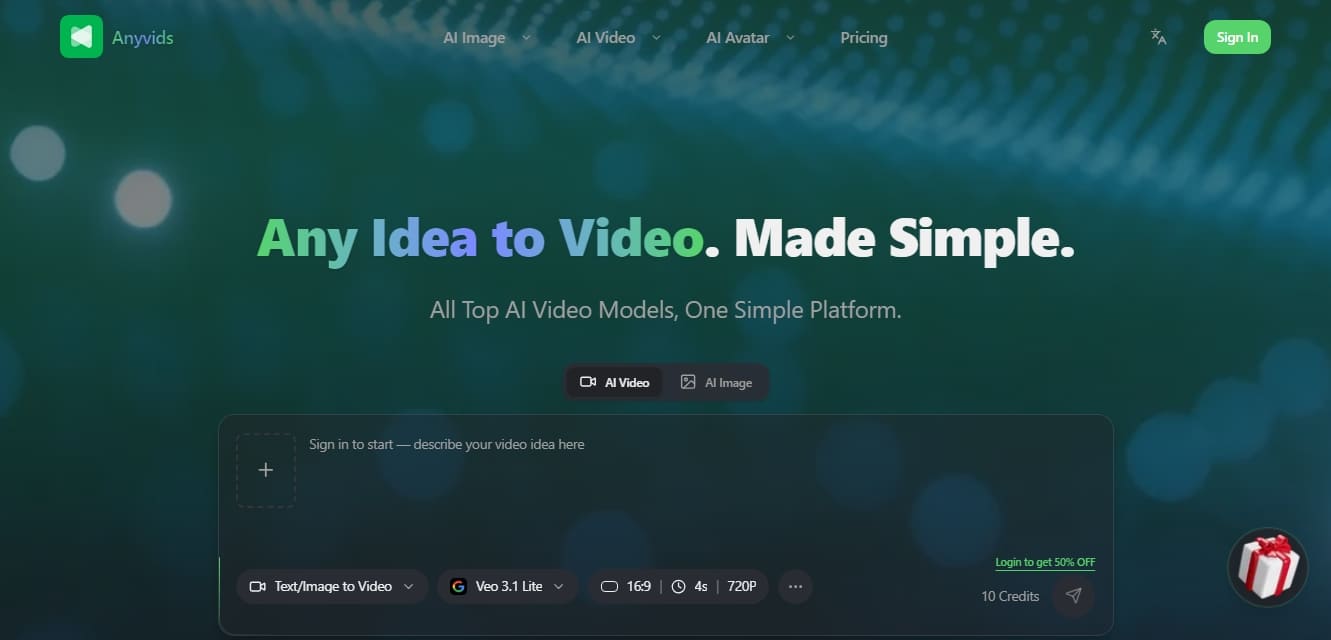
The creation process follows an intuitive workflow: describe the idea, select the output settings and the desired model, and the generative artificial intelligence processes the request to deliver a final high-definition file. This structure allows both novice and professional users to obtain high-quality results, leveraging an all-in-one ecosystem designed for creative efficiency.
Anyvids features and use cases
How to use Anyvids
Anyvids FAQ
What is Anyvids, and what kind of content can I create with it?
Anyvids is an all-in-one AI platform designed to generate professional videos, images, and avatars from simple text prompts or image files.
Does Anyvids offer a commercial use license for its creations?
Yes, users subscribed to Lite, Pro, or Premium plans receive a commercial license, allowing them to use generated content for social media and marketing campaigns.
Do I need video editing experience to use Anyvids?
No prior experience is necessary. The tool automates the creative process, delivering high-quality results in just minutes through an intuitive interface.
How does the credit system work on Anyvids?
Credit usage depends on the selected AI model and the type of content created. You can always check your usage history and available balance in your account.
Does content generated with Anyvids include a watermark?
Images and videos created under any paid subscription plan are exported watermark-free and with full privacy for the user.
Which AI models are integrated into Anyvids?
The platform brings together the most advanced models on the market under a single subscription, including top-tier options like Kling 3.0, Veo 3.1, Seedance, and Wan 2.7.
How long does it take to generate a video using AI?
The generation process typically takes an average of three minutes, depending on the complexity of the prompt and the selected output settings.
Can I request a refund if I’m not satisfied with Anyvids?
Anyvids has a clear refund policy that processes eligible requests within three business days to ensure subscriber confidence.
Anyvids pricing and plans
Trial Version - 0 $ (on login)
10 free credits upon sign-up to test the tool.
Lite - 15,0 $ / month
Access to limited video and image models.
300 credits per month (equivalent to about 30 videos or 150 images).
Limited AI visual tools.
Watermark-free exports.
No wait queues and private video visibility.
1 concurrent task.
Commercial license and standard support.
Pro - 45,9 $ / month
Access to all video and image models.
1,500 credits per month (equivalent to about 150 videos or 750 images).
Access to all AI visual tools.
Watermark-free exports and no wait queues.
Private video visibility.
3 concurrent tasks.
Commercial license and priority support.
35% discount on additional credit pack purchases.
Premium - 119,9 $ / month
Access to all video and image models.
5,000 credits per month (equivalent to about 500 videos or 2,500 images).
Access to all AI visual tools.
Watermark-free exports and no wait queues.
Private video visibility.
6 concurrent tasks.
Commercial license and priority support.
50% discount on additional credit pack purchases.
Anyvids Screenshots
Anyvids alternatives

ColorCraft
Create Amazon KDP books. Generate coloring pages, stories, puzzles, and print-ready full covers, plus promotional mockups in a single workflow.

Tesla Wrap Generator
Tesla Wrap Generator uses AI to paint designs onto the official UV template of each Tesla model for Paint Shop, with a 3D preview before you download.