Artlist Studio
Share
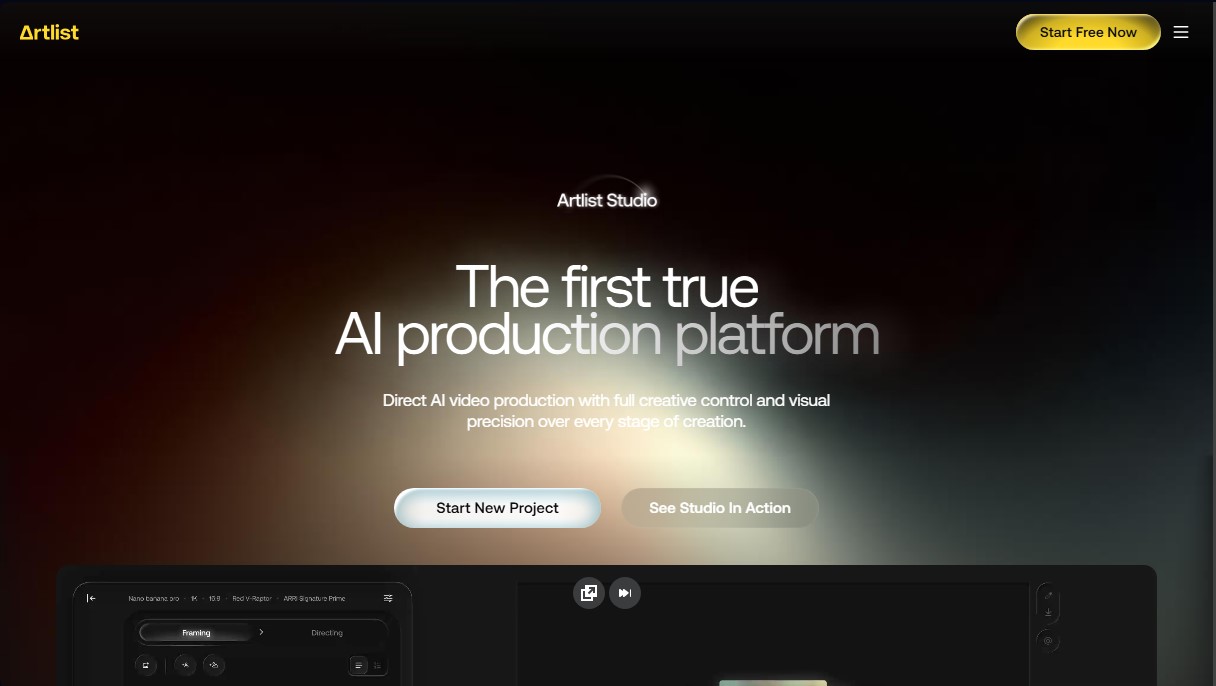
AI video production platform for creating characters, designing sets, and directing scenes with full cinematic control and visual consistency across shots.
What is Artlist Studio?
Artlist Studio is defined as a comprehensive AI video production platform designed to offer total creative control over every phase of filmmaking. Unlike conventional video generators, this tool allows filmmakers and content creators to direct scenes with visual precision—from storyboarding to the final shot—by integrating a unified workspace that optimizes professional production timelines.
The architecture of Artlist Studio is based on a direct production approach where the user is in command of critical filmmaking elements. The platform enables detailed character casting, allowing users to define age, physical appearance, and mood, or select profiles from a pre-existing library. Additionally, it facilitates location building through detailed descriptions of atmosphere, lighting, color palette, and time of day, ensuring the environment stays true to the narrative vision.
One of the tool's greatest technological advantages is its ability to maintain visual consistency across different scenes. Using advanced features such as prompt tags and character/location capture, users can reuse specific elements without needing to redefine them for every new instruction. This ensures that a character or setting maintains the same look throughout the entire project, solving one of the most complex technical challenges in AI video generation.
Key functional capabilities and practical benefits include:
- Cinematic Shot Control: Allows for the precise direction of framing, camera angles, and shot types to achieve professional-grade aesthetic results.
- Categorized Prompt Structuring: Simplifies the creation of instructions through tags organized by action, style, and composition to achieve predictable outcomes.
- Frame-to-Shot Generation: The ability to create new sequences from a specific frame, allowing for the seamless expansion or refinement of scenes.
- Hybrid Workflow: Enables the combination of conventional production with AI-driven creation within a professional and collaborative environment.
Artlist Studio is designed for professionals who need to produce everything from commercials and music videos to high-quality short films. By integrating access to multiple advanced AI models, such as Kling, Veo, or Wan 3.0, the platform functions as a virtual studio where the user controls pacing, movement, and character performance from a computer or workstation, ensuring a coherent and visually precise narrative.
Artlist Studio features and use cases
How to use Artlist Studio
Artlist Studio FAQ
What exactly is Artlist Studio?
It is an AI-powered video production platform that lets you direct every stage of the creative process, from storyboarding to the final cut.
Does Artlist Studio maintain character consistency across different scenes?
Yes, the tool includes features to capture characters and locations, making it easy to reuse them in different shots while keeping the same visual look.
What kind of content can I create with this tool?
You can produce everything from cinematic feature films and shorts to music videos, commercials, and branded content.
Is access to Artlist Studio included in all subscription plans?
Yes, access is available on all AI plans. The AI Starter plan offers basic features, while higher-tier plans provide a more robust experience.
How do prompt tags help speed up the workflow in Artlist Studio?
These tags allow you to define characters and locations once and reuse them in other prompts, so you don't have to write out detailed descriptions every time.
Does the platform offer control over technical camera settings?
Absolutely. The system lets you control framing, angles, and shot types to achieve professional results that rival real film productions.
Are the videos I create licensed for commercial use?
Yes, the subscription plans cover commercial use for all generated projects, ensuring you can legally use them in professional settings.
Can I combine real-world footage with content generated in Artlist Studio?
Yes, the platform supports a hybrid workflow, allowing you to intuitively integrate live-action footage with AI-generated content.
Artlist Studio pricing and plans
AI Starter
Price: US$19.99/mo (or US$11.99/mo billed annually).
- 16,500 monthly credits.
- Access to over 100 AI models.
- Estimated limits: up to 1,650 images, 206 videos, 3 hours of voiceover, or 110 AI songs.
- Includes Artlist Studio, Artlist Flows, and more than 70 AI apps.
- Commercial use license.
AI Core
Price: US$39.99/mo (or US$23.99/mo billed annually).
- 40,000 monthly credits.
- Unlimited generations on select models (such as Nano Banana 2 Lite, Seedream 5.0 Pro, and Gemini Omni 1.1 Flash).
- 700 monthly fast generations and 4 parallel generations per user.
- Estimated limits: up to 4,000 images, 500 videos, 8 hours of voiceover, or 266 AI songs.
- Includes all Artlist Studio tools and MCP plugins.
AI Creator
Price: US$69.99/mo (or US$41.67/mo billed annually).
- 80,000 monthly credits.
- Unlimited generations on a wide selection of premium models (including Kling 2.5, Veo 3.1 Lite, and GPT Image 2.0).
- 900 monthly fast generations and 5 parallel generations per user.
- Estimated limits: up to 8,000 images, 1,000 videos, 16 hours of voiceover, or 533 AI songs.
- Full access to all production and collaboration features.
Custom Business
Price: Contact the official website for a custom quote.
- Unlimited generations on all available models.
- Custom credits, fast generations, and parallel generations tailored to your team's needs.
- Bespoke commercial license and legal indemnification.
- Enterprise-grade security (SOC 2 Type II, SSO authentication).
- Dedicated account manager and AI creative support services.
Artlist Studio Screenshots
Artlist Studio alternatives

Comik AI-Anime Character Creator
Design anime characters using text or images. Generate multi-view design sheets to ensure visual consistency across comics, manga, and animated videos.
AI Microdrama Generator by Picsart
Create vertical micro-drama series with consistent characters. Plan seasons, generate scripts, and produce AI-powered short episodes with cliffhangers.
DomoAI AI Drama Generator
Create AI vertical minidramas and short series. Use recurring characters and lip-synced dialogue to produce social media episodes in minutes.


Burning Bridges AI
Create custom videos by inserting your photos into preset scenes. Swap the lead and audience while keeping the original choreography and audio.