Share
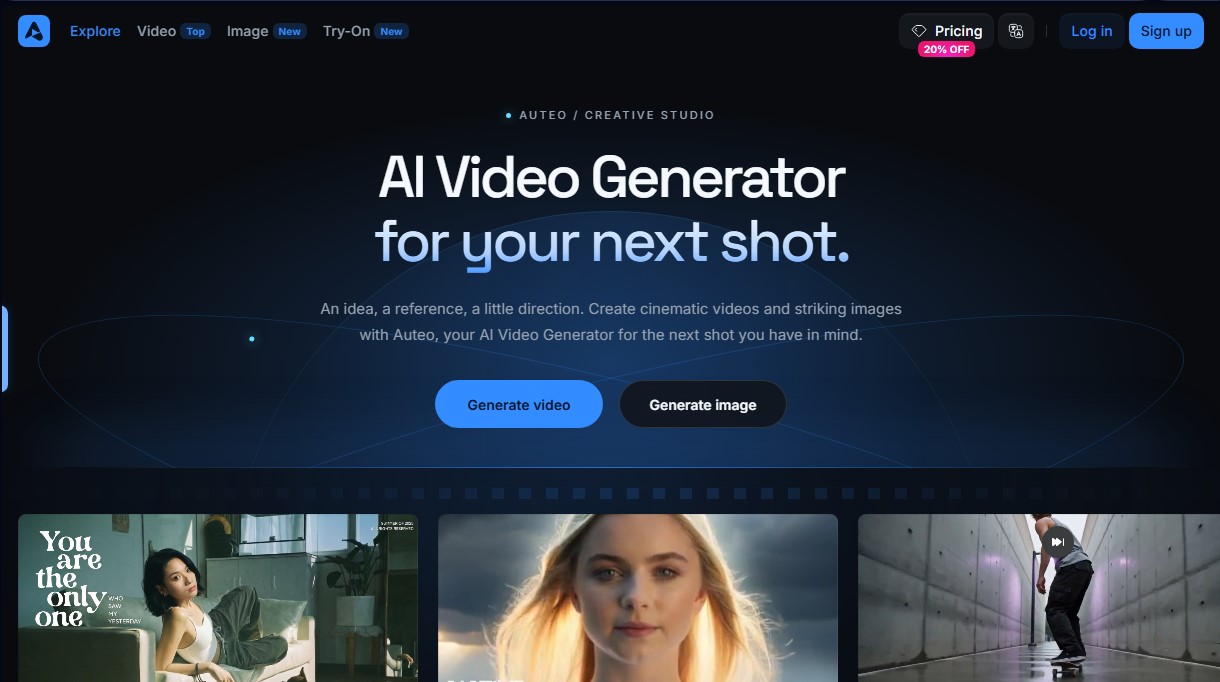
AI studio for generating cinematic videos and high-resolution images. Create professional clips from text or photos with complete control over the scene.
What is Auteo?
Auteo is a browser-based creative studio specializing in AI video generation and high-fidelity image creation. This tool allows users to directly transform text descriptions or reference images into cinematic clips and professional visual content. Its primary function is to facilitate the production of short videos, product stories, and visual concepts without the need for physical filming equipment. It is a solution geared toward content creators, marketing departments, and digital artists who need to prototype ideas or generate final footage quickly from their computers.
The platform stands out by offering access to multiple specialized models based on the project's technical objectives:
- Seedance 2.5: Enables the generation of clips up to 30 seconds long with resolutions up to 1080p.
- MiniMax H3: Provides 2K video with native stereo audio, ideal for projects requiring greater sonic and visual realism.
- Seedance 2.0: Focused on cinematic movement with high-quality outputs up to 4K resolution.
- GPT Image 2: An image generation model that stands out for its extreme precision and near-perfect text rendering.
- Nano Banana 2: Optimized for large-scale image creation with high processing speeds.
The system allows for comprehensive control over the artistic direction of every shot. Using the text-to-video feature, users define the subject, action, lighting, and camera movement, such as orbits or slow pans. Additionally, the image-to-video capability allows the use of an existing image as a starting point, which is essential for ensuring visual consistency in the first frame of an animation. Users can adjust the aspect ratio to adapt content for various social media formats or professional presentations.
The workflow in this AI video generator is intuitive and structured: select the model, enter the prompt or reference image, and configure technical parameters such as duration and resolution. Auteo displays the credit cost before starting the generation, allowing for efficient resource management. Once processed, the result appears in the user's history to be downloaded or refined through further adjustments. This versatility facilitates the development of advertising campaigns, visual narratives, and product concepts, eliminating the technical barriers of conventional video production.
Auteo features and use cases
How to use Auteo
Auteo FAQ
What is Auteo and what kind of content can it create?
Auteo is a browser-based creative studio that uses artificial intelligence to generate cinematic videos and high-quality images from text descriptions or reference images.
Does Auteo's video generator allow you to animate an existing photo?
Yes, you can upload an image to the platform and describe the camera movement or action you want, and the tool will convert it into an animated video clip.
What is the maximum length of the video clips I can generate on Auteo?
The duration depends on the model you choose; for example, options like Seedance 2.5 can generate clips up to 30 seconds long at 1080p resolution.
Does Auteo offer models that include sound in the generated videos?
Yes, the MiniMax H3 model allows you to create 2K resolution video content that includes native stereo audio.
How can I find out how many credits my creation will cost on Auteo?
The credit cost is clearly displayed on the generate button before you confirm the action, and it varies depending on the model, duration, and selected resolution.
What are the differences between Auteo's subscription plans?
Plans vary based on the number of monthly credits included and access to advanced features, with the Plus and Ultra plans offering unlimited generations on selected models.
Is it possible to download images created in Auteo to use them as a base for a video?
Yes, you can generate an image to define the lighting or style and then use the "image-to-video" feature to add movement while maintaining that initial aesthetic.
What image generation models are available on the Auteo platform?
The tool features models such as GPT Image 2 for precise text rendering and Nano Banana 2 for high-speed image generation.
Auteo pricing and plans
Starter
Price: $15/month (same price for monthly or annual billing).
200 credits per month (equivalent to approximately 4 Seedance 2.5 videos or 100 Nano Banana 2.1 generations).
Parallel generations: up to 2 videos and 4 images.
Access to select models and specific features (includes Seedance 2.0 Fast and 2.0 Mini).
Unlimited marketplace access.
Early access to advanced AI features.
Restriction: Does not include unlimited generations.
Plus
Price: $49/month ($39/month billed annually).
1,000 credits per month (equivalent to approximately 22 Seedance 2.5 videos or 500 Nano Banana 2.1 generations).
Free, unlimited generations for Z Image and FLUX.2 models (1K/2K resolutions).
Unlimited paid parallel generations.
Access to all Seedance models, features, and studio tools.
Early access to advanced AI features and unlimited marketplace access.
Ultra
Price: Starting at $129/month (starting at $99/month billed annually).
3,000 credits per month (scalable to 6,000 or 9,000 credits; the base 3,000-credit plan is equivalent to approximately 66 Seedance 2.5 videos).
Free, unlimited generations for Z Image and FLUX.2 models (1K/2K resolutions).
Unlimited paid parallel generations.
Full access to all Seedance models and all other features.
Early access to advanced AI features and unlimited marketplace access.
Note: Unlimited use may be subject to dynamic speed adjustments during high-traffic periods.
Auteo Screenshots
Auteo user reviews
Write a review
Checking your session...
Auteo Reviews
Loading reviews...