
Share
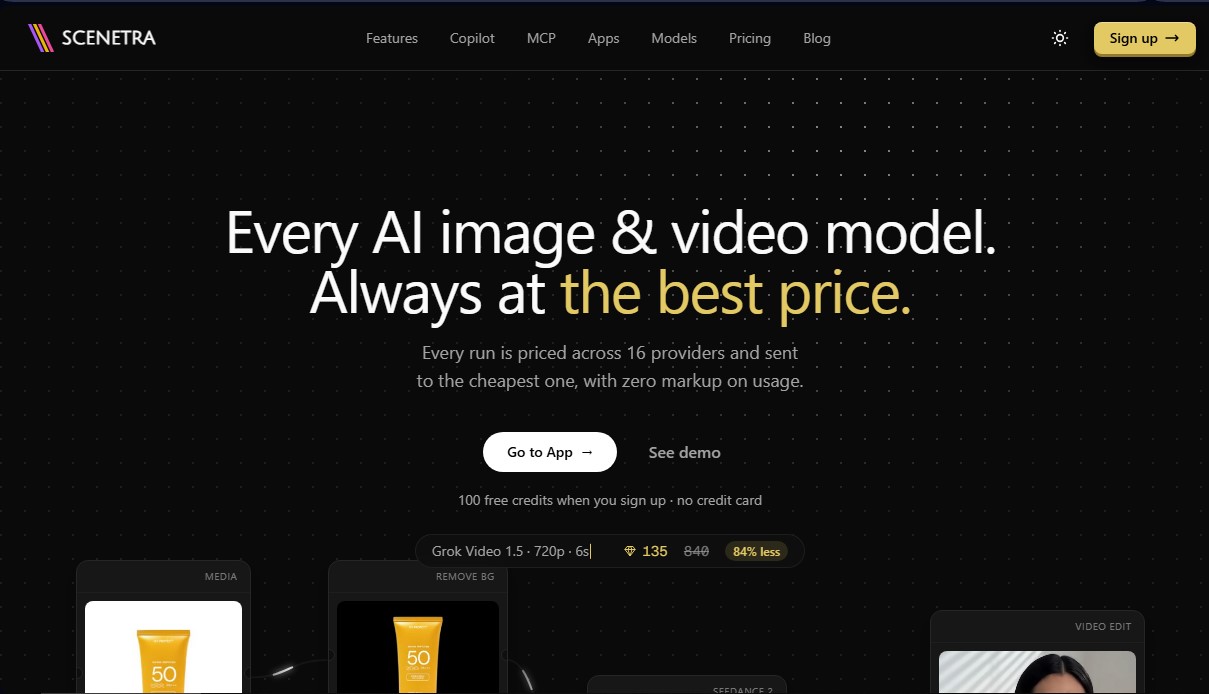
Visual platform for generating images, videos, and audio with 50+ AI models. Its system selects the lowest-cost provider to always offer the best price.
What is Scenetra?
Scenetra is an AI visual workspace designed to centralize multimedia content generation through a node-based interface. This platform allows creators, studios, and developers to access more than 50 artificial intelligence models for image, video, and audio from a single digital canvas, eliminating the need to manage multiple individual subscriptions with different providers.
The Scenetra ecosystem integrates cutting-edge models from developers such as OpenAI, Google, Black Forest Labs, and Kling. Key available models include Kling 3.0 Pro and Seedance 2.5 for cinematic video, FLUX.2 Pro and Nano Banana 2 for photorealistic image generation, and Wan 3.0 for multimodal creations. Its technical architecture is powered by a best-price engine that conducts a live price auction among 16 different providers for every generation. The system automatically routes the task to the most affordable provider that supports the selected configuration, applying a 0% markup on the original computing cost.
To simplify the creation of complex flows, the tool features Scenetra Copilot, an assistant that acts as an integrated creative director. Users can describe their needs using natural language, and Copilot designs the workflow, selects the optimal models, and automatically connects the nodes on the board. Additionally, the platform is compatible with the MCP (Model Context Protocol), allowing users to connect external agents like Claude Code or Cursor to build and execute workflows directly from the development environment.
Scenetra offers specific functional capabilities through ready-to-use applications:
- AI Product Photography: Allows users to upload an image, remove the background, and restage the object in professional settings such as kitchens or studios.
- CGI Ad Generator: Creates promotional clips with fluid, fire, ice, or zero-gravity effects from a single photo.
- Virtual Try-On: Facilitates visualizing clothing on a photo of the user while keeping the face and original pose intact.
- Product Animator: Transforms static photos into short videos with realistic camera movements.
- Reusable Workflows: Users can create custom node graphs and save them as templates to maintain consistency in recurring productions.
The platform enables batch variation generation, making it easy to compare results from the same prompt across different models simultaneously. As a no-code tool, any user can chain processes—such as using an image generated with a specific model as the starting frame for a video animation—simply by dragging and connecting elements on the canvas. This optimizes production times and provides precise control over generative AI without requiring programming knowledge or server configuration.
Scenetra features and use cases
How to use Scenetra
Scenetra FAQ
What is Scenetra and what is its purpose?
Scenetra is a visual AI workspace that allows you to generate images, videos, and audio using over fifty different models through a node-based interface.
Do I need individual subscriptions for each AI model on Scenetra?
No, a single Scenetra subscription gives you access to all supported models, such as Kling, FLUX, or Nano Banana, without the need to manage external accounts.
How does Scenetra guarantee the best price for each generation?
The platform conducts a real-time auction among sixteen different providers and automatically selects the cheapest option for your configuration without adding any markups to the original cost.
Do I need to know how to code to use this tool?
No, the system is entirely visual, allowing you to build complex workflows by intuitively connecting nodes on a canvas without writing any code.
What features does Scenetra’s Copilot offer?
The Copilot acts as a creative director that you can chat with to design workflows, choose the right models, and configure terminals for you.
Is it possible to convert images into videos within the platform?
Yes, you can connect any image node to video models so that the generated image serves as the initial frame for an animation or cinematic clip.
What are Scenetra’s ready-to-use apps?
These are specialized tools for specific tasks, such as product photography or fashion shoots, that allow you to achieve professional results by simply filling out a form without having to configure nodes.
What does the MCP server integration involve?
This feature allows you to connect external agents like Claude or Cursor to your workspace so the AI can build, execute, and manage your projects directly.
How do credits work in the pricing plans?
Each plan includes a monthly credit allowance used to cover the providers' computing costs, maintaining a direct equivalence without any additional profit margins.
Can I generate multiple versions of an idea at the same time?
Yes, the batch variation tools allow you to generate dozens of results simultaneously using different models or parameters so you can compare and choose the best one.
Scenetra pricing and plans
Free Plan
Price: 0 $ (Free upon sign-up).
100 free welcome credits.
No credit card required.
Starter
Price: 20 $ per month (or 192 $ per year).
17,400 monthly credits (174,500 credits granted upfront with the annual plan).
Access to 50+ AI models (image and video).
Unlimited projects and boards.
No external API keys required.
Plus
Price: 45 $ per month (or 432 $ per year).
40,000 monthly credits (396,000 credits granted upfront with the annual plan).
Priority generation queue.
Early access to new AI models.
Reduced member rates on credit pack purchases.
Includes all Starter plan features.
Pro
Price: 80 $ per month (or 768 $ per year).
72,500 monthly credits (711,000 credits granted upfront with the annual plan).
Highest priority generation queue.
Dedicated support.
Best credit rate available on the platform.
Includes all Plus plan features.
Credit Packs (One-time payment)
Price: From 20 $ to 120 $.
No subscription required and credits never expire.
20 $: 16,000 credits.
40 $: 33,000 credits.
70 $: 58,000 credits.
120 $: 100,000 credits.
Scenetra Screenshots
Scenetra user reviews
Write a review
Checking your session...
Scenetra Reviews
Loading reviews...
Scenetra alternatives



FaceTouchUp
AI-powered cosmetic surgery simulator to visualize facial and body enhancements. Streamline consultations and help patients preview their final look.

Sprite Fusion
Generate and animate professional pixel art for games using AI. Create sprites, character sheets, and normal maps with direct export to Unity and Godot.

AI Comic Builder
A platform to create comics and webtoons from text. Generate panels with consistent characters and diverse art styles—no drawing skills required.