
Share
What is Buffer?
Buffer is a social media management tool to organize, schedule and analyze posts across the major platforms from a single dashboard. The company says more than 100,000 creators, brands and agencies use it, and it focuses on simplicity rather than heavyweight enterprise suites.
What is Buffer used for?
It keeps a consistent content calendar without logging into each network separately. It publishes to Facebook, Instagram, TikTok, LinkedIn, Threads, Bluesky, YouTube Shorts, Pinterest, Google Business, Mastodon, X and Substack, and stores ideas in a library so you can turn them into posts later.
What does Buffer's AI do?
The AI Assistant brainstorms ideas, rewrites copy and adapts one post to each network's format. Buffer can also connect to Claude or ChatGPT so you can pull real performance data, build content around what works and send content straight to your queue.
What else does Buffer include?
- A community inbox to reply to comments from every channel.
- Analytics and performance reports.
- Approval workflows for teams.
- Start Page, a link-in-bio landing page.
- Mobile app and API for automations with tools like n8n.
Who is Buffer for?
Creators, small businesses, agencies, nonprofits and schools that need to post regularly without a steep learning curve. Its support team is spread across time zones and made up of real people, not bots.
Buffer pros and cons
- Pro: simple interface that is quick to learn
- Pro: supports many networks, including Bluesky, Threads and Substack
- Pro: connects to AI assistants for analysis and planning
- Con: the bill grows with each connected channel
- Con: no PayPal or bank transfer payments
Buffer features and use cases
How to use Buffer
Buffer FAQ
What is Buffer?
Buffer is a social media management tool to plan, schedule and analyze posts, with a built-in AI assistant.
Is Buffer free?
Yes, there is a free plan with up to 3 channels and 10 scheduled posts per channel.
Which networks can Buffer post to?
Facebook, Instagram, TikTok, LinkedIn, Threads, Bluesky, YouTube Shorts, Pinterest, Google Business, Mastodon, X and Substack.
Does Buffer use AI?
Yes, its AI Assistant brainstorms, rewrites and adapts posts for each network, and Buffer can connect to Claude or ChatGPT.
Does Buffer have a free trial?
Yes, paid plans come with a 14-day free trial, so you can test unlimited scheduling first.
Does Buffer charge per channel?
Yes, paid plans are billed per connected channel, so the price grows as you add networks.
Does Buffer accept PayPal?
No, Buffer only accepts credit and debit cards such as Visa, Mastercard and American Express.
Does Buffer offer a nonprofit discount?
Yes, nonprofit and charity organizations get a 50% discount on paid plans.
What are the best Buffer alternatives?
On GptZone you can compare it with Metricool, Publer and Vista Social.
Buffer pricing and plans
Reference price: 5 USD / month. Source · Verified: November 2, 2026
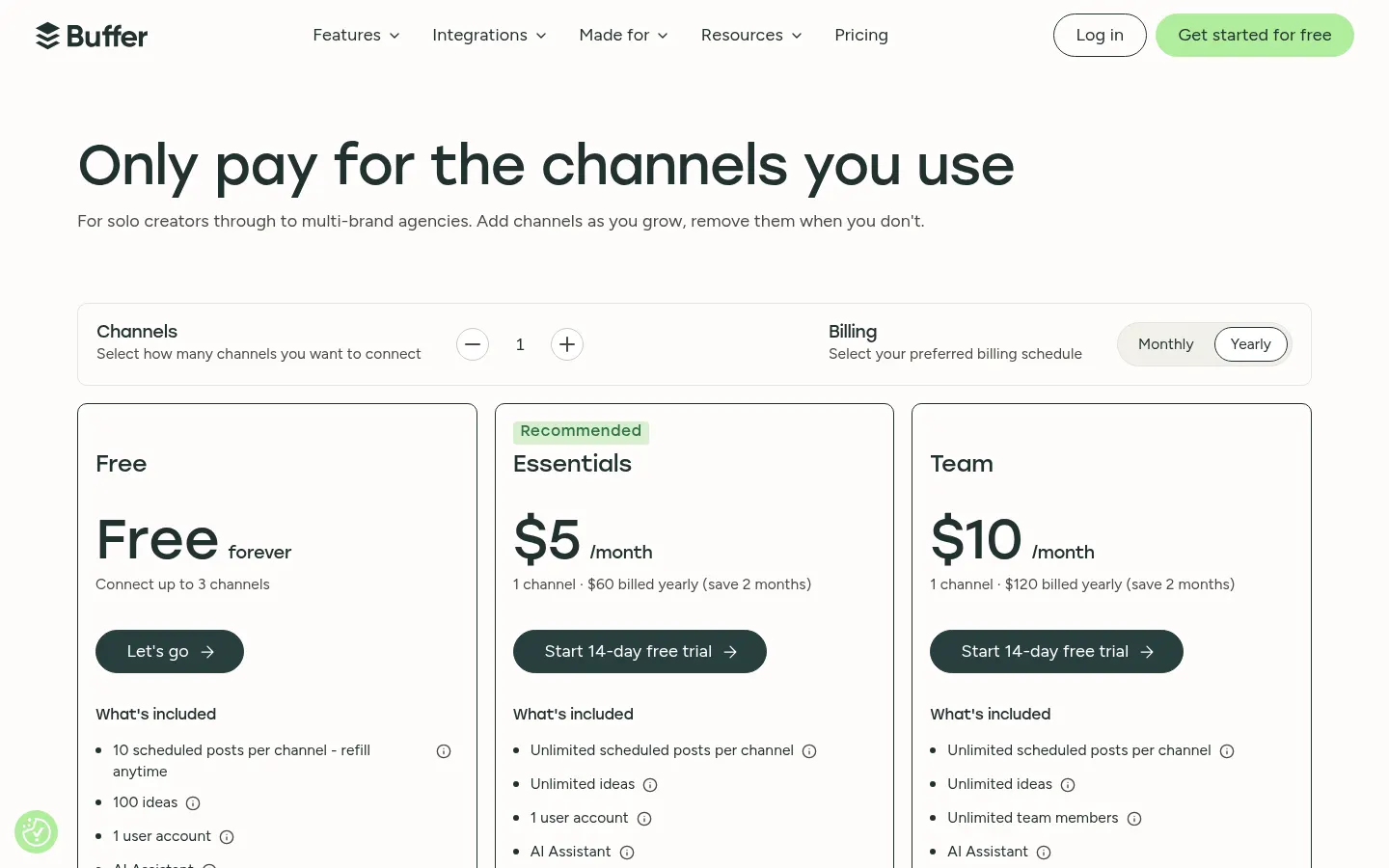
Prices in US dollars (USD) per channel, billed annually (20% cheaper than monthly). Checked on: 02/11/2026.
Free: $0; up to 3 channels, 10 scheduled posts per channel, 1 API key and community inbox.
Essentials: $5 per month per channel ($60 per year); unlimited scheduled posts and 3 API keys.
Team: $10 per month per channel ($120 per year); unlimited team members, approvals and 5 API keys.
14-day free trial on paid plans and 50% off for nonprofits.
Card payments only; no PayPal, checks or bank transfers.
Buffer Screenshots

Buffer user reviews
Write a review
Checking your session...
Buffer Reviews
Loading reviews...
Buffer alternatives


AuthoredUp
AuthoredUp is LinkedIn creation and analytics software: formatted editor, hooks, drafts, calendar, metrics and a Chrome extension.