Share
What is Quso.ai?
Quso.ai is an AI video editing tool that turns long recordings into short, social-ready clips and then publishes them, built for creators, podcasters, agencies and marketing teams who want to repurpose content without spending hours in a timeline editor. It was previously called Vidyo.ai, and the old domain now redirects to the new brand.
How does Quso.ai turn a long video into clips?
You upload a file or paste a link from YouTube, Vimeo, Zoom, Loom, Twitch, Google Drive or Dropbox. The Intelliclips engine reads the speech, finds the most engaging moments and produces several vertical clips with automatic reframing, animated captions in 99 languages and a score that estimates their viral potential. Every clip can be refined in a text-based editor: delete a sentence from the transcript and it is cut from the video.
What else does it do beyond clipping?
- Automatic filler-word and silence removal with CutMagic.
- Brand kit with saved logos, fonts, colors and templates.
- Scheduling to seven networks: TikTok, Instagram, YouTube, LinkedIn, Facebook, X and Pinterest, with a content calendar.
- Performance analytics and an assistant, Viddy, that suggests captions, ideas and posts.
The company says more than 4 million users have tried it, from solo creators to agencies running several brands.
Quso.ai pros and cons
Pros: clipping, editing, captioning and publishing live in one workflow, and the transcript editor makes fine-tuning fast. Cons: usage is metered by minutes of processed video, projects are not stored indefinitely, and automatic moment picking does not always match your tone, so every clip deserves a quick review before it goes live.
Quso.ai features and use cases
How to use Quso.ai
Quso.ai FAQ
What is Quso.ai?
Quso.ai is an AI tool that turns long videos into short captioned clips and schedules them to social media.
Is Quso.ai the same as Vidyo.ai?
Yes, Vidyo.ai rebranded as Quso.ai and the old domain redirects to the new site.
Is Quso.ai free?
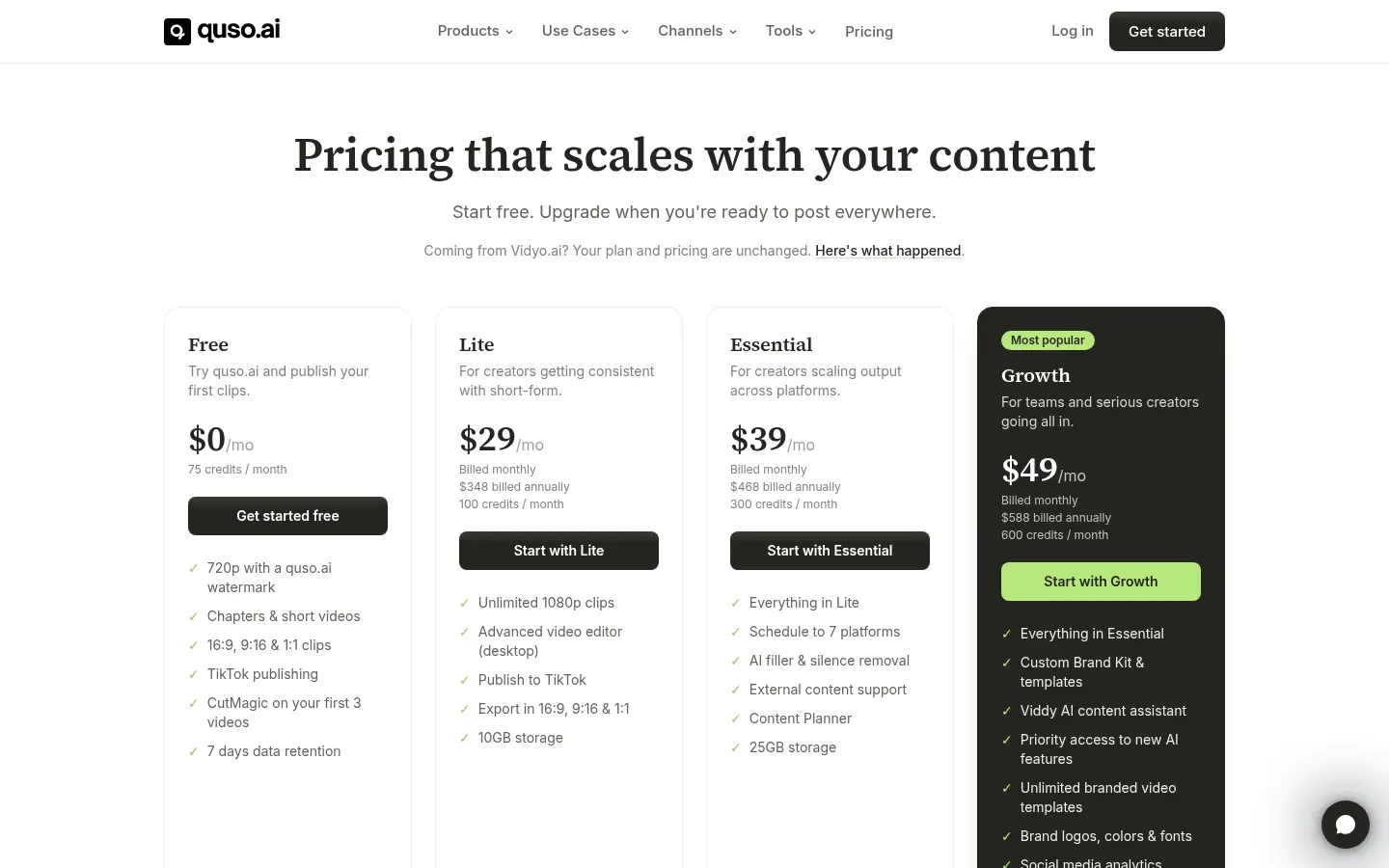
There is a free plan with 75 credits per month and 720p watermarked exports; paid plans remove the watermark. See the pricing section.
How much video does one credit cover?
Roughly one minute of processed video.
Which networks can Quso.ai publish to?
TikTok, Instagram, YouTube, LinkedIn, Facebook, X and Pinterest, depending on the plan.
Does it add captions in other languages?
Yes, it creates automatic captions in 99 languages, including Spanish.
Can I edit the clips?
Yes, with a transcript-based editor, templates, a brand kit and filler-word removal.
Where can I import videos from?
From your computer or via links from YouTube, Vimeo, Zoom, Loom, Twitch, Google Drive or Dropbox, among others.
Who is Quso.ai for?
Creators, podcasters, agencies and marketing teams repurposing long-form video into short clips.
What are the best Quso.ai alternatives?
On GptZone you can compare OpusClip and Pictory for AI clipping and video creation.
Quso.ai pricing and plans
Reference price: 29 USD / month. Source · Verified: November 4, 2026
Information from the official site (Checked on: 04/11/2026). Reference currency: USD; amounts may vary by country. 1 credit is roughly 1 minute of video.
- Free: 0 USD, 75 credits per month, 720p export with watermark and TikTok publishing.
- Lite: 29 USD/month (348 USD/year), 100 credits, watermark-free 1080p.
- Essential: 39 USD/month, 300 credits, scheduling to 7 networks and filler-word removal.
- Growth: 49 USD/month, 600 credits, brand kit and analytics.
Quso.ai Screenshots

Quso.ai user reviews
Write a review
Checking your session...
Quso.ai Reviews
Loading reviews...