

Share
Transcribe audio and video to text with AI in 99+ languages. Generate summaries, translate, and export in various formats with total precision, timestamps, and subtitles.
What is Clipto?
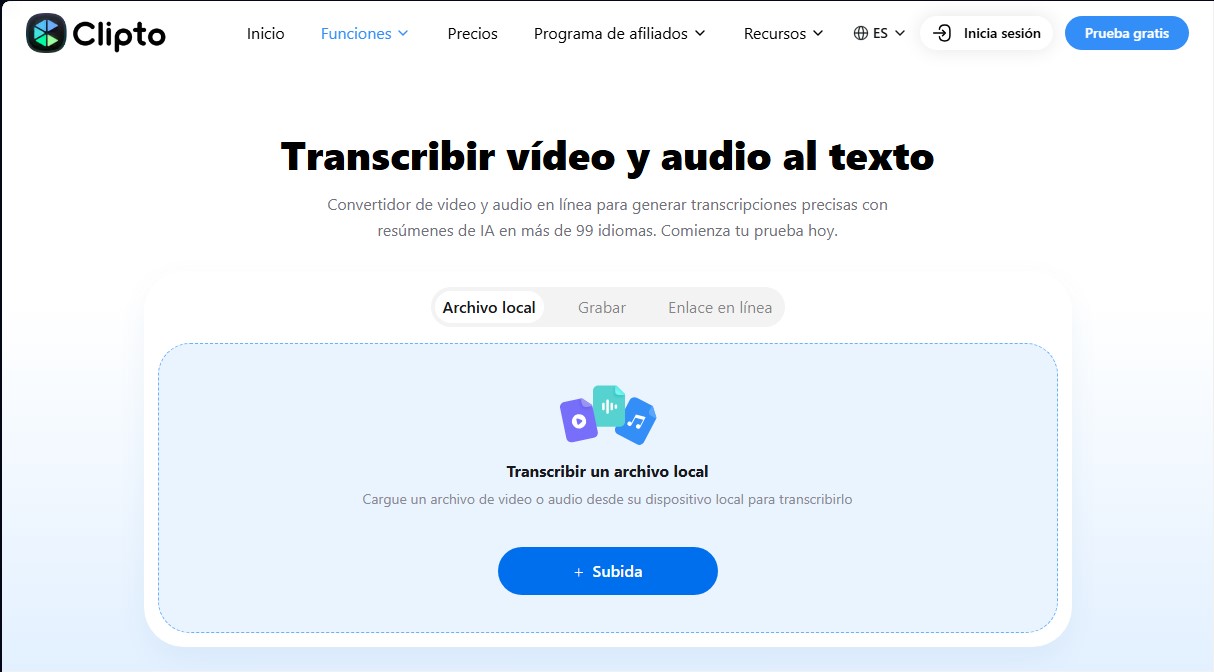
Clipto is an advanced video and audio-to-text transcription solution designed to convert multimedia files into written content with 99% accuracy. This tool utilizes state-of-the-art artificial intelligence algorithms to process more than 99 languages, facilitating content management both locally and online. Its functionality is highly versatile, allowing users to upload files in common formats such as MP4, MP3, MOV, or AVI, paste direct links from platforms like YouTube, or record audio in real-time directly from their computer.
Clipto’s technology goes beyond simple speech-to-text conversion. The system integrates automatic speaker identification and precise timestamps, which are essential for organizing interviews, business meetings, or academic conferences. One of its most standout features is the real-time transcription function, which captures and processes live audio as a session unfolds, even allowing you to navigate away from the page while the software continues to work automatically in the background.
To optimize workflow, the platform incorporates generative AI tools like AI summaries and AI Chat. These features allow users to interact with their transcriptions to extract key points, important decisions, and action plans without having to listen to hours of recordings. The intelligent chat allows for specific questions about the processed content, speeding up the location of key moments and the synthesis of complex information.
Clipto’s capabilities are tailored to various professional profiles:
- Content creators and YouTubers: Ideal for generating accurate subtitles and transforming videos into articles or social media posts.
- Businesses and professionals: Allows for documenting meetings, calls, and discussions into searchable and organized text.
- Education sector: Students and teachers can convert online lessons and courses into structured study notes.
- Healthcare and legal fields: Facilitates the transcription of consultations and interviews while maintaining an accurate record of information.
In addition to transcription, the tool offers a powerful automatic translation engine that helps break down language barriers for global teams. Once processing is complete, users can export their files in multiple professional formats, including TXT, DOCX, PDF, SRT, and VTT, ensuring compatibility with video editors and document management systems.
For users who prioritize privacy, Clipto offers native apps for Mac and Windows that enable offline transcription. This mode processes files locally on the device, ensuring that sensitive data is not uploaded to the cloud and allowing you to work without an internet connection with the same efficiency and speed as the web version.
Clipto features and use cases
How to use Clipto
Clipto FAQ
What is Clipto and what are its primary features?
Clipto is an advanced tool that uses artificial intelligence to accurately transcribe audio and video files into text in more than 99 languages.
How do I transcribe a YouTube video with Clipto?
Simply copy and paste the video link directly into the application to receive a full transcript complete with timestamps and speaker tags.
What export formats are available on the platform?
You can download your transcripts and subtitles in various professional formats, including TXT, DOCX, PDF, SRT, and VTT files.
Can Clipto automatically summarize transcriptions?
Yes, the tool includes an AI-powered summary feature that extracts key points and important decisions from any recording.
Can I perform real-time transcriptions with this tool?
The recording feature allows you to capture and transcribe live content instantly, keeping the process active even if you navigate away from the main page.
Is there a way to try Clipto for free?
The platform offers a seven-day free trial that provides access to core transcription and analysis features before you choose a subscription plan.
Is it possible to translate transcripts into other languages?
Yes, the system allows you to translate generated text into more than 99 different languages to facilitate communication in multilingual environments.
What types of files can I upload for processing?
You can upload a wide variety of local files in popular formats such as MP4, MP3, MOV, AVI, and WAV for immediate conversion to text.
Clipto pricing and plans
7-day free trial
Access to transcription and analysis features to test the tool.
Cancel anytime before the trial period ends.
Monthly Pro Plan: $9.99 for the first month ($24.99 for subsequent months)
Unlimited video and audio search.
Automated speech transcription and speaker labeling.
Support for 99+ languages and integrated translation.
Ability to analyze videos up to 6 hours long.
Access to advanced AI models for summaries and interactive chat with transcripts.
Export in multiple formats: TXT, DOCX, PDF, SRT, and VTT.
Annual Pro Plan: $12.49 per month (billed as $149.88 per year)
Includes a 7-day free trial.
Unlimited video and audio file search.
Automated transcription and speaker detection.
Support and translation for 99+ languages.
Analysis limit of up to 6 hours per video file.
Full access to advanced AI models and summarization features.
Export subtitles and text in various professional formats.
Clipto Screenshots
Clipto alternatives

AI Translate Manga.com
Translate Japanese manga into English or Simplified Chinese directly in the panels. Supports PNG, JPG, and PDF files, plus a Chrome extension for online reading.

Kapwing Hinglish Subtitles Generator
Generate automatic Hinglish captions for videos in 100+ languages. Includes AI-powered editing and dubbing tools to reach bilingual audiences.
Ask BONBON
AI assistant for electricians that answers NEC and CEC code questions with official citations. Includes calculation tools, blueprint analysis, and a voice assistant.

GLMImage AI Scientific Illustration Generator
Generate precise, labeled scientific illustrations from text. Covers 9 disciplines, including botany and anatomy, for articles and educational materials.