
Share
Generate SaaS documentation portals from URLs or files. Includes automated branding, AI-assisted editing, and repository synchronization.
What is Docsio?
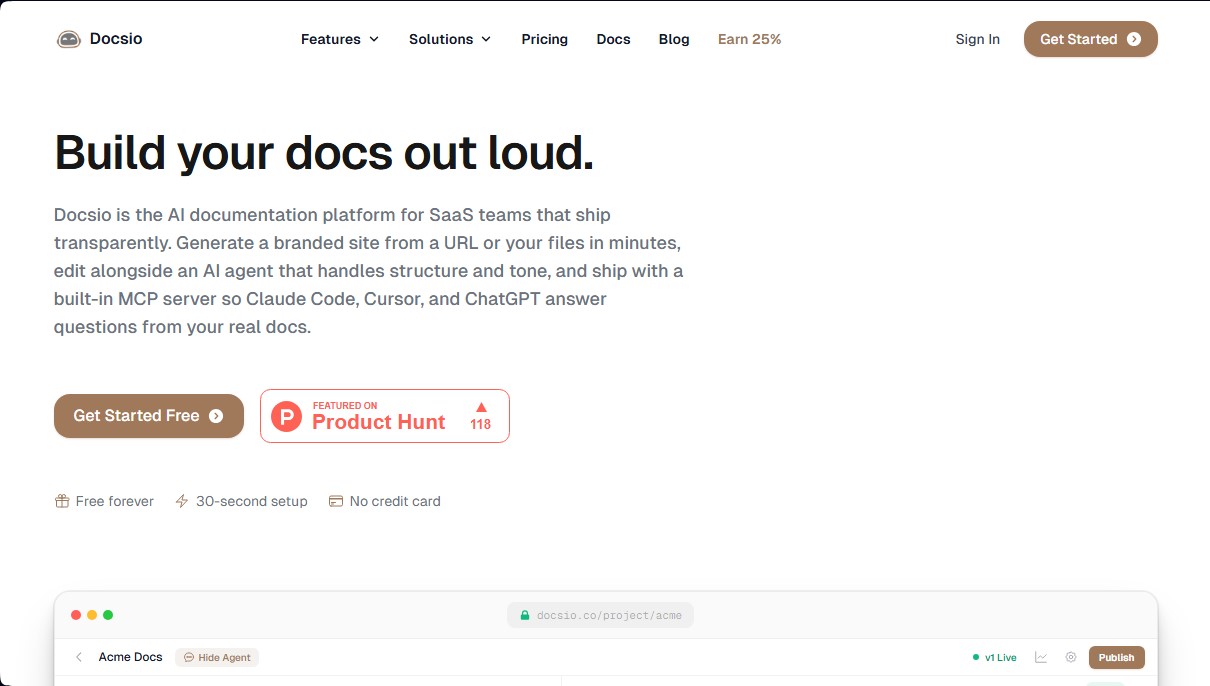
Docsio is an AI-powered documentation platform designed specifically for SaaS teams seeking agility and professionalism in their launches. Its primary function is to transform a URL or local files into a complete, customized documentation site in minutes, eliminating the need to set up complex infrastructure or manual deployment pipelines.
The tool's technology is powered by an AI agent capable of mapping existing websites to automatically extract visual identity, including corporate colors, logos, and typography. Thanks to this brand extraction approach, the generated documents maintain total aesthetic consistency with the original product without requiring manual CSS adjustments. The system processes information using language models that organize content logically, allowing users to edit the structure, tone, or design simply by providing natural language instructions through an integrated chat.
Key functional capabilities include:
- AI-Assisted Editing: Allows users to add pages, rewrite sections, or modify visual styles by conversing with the agent, which has full access to the project files.
- GitHub Sync: Offers two-way integration where changes made on the platform are pushed to the repository, and code updates automatically rebuild the site.
- MCP Server for Developers: Facilitates documentation editing from external tools like Claude Code or Cursor, enabling "headless" content management.
- AI Assistant for Visitors: Every published site can include a chat widget specifically trained on the documentation's own data to instantly resolve end-user questions.
- Integrated Analytics: Provides data on visitor behavior and the most viewed pages through a cookieless system that respects privacy and complies with European regulations.
The workflow is purely visual and practical: after entering the data source, users can monitor in real-time as the AI builds the site in a staging environment. Once validated, deployment is completed with a single click, including automatic SSL certificates and support for custom domains.
Docsio is particularly useful for developers and product managers who need to keep user manuals, API references, or changelogs consistently up to date. By centralizing creation in an intuitive interface accessible from a desktop or mobile device, it ensures that technical documentation stops being a chore and becomes an automated, scalable process. Regarding security, the platform employs isolated sandboxes and ensures that content is not used to train external AI models, protecting each team's intellectual property. All of this translates into significant time savings, allowing you to go from an empty web page to a professional help portal in less than five minutes.
Docsio features and use cases
How to use Docsio
Docsio FAQ
How does Docsio generate documentation from my website?
Simply enter your product’s URL, and our AI agent will analyze your site to extract your brand identity and generate a professional documentation structure in less than five minutes.
Can I edit the content generated by Docsio?
Yes. You can make changes by chatting directly with the AI agent to add pages or adjust the tone. You also have access to a real-time preview to review every update before publishing.
What is included in the Docsio free plan?
The free plan includes one documentation site with ten AI edits per month, GitHub synchronization, visitor analytics for the past week, and hosting with a free SSL certificate.
Are my data and internal documents secure with Docsio?
Our platform uses isolated environments and follows a zero-data retention policy. This ensures your content is never used to train AI models and is not stored after processing.
How does Docsio’s GitHub synchronization work?
We provide two-way synchronization: any changes made on our platform are saved to your repository, and any updates to your GitHub branch automatically trigger a rebuild of your documentation site.
Can I use my own custom domain with Docsio?
Yes. Both Free and Pro plan users can set up custom domains with automatic SSL certificates, ensuring your documentation is fully integrated with your brand.
What is the Docsio AI chat widget?
Available on the Pro plan, this assistant is trained on your entire documentation to instantly answer visitor questions using code blocks and formatted text, saving them from having to search through pages manually.
What makes Docsio different from tools like GitBook or Mintlify?
Docsio stands out by automatically generating your documentation and visual identity directly from your existing website, eliminating the need for complex configurations or manual deployment processes.
Docsio pricing and plans
Free
0 $ per month
- 1 documentation site.
- 10 AI agent edits per month.
- AI generation from any URL.
- Custom domain with SSL certificate included.
- Automatic brand extraction (colors, logos, and fonts).
- Real-time preview and one-click publishing.
- Two-way GitHub sync.
- Visitor analytics for the last 7 days.
- AI-optimized documentation (llms.txt file).
Pro
60 $ per month per site
- Unlimited AI agent usage.
- Unlimited sites and team members.
- Document versioning.
- Password-protected content.
- AI chat widget trained specifically on your documentation.
- Full-text search bar.
- MCP server for AI coding tools (Claude Code, Cursor, etc.).
- Full analytics history (30 and 90-day windows).
- Remove Docsio branding.
- Priority support.
Docsio Screenshots
Docsio user reviews
Write a review
Checking your session...
Docsio Reviews
Loading reviews...
Docsio alternatives

ProWritingAid
AI grammar checker and style editor for novelists, with in-depth writing reports, chapter critiques, manuscript analysis and a virtual beta reader.



NeuronWriter
NeuronWriter is an SEO content editor that studies search results with NLP, scores your drafts and keeps an eye on your visibility in AI search.