

Share
Real-time YouTube dubbing extension with natural AI voices. Get synced audio translations in your language and avoid reading subtitles.
What is EarDub?
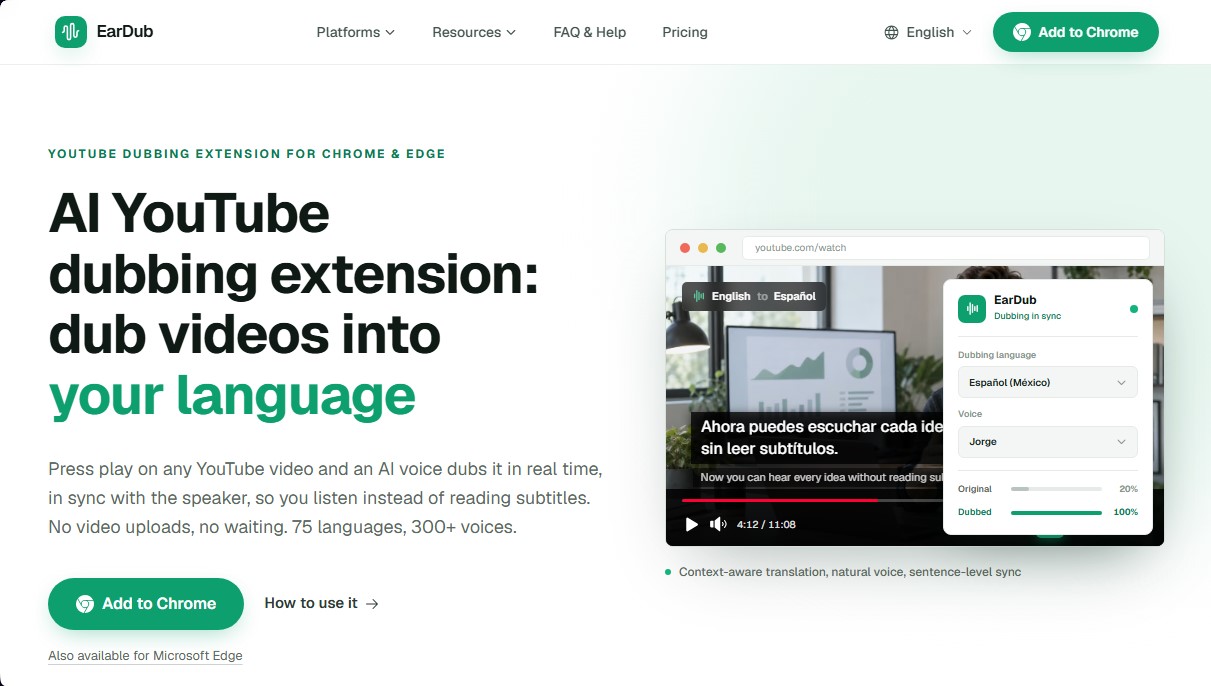
EarDub is a dubbing extension for YouTube specifically designed for Chromium-based browsers, such as Chrome and Microsoft Edge. Its primary function is to automatically translate and dub videos in real time using AI voices. Unlike conventional subtitle translators, this tool allows users to listen to content in their own language while maintaining visual synchronization with the speaker, eliminating the need to read on-screen text while viewing content on a computer.
The technology behind EarDub is based on context-aware AI translation. Instead of translating isolated fragments or single words, the system groups subtitles into complete sentences before processing them, ensuring more natural, fluid, and coherent narration. The software employs a phrase-level synchronization approach, dynamically adjusting the speech rate (up to a maximum of 1.45x) so that the generated voice matches the rhythm of the original video. Additionally, for content that lacks original subtitles, the tool has the capability to perform advanced speech recognition to generate dubbing directly from the source audio.
EarDub’s catalog is extensive, offering support for 75 languages and more than 300 AI voices with different tones, genders, and regional accents. Its key functional capabilities and practical benefits include:
- Real-time dubbing: It works instantly upon pressing the play button, with no wait times or file uploads required.
- Dual audio control: It allows you to mix the volume of the original and dubbed voices using independent controls, which is useful for maintaining the video's ambient tone.
- Bilingual subtitles: It offers the option to display translated and original subtitles simultaneously, with adjustable sizes from 14 to 28 px.
- Multi-platform compatibility: In addition to YouTube, it works on learning sites like Udemy and Coursera, as well as social media networks like X (Twitter) and Bilibili.
This solution is ideal for users who consume programming tutorials, financial investment courses, or academic lectures in foreign languages. By allowing users to keep their eyes fixed on the code, charts, or presentations, EarDub optimizes learning and productivity. It is also an effective tool for consuming long-form podcasts and entertainment content, allowing for clear audio listening while multitasking on a mobile device (via the Vivaldi browser on Android) or a desktop computer. Setup is simple, requiring just a couple of clicks to activate dubbing on any compatible video.
EarDub features and use cases
How to use EarDub
EarDub FAQ
What is EarDub and how does it work?
EarDub is a Chrome and Edge extension that translates and dubs YouTube videos in real-time using AI, syncing the voice with the speaker so you don't have to read subtitles.
Is EarDub free to use?
The tool offers a free plan that allows you to dub up to 30 minutes per day on videos that already have subtitles, with a monthly limit of 180 minutes.
How many languages and voices can it dub in?
EarDub supports 75 languages and features over 300 different voices, allowing you to choose between male and female tones and various regional accents.
Can EarDub dub a video that doesn't have subtitles?
Yes, paid plans include a speech recognition feature that can generate dubbing even if the original video doesn't include subtitles or transcripts.
What browsers and devices can it be installed on?
It works natively on Google Chrome and Microsoft Edge for desktop, and it’s also compatible with Android devices if you use the Vivaldi browser.
What is the difference between EarDub and YouTube's auto-dubbing?
Unlike YouTube's system, which is only available on videos chosen by the creator, EarDub works on almost any video and lets you customize the voice and language.
Does the extension work on platforms other than YouTube?
Yes, EarDub is compatible with online course sites and social media platforms like Udemy, Coursera, X, and Bilibili, as long as the user authorizes it to run on those pages.
Can I listen to the original audio while the dubbing is playing?
The extension includes independent volume controls that allow you to completely mute the original audio or keep it in the background while listening to the AI voice.
How does EarDub ensure the translation sounds natural?
The system uses context-aware translation technology that groups subtitles into full sentences before translating them to prevent the result from sounding robotic.
What happens if the dubbing is longer than the original speech?
EarDub automatically adjusts the speed of the generated voice by up to 1.45x to ensure the voiceover finishes at the same time as the speaker in the video.
EarDub pricing and plans
Free
$0 per month
30 minutes per day, up to a maximum of 180 minutes per month.
Up to 60 minutes per video.
Maximum of 3 videos per day.
Only supports videos with existing subtitles.
Context-aware AI translation.
Basic
$9.99 per month (or $6.99/mo billed annually at $83)
60 hours of dubbing per month.
Up to 180 minutes per video.
Up to 20 videos per day.
Supports dubbing for videos without original subtitles.
Context-aware AI translation.
Email technical support.
Pro
$19.99 per month (or $12.99/mo billed annually at $155)
Unlimited dubbing time (subject to fair use policy).
No video length limits.
Unlimited videos per day.
Supports dubbing for videos without original subtitles.
Context-aware AI translation.
Priority support with response times under 24 hours.
EarDub Screenshots
EarDub user reviews
Write a review
Checking your session...
EarDub Reviews
Loading reviews...
EarDub alternatives

SayLingo.ai
Practice 30 languages with AI tutors. Improve your pronunciation and grammar through real conversations, guided lessons, and official exam preparation.

AI Translate Manga.com
Translate Japanese manga into English or Simplified Chinese directly in the panels. Supports PNG, JPG, and PDF files, plus a Chrome extension for online reading.

Kapwing Hinglish Subtitles Generator
Generate automatic Hinglish captions for videos in 100+ languages. Includes AI-powered editing and dubbing tools to reach bilingual audiences.
Ask BONBON
AI assistant for electricians that answers NEC and CEC code questions with official citations. Includes calculation tools, blueprint analysis, and a voice assistant.