Share
Academic writing assistant that generates essays with real APA citations in seconds. Its natural human style bypasses AI detectors.
What is EduWriter?
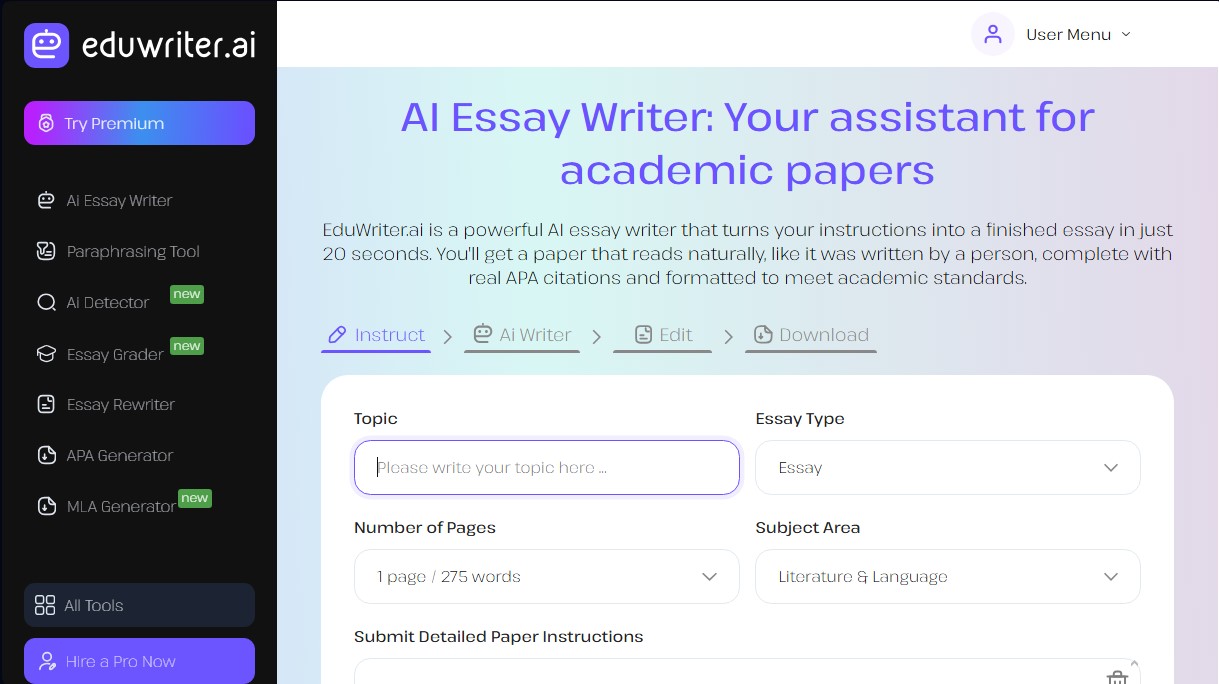
EduWriter is an AI academic writing assistant designed to automate the creation of essays, research papers, and complex academic assignments. This tool stands out for its ability to transform detailed instructions into structured text in just 20 seconds, delivering results that maintain a natural and professional tone. Unlike generic language models, EduWriter specializes in academic writing, natively integrating real APA citations and meeting the formatting standards required in university environments.
The application's technological core is based on Natural Language Processing (NLP) systems and machine learning algorithms. The tool has been specifically trained on millions of human-written papers, allowing it to understand and replicate human syntactic structures, sentence length variations, and contextual nuances. Thanks to the advanced EduWriter Ultra model, the system avoids the predictable patterns that typically trigger automated content detectors, achieving a high humanization rate in the final text.
EduWriter’s core capabilities include:
- Versatile Essay Generation: The ability to write narrative, argumentative, analytical, descriptive, and comparative texts based on user needs.
- Authentic Bibliographic References: The system extracts citations from verified academic databases, eliminating the risk of "hallucinations" or fabricated sources common in other AI tools.
- AI Detector Optimization: The content is designed to bypass detection tools such as Turnitin, GPTZero, or Winston AI, while guaranteeing 100% originality.
- Automatic Academic Formatting: Documents are generated directly following APA 7th edition standards and can be downloaded in MS Word format.
- Integrated Editing Tools: Includes features for paraphrasing, summarizing text, and detecting plagiarism, allowing for total control over document quality.
To use EduWriter, users define the topic, field of study, and page count, and can even upload reference documents to customize the approach. This functionality is especially useful for students and professionals who need to overcome writer's block or streamline the research and structuring phase of their work. The platform allows for adjusting the academic level and tone, ensuring that the flow of arguments is coherent and backed by solid evidence.
When using this technology, it is recommended to provide precise and detailed instructions to obtain more specific results. Although the tool generates submission-ready text, its primary focus is to serve as a support in the learning process, facilitating the creation of high-quality drafts that the user can later review and personalize on their computer. In this way, EduWriter positions itself as a comprehensive solution for efficiently managing academic workloads through specialized artificial intelligence.
EduWriter features and use cases
How to use EduWriter
EduWriter FAQ
What is EduWriter, and how can it help me with my academic papers?
EduWriter is an AI-powered writing assistant that generates complete academic essays in just twenty seconds based on your specific instructions.
How does EduWriter differ from general-purpose tools like ChatGPT?
Unlike other models, this platform is specifically designed for academia, providing real references and preventing the fabrication of data
Can AI detectors identify essays generated by EduWriter?
No. The system uses models trained on human-written text to mimic a natural style that successfully bypasses detectors like Turnitin or GPTZero.
Does the tool include real citations and bibliographic references in the text?
Yes. The platform automatically searches academic databases to include authentic, verified citations following APA 7th edition formatting.
How long does it take the system to generate a full essay?
The process is extremely fast; the tool delivers a structured, ready-to-download document in approximately twenty seconds.
Can I use EduWriter for free for my school assignments?
The free plan allows you to create two papers of up to two pages each week, which is typically sufficient for standard academic assignments.
Can I edit the content once the AI has finished the draft?
Yes. You can download the essay in Microsoft Word format to add your own personal examples or adjust any specific details as needed.
What types of documents can EduWriter generate?
The tool can create a wide variety of documents, including argumentative essays, research papers, and critical or comparative analyses.
EduWriter pricing and plans
Free Plan
Price: $0/month
- 1 AI Writer page per day.
- 1 paraphrasing page per day.
- Custom content generation.
- Real reference inclusion.
- Instant APA formatting.
- Limit of up to two 2-page assignments per week based on the general overview.
Premium Monthly
Price: $19/month
- Advanced AI Writer (access to models like EduWriter Ultra).
- Unlimited paraphrasing.
- 3 plagiarism reports included.
- APA citation generator.
- Text generator and summarizer.
- AI detection tool.
- No restrictions on the number of essays or page count.
Premium Quarterly
Price: $14/month (billed quarterly)
- Advanced AI Writer for more human-like results.
- Unlimited paraphrasing.
- 3 plagiarism reports.
- Full access to tools: APA Generator, Summarizer, and AI Detector.
- 24/7 customer support.
Premium Yearly
Price: $11/month (billed annually)
- All features of the advanced Premium plan.
- Unlimited paraphrasing.
- 3 plagiarism reports.
- Turn-in ready MS Word document generation.
- No word or page limits per essay.
EduWriter Screenshots
EduWriter user reviews
Write a review
Checking your session...
EduWriter Reviews
Loading reviews...
EduWriter alternatives


MakeLesson
Transform educational materials into interactive, auto-graded lessons. Includes student management, scheduling, and payments in an all-in-one platform for teachers.

ReferenceChecker.ai
Verify academic citations and DOIs against scientific databases. Detect errors or fake references and correct bibliographies in multiple professional formats.