Everest AI Scheduling Assistant
Share
AI assistant that syncs Google and Outlook calendars to schedule meetings via email. It suggests times, negotiates availability, and books appointments automatically.
What is Everest AI Scheduling Assistant?
Everest AI Scheduling Assistant is an AI-powered scheduling assistant specifically designed for professionals who manage multiple calendars simultaneously. Its primary function is to act as an intelligent scheduling agent that synchronizes availability across different accounts and manages meeting arrangements directly via email. This tool is ideal for independent consultants, freelancers, and agency leads who need to balance client, work, and personal calendars without any overlaps.
Everest AI works by integrating with Google Calendar and Outlook. Once accounts are connected, the user simply needs to carbon copy (CC) the assistant's email address on any message thread. From that point on, the AI takes control of the conversation: it proposes times based on the user's actual availability, negotiates the best option with the other party, and, once agreed upon, confirms the appointment in the appropriate calendar. If plans change, the assistant can autonomously reschedule or cancel the event and even follow up if the contact does not respond.
Key functional capabilities of the Everest AI Scheduling Assistant include:
- Multi-platform synchronization: It maintains consistency across all connected schedules, automatically blocking off time as "Busy" on other calendars to prevent double-booking.
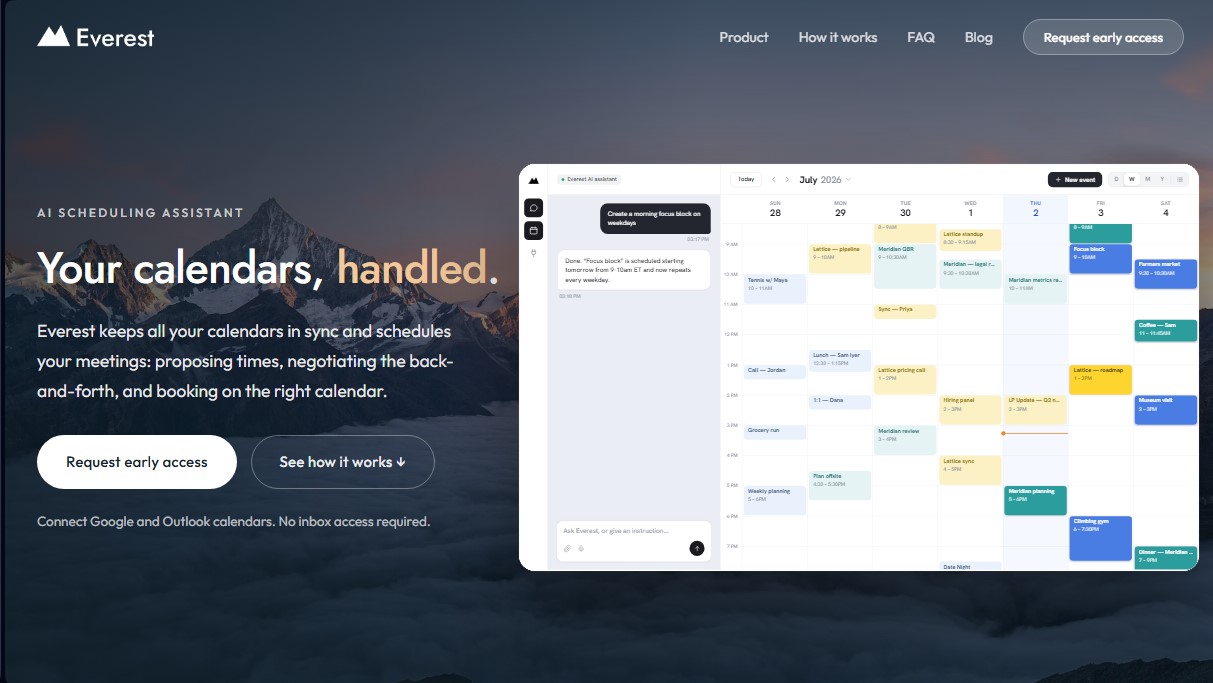
- Unified calendar: It offers a single view to manage all commitments from one place, whether on a computer or mobile device, allowing users to toggle between day, week, month, or agenda list views.
- Context capture and memory: The system recognizes recurring contacts, saving their names, emails, and time zones to automate future scheduling without manual intervention.
- Chat interaction: In addition to email, it allows for direct instructions to be given to the assistant via text message, such as blocking out time for breaks or requesting that specific invitations be sent.
Regarding security, Everest AI stands out because it does not require access to the user's inbox. The tool only reads email threads where it has been explicitly included and only sends brief messages related to scheduling. When synchronizing accounts, it only shares availability status (free or busy) without exposing titles or private event details between different calendars. This architecture ensures that the user maintains full control over their personal information while optimizing productivity and delegating the administrative burden of their workflow.
Everest AI Scheduling Assistant features and use cases
How to use Everest AI Scheduling Assistant
Everest AI Scheduling Assistant FAQ
What exactly is Everest AI Scheduling Assistant?
It’s an artificial intelligence assistant that syncs all your calendars and manages meeting scheduling by suggesting times and handling the coordination for you.
Does Everest have access to my entire inbox?
No, the assistant only accesses the email threads where you explicitly CC it and does not have permission to read the rest of your mailbox.
How do I start scheduling meetings with Everest?
Simply CC your personal assistant’s email address on any message, and Everest will take care of suggesting available times and confirming the booking.
Which calendar services are compatible with Everest AI Scheduling Assistant?
The tool currently works with Google Calendar and Microsoft Outlook accounts.
Do my contacts need an Everest account to schedule a meeting?
No, the people you are communicating with can reply to emails normally, and the assistant will understand their responses to finalize the appointment.
How does the tool prevent double-booking if I use multiple calendars?
Everest analyzes availability across all your linked accounts and creates private "busy" time blocks on your other calendars to ensure you are never double-booked.
Can Everest AI Scheduling Assistant handle changes or cancellations?
Yes, if you need to reschedule or cancel a meeting, just request it in the email thread, and the assistant will update the schedule for all participants.
How much does it cost to use the assistant during the early access phase?
The service is completely free during the early access program, and no credit card or banking information is required to start using it.
Everest AI Scheduling Assistant pricing and plans
Early Access Program: Free
Unlimited Google and Outlook calendar sync without requiring inbox access.
AI assistant for meeting scheduling via CC in email threads.
Automated time suggestions, response management, and appointment confirmation in the corresponding calendar.
Unified calendar view to simultaneously manage personal, work, and client accounts.
Automatic availability blocking (Sync) across all connected calendars to prevent double bookings.
Automated management of rescheduling, cancellations, and follow-ups with contacts.
Context capture to remember frequent contacts and their time zones.
Direct AI chat interface to request schedule blocks or manually send invitations.
Restriction: Access is limited to a waitlist and granted selectively in batches.
Public Launch: See official website
Details regarding final pricing will be announced following the conclusion of the Early Access phase.
Early access program members will receive "exclusive founder’s pricing" once the tool is publicly launched.
Everest AI Scheduling Assistant Screenshots