Share
Node-based platform integrating various AI models and professional editing tools to transform creative visions into scalable workflows.
What is Figma Weave?
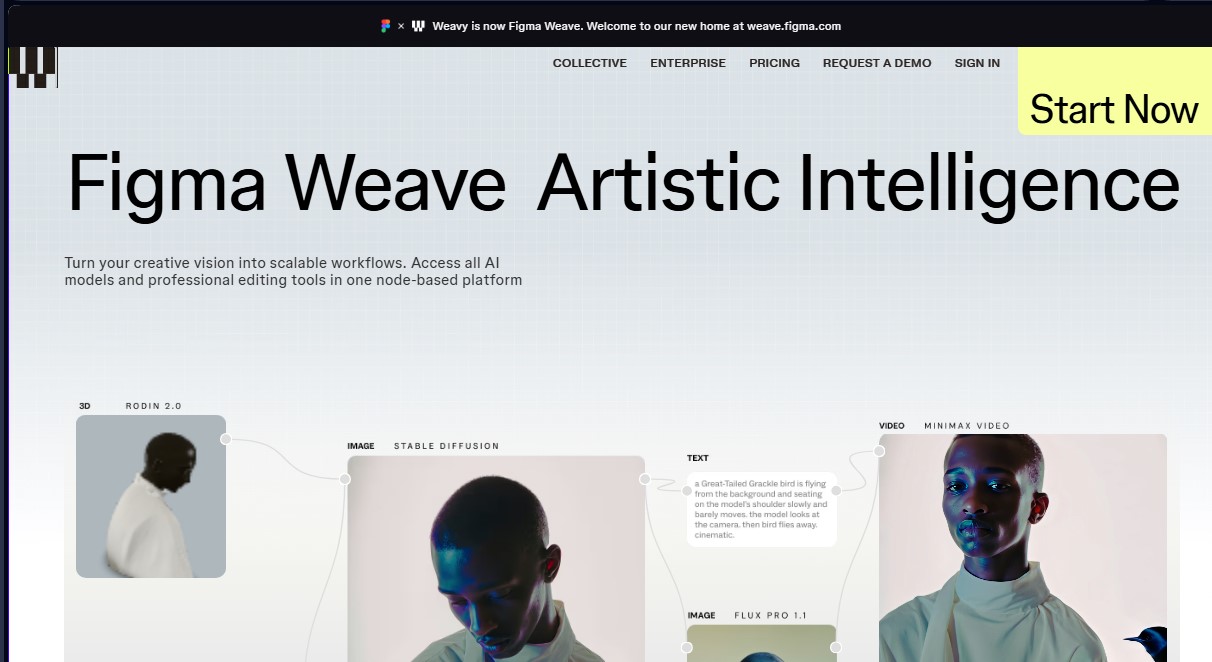
Figma Weave is a node-based AI platform designed to transform creative visions into scalable, professional workflows. Formerly known as Weavy, this tool allows designers and visual creators to unify the potential of multiple generative AI models within a single technical and precise workspace. Its primary focus is the concept of Artistic Intelligence, which seeks to balance automated capabilities with human creative control to maintain technical quality in every project from your computer.
The tool stands out for its ability to integrate various market-leading AI engines into a single workflow, including OpenAI, Google, Runway, Luma, Kling, Bytedance, Black Forest Labs, Grok, Recraft, and Bria. Instead of using these technologies in isolation, Figma Weave allows them to be combined via a node system, facilitating the creation of complex processes ranging from image and video generation to advanced editing without compromising resolution or style.
Among its technical capabilities, it offers a comprehensive suite of professional editing tools integrated directly into the workspace canvas:
- Inpainting and Outpainting to coherently modify, correct, or expand specific areas of an image.
- Mask extraction and depth maps (Z-depth extractor) for pinpoint control over composition and volume.
- High-quality upscaling features and automatic image description to improve semantic context.
- Multi-layer composition tools, channel management, relighting adjustments, and drawing tools (Painter).
One of Figma Weave's competitive advantages is its ability to maximize team efficiency by automatically generating a simplified user interface from complex workflows. This allows technical processes like matte manipulation or multi-layer composition to become operational, repeatable tools for any team member. Additionally, the platform ensures data security through SOC 2 Type II certification, making it ideal for corporate environments and agencies managing sensitive digital assets.
This solution is specifically designed for content creators, digital artists, and visual teams looking for a robust alternative to scale their media production. By centralizing access to the most advanced AI models and combining them with traditional design tools—such as layers, typography, and blending modes—Figma Weave optimizes execution time and allows for experimentation with professional AI workflows in a fluid, structured, and professional manner.
Figma Weave features and use cases
How to use Figma Weave
Figma Weave FAQ
What is Figma Weave and what is this tool used for?
It is a node-based platform that integrates multiple artificial intelligence models with professional editing tools to create creative and scalable workflows.
What happened to the old Weavy platform?
Weavy has been rebranded as Figma Weave, and you can now find all its features and services at the new web address: weave.figma.com.
Which AI models can be used in Figma Weave?
The platform allows you to combine models from Google, Kling, OpenAI, Bytedance, Black Forest Labs, Runway, Luma, LTX, Wan, Grok, Recraft, and Bria within a single workflow.
Is there a free option to try Figma Weave?
Yes, we offer a free plan that includes 150 monthly credits to generate approximately 375 images, access to all AI models, and a commercial license.
How do monthly credits work across the different plans?
Credits are allocated every month for image or video generation; on the Professional plan, you can roll over unused credits for a period of up to three months.
What professional editing tools are included in the platform?
Figma Weave offers advanced features such as inpainting, outpainting, image upscaling, mask extraction, layers, text tools, and channel management.
Can I use Figma Weave creations for commercial purposes?
Yes, all subscription plans—including the free tier—grant a commercial license so you can use your projects professionally.
What advantages does the Team plan offer for group work?
This plan features unified billing, a shared credit pool for all members, user administration, and the ability to share files within the workspace.
What additional services are included in the Figma Weave Enterprise plan?
The Enterprise plan adds custom credit allocation, team training, premium Slack support, and access to private API keys.
Figma Weave pricing and plans
Free
Price: $0 per month.
- 150 monthly credits (equivalent to about 375 images).
- Full access to all image AI models.
- Professional-level editing tools.
- Commercial license included.
- Limit of 5 workflows.
Starter
Price: $24 per month ($19 per month billed annually).
- 1,500 monthly credits (equivalent to 3,750 images or 417 seconds of video).
- Includes all Free plan features.
- Unlimited workflows.
- Top-up option: 1,000 additional credits for $10.
Professional
Price: $45 per month ($36 per month billed annually).
- 4,000 monthly credits (equivalent to 10,000 images or 1,111 seconds of video).
- Includes all Starter plan features.
- Credit rollover for unused credits for up to 3 months.
- Top-up option: 1,200 additional credits for $10 (20% more value).
Team
Price: $60 per user per month ($48 per user per month billed annually).
- 4,500 monthly credits per user (equivalent to 11,250 images or 1,250 seconds of video).
- Includes all Professional plan features.
- Unified billing and team member management.
- Shared team credit pool.
- Shared workspace file access.
- Admin and credit management tools.
Enterprise
Price: Visit the official website to request a demo.
- Includes all Team plan features.
- Custom credit allocation.
- Dedicated team training.
- Premium Slack support.
- Dedicated API keys.
- Run workflows via API (coming soon).
Figma Weave Screenshots
Figma Weave alternatives


utilz Background Remover
Remove image backgrounds for free with total privacy in your browser. Create transparent or colored backgrounds without uploading files while maintaining original resolution.


Osmo Studio
AI animation studio for professional motion graphics and videos. Control every detail, collaborate with teams, and export with transparent backgrounds.

ColorCraft
Create Amazon KDP books. Generate coloring pages, stories, puzzles, and print-ready full covers, plus promotional mockups in a single workflow.