Share
Cinematic AI tool for generating consistent clips and scenes. Create high-quality visual stories with Google’s generative models.
What is Flow?
Flow is an AI-powered filmmaking tool developed by Google to streamline high-quality video production. This software enables users to generate clips, scenes, and full narratives with a professional finish. It is specifically designed for the creative sector, offering an environment where AI video generation integrates seamlessly into the ideation and iteration process. It is an ideal resource for filmmakers, visual artists, and storytellers seeking aesthetic consistency and technical quality in their digital projects.
The technology powering this platform is based on the most advanced generative models from Google DeepMind, highlighting the use of Veo 3.1 and Veo 2. These models deliver exceptional image quality and precise control over movement and composition. The tool utilizes cutting-edge generative AI approaches to interpret complex prompts and transform them into coherent visual sequences. Additionally, it incorporates SynthID, an invisible digital watermarking technology that identifies AI-generated content, ensuring transparency without compromising the visual experience.
Among its core capabilities, Flow offers total creative control through various workflows:
- Text to Video: Generating cinematic sequences from detailed text descriptions.
- Frames to Video: The ability to animate static images and turn them into dynamic clips.
- Ingredients to Video: Using specific assets as references to maintain visual consistency throughout the work.
- Camera control: Precise adjustments to camera movement to achieve specific narrative effects.
- Scenebuilder: An interface designed to build and organize complex scenes in a structured way.
- Video extension: A feature to extend existing clips while maintaining the consistency of on-screen elements.
- Resolution Scaling: The option to upscale to 1080p or 4K, ensuring optimal sharpness for large-format screens.
The app’s workflow is optimized for desktop use, particularly through Chromium-based browsers like Google Chrome. Users can import their own assets or generate them directly within the platform, streamlining file and reference management during the creative process. The system enables efficient asset management, allowing creators to focus on the narrative while the AI handles rendering and visual detail.
This solution is aimed at professionals 18 and older who require AI tools for filmmakers with a high degree of customization. As a tool integrated into the Google ecosystem, it provides a robust infrastructure for advanced visual storytelling, adhering to safety policies that prohibit the generation of inappropriate content and protecting the integrity of the results through visible and invisible watermarks depending on the user profile.
Flow features and use cases
How to use Flow
Flow FAQ
What are the requirements to use Flow?
You must be at least 18 years old, reside in a supported region, and have an active Google AI Pro, Ultra, or Workspace subscription.
Which browsers are recommended for using Flow?
For the best experience, we recommend using a Chromium-based browser, such as Google Chrome, on a desktop computer.
Will I lose my credits if a video generation fails in Flow?
You will not be charged any credits for failed generations. In the event of technical errors, such as audio glitches, your credits will be refunded.
Will the content I generate with Flow have a watermark?
Videos created by Pro users include a visible Veo watermark, while Ultra subscribers do not. However, both include invisible SynthID watermarks.
What is Flow TV, and what kind of content can I find there?
It is a showcase gallery where you can watch clips and short films created by professionals to get inspired and explore the potential of the Veo model.
How many free credits does Flow offer each month?
The tool provides 180 free monthly credits, though you can increase this amount by upgrading to a Pro or Ultra plan.
Can I use Flow via a VPN from an unsupported region?
No, using a VPN will not grant access to the platform if you are physically located in a region where the service is not yet available.
What is the difference between the Fast and Quality models in Flow?
Flow offers two model tiers based on your speed or quality needs, though some advanced features may require a specific model.
How can I share my work with other Flow users?
You can join the tool’s official Discord channel to share your creations and connect with other creatives in the community.
Flow pricing and plans
Free Plan
- 180 free monthly credits to start creating.
- Eligible Workspace plan subscribers (Business, Enterprise, Education) receive 100 monthly credits at no extra cost.
Google AI Pro
Price: $19.99 per month (first month free trial).
- Access to Veo 2 and Veo 3.1 models.
- Creation tools: Text to Video, Frames to Video, Ingredients to Video, and Video extension.
- Camera control and Scenebuilder tool.
- 1080p video upscaling.
- Includes Gemini in Gmail and Docs, plus 2 TB of Google One storage.
- Generated videos include a visible watermark.
- Option to purchase additional credit top-ups.
Google AI Ultra
Price: $249.99 per month ($124.99/month for the first 3 months).
- Includes all Pro plan features.
- Higher monthly generation limits.
- Veo 3.1 Fast generations for 10 credits.
- 4K resolution video upscaling.
- Priority access to experimental models and advanced features.
- Generated videos do not include a visible watermark.
- Includes an individual YouTube Premium subscription and 30 TB of storage.
- Option to purchase additional credit top-ups.
Google AI Ultra for Business
For pricing on this Workspace plan add-on, please visit the official website.
- Provides the highest level of access to next-generation AI models and tools.
- Includes access to advanced tools like Whisk and Project Mariner.
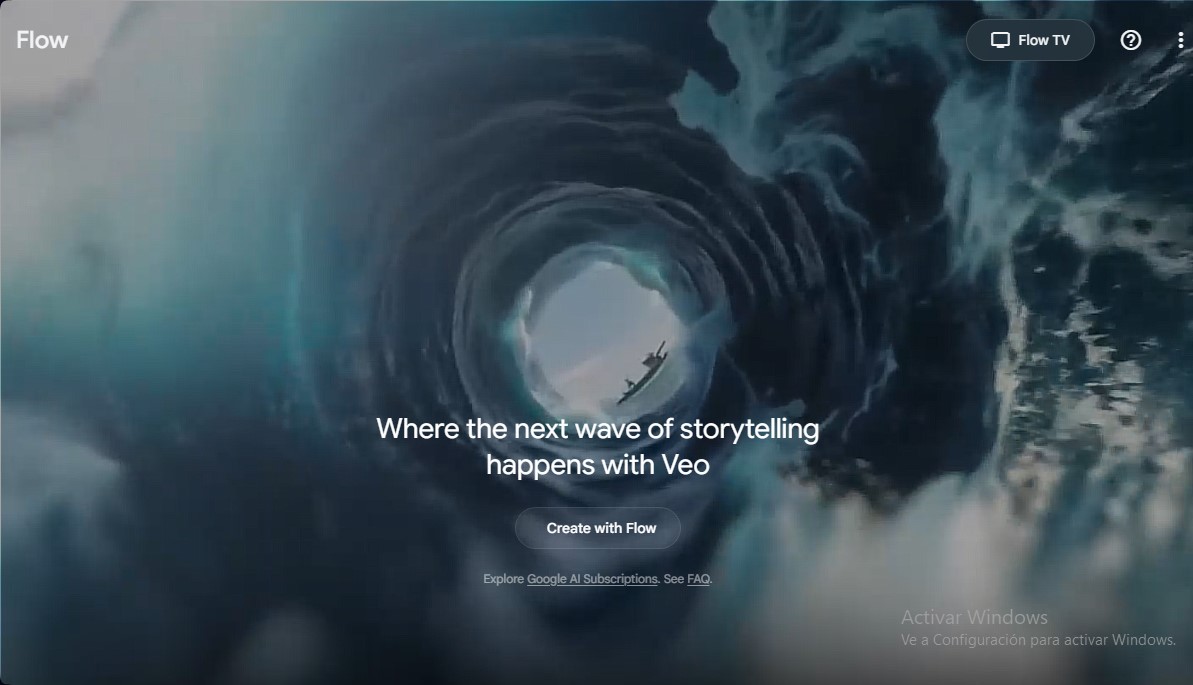
Flow Screenshots
Flow alternatives

utilz Background Remover
Remove image backgrounds for free with total privacy in your browser. Create transparent or colored backgrounds without uploading files while maintaining original resolution.
Osmo Studio
AI animation studio for professional motion graphics and videos. Control every detail, collaborate with teams, and export with transparent backgrounds.

ColorCraft
Create Amazon KDP books. Generate coloring pages, stories, puzzles, and print-ready full covers, plus promotional mockups in a single workflow.