Share
Turn scripts and ideas into short dramas for TikTok and Reels. Generate characters, scenes, and dialogue with AI—no filming, cameras, or professional actors required.
What is Framia | Short Drama Maker?
Framia Short Drama Maker is an advanced AI video creation tool designed for producing short-form content for platforms like TikTok, Reels, and YouTube Shorts. This application allows users to transform scripts, basic ideas, or novel chapters into short-form cinematic productions without the need for cameras, actors, or complex manual editing software. Its primary function is to automate the creative workflow, from story planning to exporting the final video.
The platform offers various creation methods tailored to different levels of control. Through its AI drama template system, users can select pre-designed structures, clone projects, and customize specific elements like characters or settings using prompts. Additionally, its Workflow Canvas allows for deeper technical management, where a specialized agent acts as a short-form video director, organizing production into independent text, image, and audio nodes that the user can review and adjust before the final generation.
Technologically, Framia Short Drama Maker stands out by integrating cutting-edge video models such as Seedance 2.5, Kling 3.0 Omni, and Nano Banana. These models enable fluid movement and diverse visual styles, ranging from realism to animation. The tool centralizes the creation of all necessary assets into a single workspace—including AI synthetic voices, automatic subtitles, background music, and visual effects—ensuring narrative consistency in every episode.
Its core capabilities and functional benefits include:
- Story Planning: Organize scenes, develop characters, and structure cliffhangers before starting video production.
- Smart Text-Based Editing: Easily modify dialogue, visuals, or timing directly on the canvas, allowing you to update parts of the micro-drama without having to rebuild the entire file from scratch.
- Multi-format Support: Capable of processing everything from simple plot outlines to novel excerpts, converting them into structured scenes with dialogue and narration.
- Visual Consistency: Helps maintain the appearance of characters and environments throughout a series of connected episodes.
This solution is especially useful for content creators looking to produce viral series, digital marketing specialists who need brand storytelling, and educators who want to present practical scenarios through dramatizations. By optimizing AI micro-drama creation, the tool drastically reduces production costs and time, allowing users to publish high-quality narrative content consistently across their social channels. The system supports the use of custom reference images and allows for the adjustment of technical parameters such as aspect ratio, resolution, and the duration of each generated clip.
Framia | Short Drama Maker features and use cases
How to use Framia | Short Drama Maker
Framia | Short Drama Maker FAQ
What is Framia Short Drama Maker and what is it used for?
It is an AI-powered tool that transforms scripts, ideas, or novel chapters into short-form drama videos optimized for platforms like TikTok and Reels.
Can I use the videos created with Framia for commercial purposes?
Yes, paid subscription plans include commercial use rights, allowing you to use your creations for professional projects, marketing, or branding.
How can I quickly convert a script or an idea into a video?
You can choose a pre-designed template in the "Drama Story" section or use the workflow canvas to have the AI automatically generate the script, characters, and scenes from your text.
Can I edit scenes or dialogue once the drama has been generated in Framia?
Yes, the platform allows you to modify each scene individually, adjust the pacing, change dialogue via text prompts, and regenerate specific parts without having to redo the entire process.
Does Framia Short Drama Maker include AI voices and subtitles?
The tool automatically generates character voices, background music, and subtitles, allowing you to create a complete production in a single workspace without needing actors.
Can I post videos directly to social media from the platform?
Framia allows you to download the final video directly to your device or instantly share it to your connected social media profiles with just one click.
Do I need video editing skills to use Framia Short Drama Maker?
You don't need to be an expert. The tool uses artificial intelligence to plan and assemble scenes, though it does offer an advanced editor for those who want total control over the final result.
What input formats does the tool support for creating stories?
You can start creating from a structured script, a plot outline, a novel excerpt, or even just a brief idea written in natural language.
Framia | Short Drama Maker pricing and plans
Free Version
Provides initial access to the platform to start creating AI short dramas at no upfront cost, though specific free credit limits are not permanently disclosed.
Basic Plan: $20 per month ($16 for the first month for new users) or $17 per month with annual billing.
1,500 credits per month (approximately 500 images or 375 seconds of video).
Access to all image, video (Seedance 2.5, Kling 3.0, Nano Banana 2), and music models.
Commercial use and removal of the Framia watermark.
Resource downloading and exporting.
Canvas-to-Content planning and integrated video editing.
All-in-one creative agent and plugin support.
One-click social media publishing.
Shared credits with other products in the Converge ecosystem.
Pro Plan: $40 per month ($32 for the first month) or $34 per month with annual billing.
4,000 credits per month (approximately 1,333 images or 1,000 seconds of video).
Includes all features from the Basic plan.
Workspace collaboration for up to 2 members.
Early access to new models and features.
Priority support and exclusive features.
Ultimate Plan: $190 per month ($152 for the first month) or $152 per month with annual billing.
20,000 credits per month (approximately 6,666 images or 5,000 seconds of video).
Includes all features from previous plans.
Workspace collaboration for up to 5 members.
Enterprise Plan: Check pricing on the official website.
Custom credits based on team needs.
Advanced security measures.
Tailored onboarding process for large-scale operations.
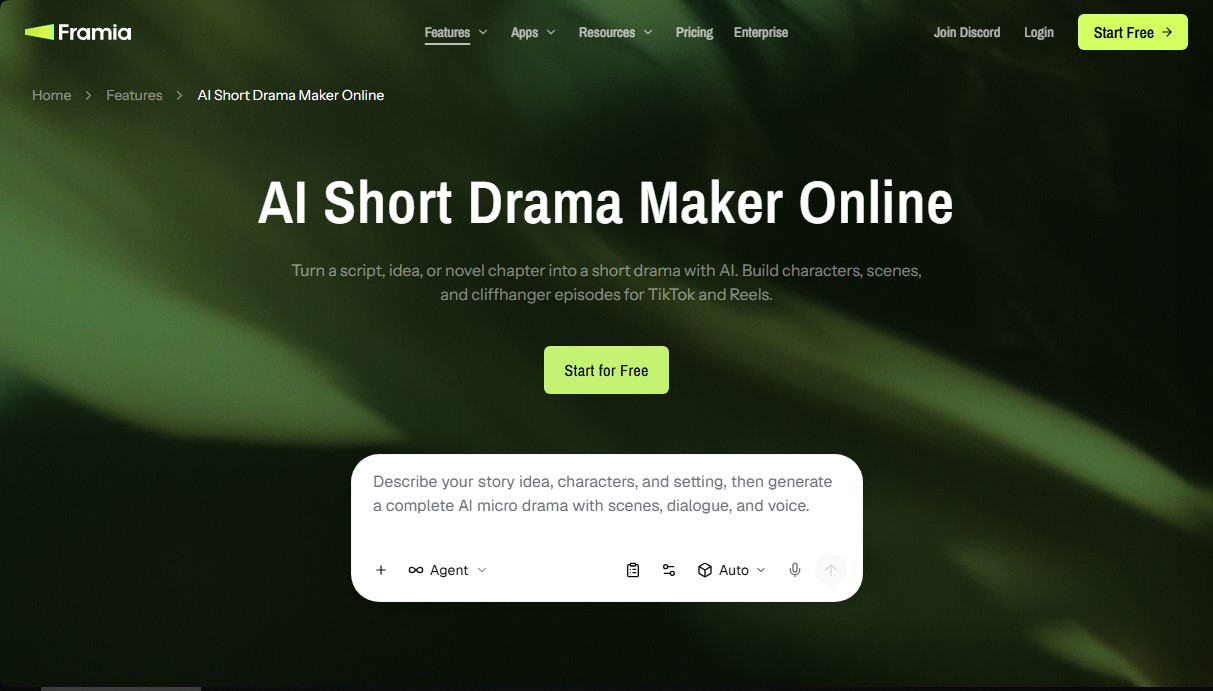
Framia | Short Drama Maker Screenshots
Framia | Short Drama Maker alternatives

VideoWeb Video Generator
Generate professional AI videos from text or images. Features realistic avatars, automated scripts, and optimized formats for marketing and social media.
Motion Transfer AI Video Generator
Animate character photos using reference videos. Precisely transfer gestures, dances, and body movements from a clip to an image for realistic results.

AlreadyRan
AlreadyRan brings dozens of AI image, video and audio models into one web studio with a single credit balance and the cost shown before every generation.


Vidverse AI
Vidverse AI brings several AI video, image and voice models into one web and mobile app, so you can turn text or photos into clips, images and voiceovers.