
Share
Turn photos and posters into promotional videos. Create ads and social media content from static images quickly and effectively.
What is FreyaVideo?
FreyaVideo is an AI video generator specializing in transforming static images into high-quality dynamic promotional content. This image to video AI tool allows businesses and creators to convert product photos, posters, flyers, and campaign visuals into short marketing-optimized videos. Its primary function is to bring existing visual assets to life, eliminating the need to start projects from scratch in a conventional video editor or organize costly new shoots.
The operation of this video creation AI is based on a simple and intuitive four-step process. After uploading an image with good lighting and a clear subject, the user describes the desired movement through a motion prompt. FreyaVideo's technology analyzes the original file's composition to add camera movements, subject shifts, and a specific rhythm, while always maintaining visual consistency so the original product or design remains perfectly recognizable in the final result.
Some of its most notable technical and functional capabilities for professional environments include:
- Formats and Resolution: File export in MP4 with H.264 encoding, ensuring universal compatibility with resolutions up to 1080p (Full HD).
- Versatile Aspect Ratios: Supports 9:16 formats for vertical social media, 1:1 for square posts, and 16:9 or 4:3 for presentations and websites.
- Integrated Audio Generation: The ability to automatically generate background music and sound effects that match the video's mood and content.
- Advanced Motion Control: Supports instructions for parallax effects, slow push-ins, lateral pans, and subtle background animations.
This solution is specifically designed for marketing teams that need to generate ad variations quickly and for e-commerce businesses looking to transform their photo catalogs into engaging launch teasers. Designers and creative studios can use FreyaVideo to produce multiple content pieces from a single graphic asset, making it easier to adapt to different channels and conduct creative performance testing.
The tool stands out for its focus on rapid iteration, allowing users to render versions, compare results, and adjust motion instructions quickly from their computer. As a browser-based platform, it optimizes the workflow from static design to final video output, making it an essential resource for creating high-impact social media ads and promotional content without requiring advanced technical editing skills.
FreyaVideo features and use cases
How to use FreyaVideo
FreyaVideo FAQ
What exactly is FreyaVideo?
It is an AI tool designed to transform static images, such as product photos or posters, into short promotional marketing videos.
How can I convert an image into a video with FreyaVideo?
Simply upload your image, describe the type of motion you want, choose the duration and format, and the system will automatically generate the clip.
What types of files can I upload to the platform?
The tool works best with product photos, posters, flyers, and campaign images that are well-lit and have a clear main subject.
Does FreyaVideo allow for the creation of content for social media like Instagram or TikTok?
Yes, you can select various aspect ratios, such as 9:16 vertical, 1:1 square, or 16:9 horizontal, to fit any platform.
Is a monthly subscription required to use the tool?
No, it operates on a pay-as-you-go system where you purchase credit packs to use whenever you need them, without automatic renewals or fixed fees.
What happens to my credits if a video generation fails?
If the system detects a rendering error on the platform's side, the credits used will be automatically returned to your balance so you can try again.
Can I include music or sound effects in my FreyaVideo creations?
Yes, you have the option to enable audio generation so the tool can create background music and effects that match the movement and content of your video.
What format are the generated videos downloaded in?
All videos are exported in MP4 format with H.264 encoding to ensure compatibility with any media player or social media platform.
How long are the credits I purchase valid for?
Credits from any pack you purchase are valid for twelve months from the date of purchase.
What is the resolution of the final videos?
The tool supports output resolutions of up to 1080p, which is equivalent to Full HD quality.
FreyaVideo pricing and plans
Free Trial Credits
- Small amount of credits granted to new accounts.
- Allows you to test image generation workflows.
- Limit: Trial credits are not sufficient to generate a full Veo video.
Starter Pack: $9 (One-time payment)
- 500 credits valid for 12 months.
- Enough for an initial short promo video and several image generations.
- No subscription or auto-renewal.
- Use credits across all supported models.
Creator Pack: $35 (One-time payment)
- 2,500 credits valid for 12 months.
- Ideal for recurring creative work, ad variations, and social media assets.
- Reduced price per credit ($0.014).
- Use credits across all supported models.
Studio Pack: $90 (One-time payment)
- 7,000 credits valid for 12 months.
- Designed for agencies and teams managing high-volume campaigns.
- Best price per credit available ($0.013).
- Use credits across all supported models.
Restrictions and Usage Costs:
- Veo Video 3.1 (8s, 1080p with audio): 420 credits.
- Veo Video 3.1 (without audio): 210 credits.
- Veo Video 3.1 Fast: 210 credits with audio / 105 credits without audio.
- Nano Banana Pro Images: 3 credits (1K/2K) or 6 credits (4K).
- Expiration: All credits expire 12 months after purchase.
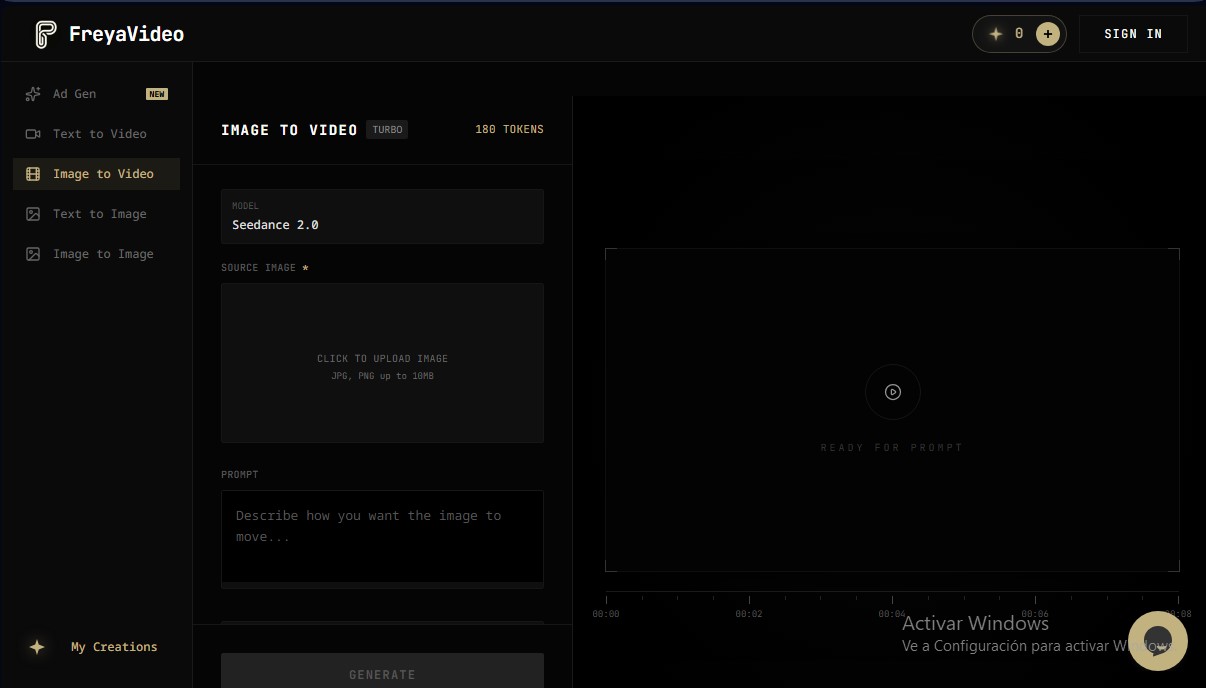
FreyaVideo Screenshots
FreyaVideo alternatives


Osmo Studio
AI animation studio for professional motion graphics and videos. Control every detail, collaborate with teams, and export with transparent backgrounds.

Victoria Secret Runway
Create fashion show videos by integrating your face into real scenes. Just upload a photo to replace professional models and walk the runway.


BurningBridgesAI.app
Turn a photo into Drake’s viral dance. AI automatically recreates the choreography and gestures so you can star in the trend without recording a thing.

VideoWeb Video Generator
Generate professional AI videos from text or images. Features realistic avatars, automated scripts, and optimized formats for marketing and social media.