
Share
Transform images and text into videos with fluid animations and cinematic effects. Features artistic styles and high-resolution export for social media.
What is GeniLoop?
GeniLoop is an advanced AI video generation platform designed to transform static images and text descriptions into high-quality dynamic content. This tool specializes in creating short clips optimized for social media platforms like TikTok and Instagram Reels, as well as digital advertising, allowing users to generate fluid animations without requiring technical editing skills. Its architecture stands out by integrating multiple next-generation AI models, including engines such as Kling, Sora, Runway, Vidu, and FLUX, which ensures exceptional versatility in visual results.
The core feature of GeniLoop is its image-to-video generator, which is capable of interpreting the content of a photograph to add coherent and natural movement. The system utilizes deep style transfer algorithms to apply cinematic, watercolor, sketch, or pixel art aesthetics, while always maintaining character consistency and object integrity across frames. This is essential for creators who need a subject to retain its exact visual identity despite complex camera movements or changes in artistic style.
Among its technical capabilities and practical benefits, the tool offers precise control over visual storytelling through:
- Cinematic camera control: Allows for adjusting parallax depth, selective focus, and dramatic angles starting from a single image.
- Specialized AI effects: Includes dedicated functions to generate specific interactions such as hugging, dancing, kissing, or hairstyle changes.
- Output customization: Users can choose durations of 5, 10, or 15 seconds, various aspect ratios (16:9, 9:16, 4:3), and fast or standard processing modes.
- Professional finish: Features tools to shape the atmosphere through lighting adjustments, film grain, and 4K resolution export.
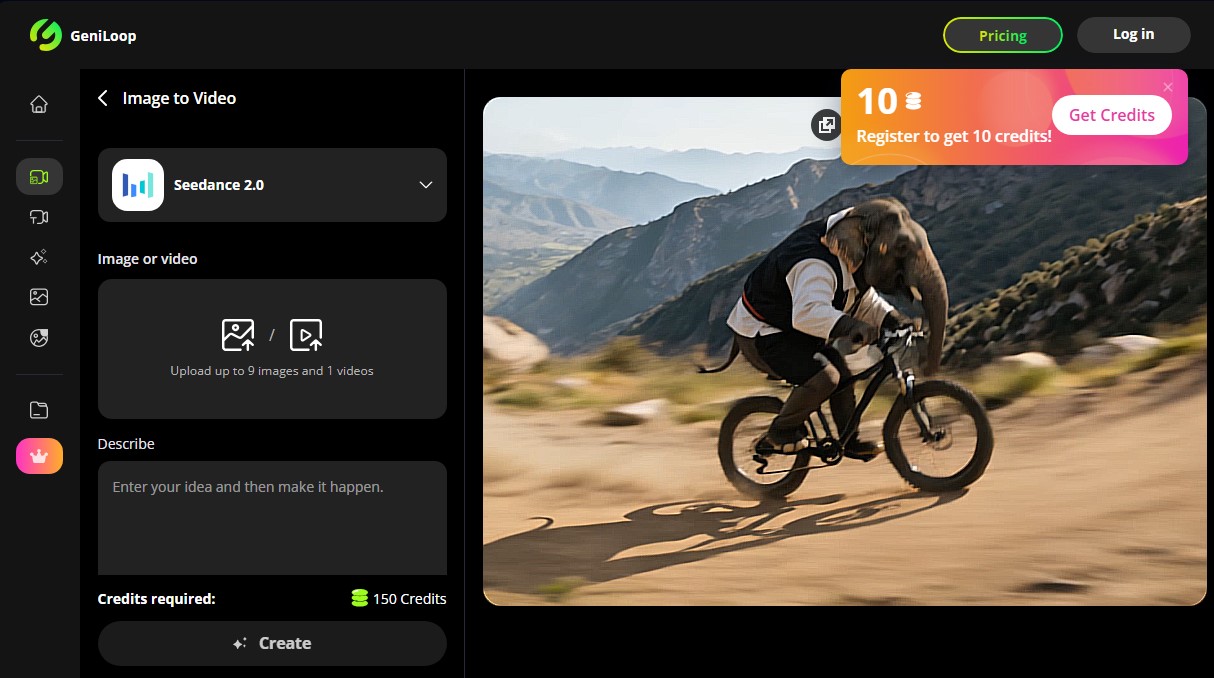
The workflow in GeniLoop is straightforward and functional. Users upload up to nine images or a video from their computer or mobile device, select the appropriate AI model, and add a brief description of the desired movement. Once the clip is generated, the platform allows for intensity and contrast adjustments to perfect the piece before the final download. Thanks to its focus on generative video AI, the application removes traditional production barriers, enabling agencies and independent creators to produce high-impact visual content in minutes, ensuring results that maintain the integrity of the original subject at all times.
GeniLoop features and use cases
How to use GeniLoop
GeniLoop FAQ
What is GeniLoop and what is this tool used for?
GeniLoop is an AI generator that allows you to transform static images into short videos featuring realistic animations and cinematic effects.
Can I use GeniLoop for free?
Yes, new users receive fifty free credits upon signing up and twenty additional credits every day they log into the platform.
What is the maximum length of the videos created with GeniLoop?
You can generate video clips with a duration of five, ten, or fifteen seconds, which are ideal for social media platforms like TikTok or Instagram Reels.
In what resolution can GeniLoop projects be exported?
The tool allows you to export your creations in high definition, and paid plans offer the option to get results in resolutions up to 4K.
Is it possible to use the generated videos for commercial purposes?
Commercial use of the content is permitted for all users who have a subscription to any of the available paid plans.
Which AI models does the GeniLoop platform integrate?
The system utilizes advanced models such as Kling, Sora, Runway, and Flux to ensure high visual quality and character consistency.
How many credits are needed to create a video from an image?
Standard video generation from an image typically requires a total of one hundred and fifty credits per creation.
What kind of special effects can I apply to my images?
You can apply a variety of effects, such as hugs, kisses, hairstyle changes, dance styles, and artistic transformations like Ghibli or anime styles.
Can I choose the screen format for my GeniLoop creations?
Yes, the tool allows you to select different aspect ratios, such as 16:9 for landscape or 9:16 for vertical format.
What happens if I need more credits for my projects?
You can subscribe to a monthly or annual plan, or make a one-time credit purchase. These credits do not expire and also remove watermarks.
GeniLoop pricing and plans
Free Version
- 50 free credits upon initial sign-up.
- 20 additional bonus credits every day you log in.
- Create and download short HD clips.
STARTER Plan
$9.99 per month (or $7.99/mo billed annually).
- 1,100 monthly credits.
- Limit of up to 73 videos or 822 images per month.
- Access to premium models like Kling, Runway, Sora, FLUX, and Grok.
- Over 500 video and image effects.
- Watermark-free exports.
- Commercial use license.
- Priority processing queue.
CREATOR Plan
$29.99 per month (or $25.99/mo billed annually).
- 3,800 monthly credits.
- Limit of up to 253 videos or 2,850 images per month.
- Access to all AI models and platform tools.
- Over 500 video and image effects.
- Watermark-free exports.
- Commercial use license.
- Priority processing queue.
PRO Plan
$59.99 per month (or $45.99/mo billed annually).
- 7,500 monthly credits.
- Limit of up to 500 videos or 5,622 images per month.
- Access to advanced models (Kling, Runway, Vidu, Veo, etc.).
- Over 500 effects and full access to AI tools.
- Watermark-free exports.
- Commercial use license.
- Priority processing queue.
BUSINESS Plan
$99.99 per month (or $79.99/mo billed annually).
- 14,000 monthly credits.
- Limit of up to 933 videos or 10,500 images per month.
- Full access to all models and platform tools.
- Over 500 video and image effects.
- Watermark-free exports.
- Commercial use license.
- Priority processing queue.
Extra Credits (One-time purchase)
- 500 credits: $6.99.
- 1,200 credits: $12.99.
- 3,500 credits: $29.99.
- 5,300 credits: $39.99.
- 7,000 credits: $49.99.
- These credits never expire and allow for watermark-free exports.
GeniLoop Screenshots
GeniLoop alternatives


Osmo Studio
AI animation studio for professional motion graphics and videos. Control every detail, collaborate with teams, and export with transparent backgrounds.

Victoria Secret Runway
Create fashion show videos by integrating your face into real scenes. Just upload a photo to replace professional models and walk the runway.


BurningBridgesAI.app
Turn a photo into Drake’s viral dance. AI automatically recreates the choreography and gestures so you can star in the trend without recording a thing.

VideoWeb Video Generator
Generate professional AI videos from text or images. Features realistic avatars, automated scripts, and optimized formats for marketing and social media.