
Share
A platform that unifies AI video engines like Sora, Kling, and Runway. Create cinematic clips from text with a single subscription and centralized account.
What is getvivix?
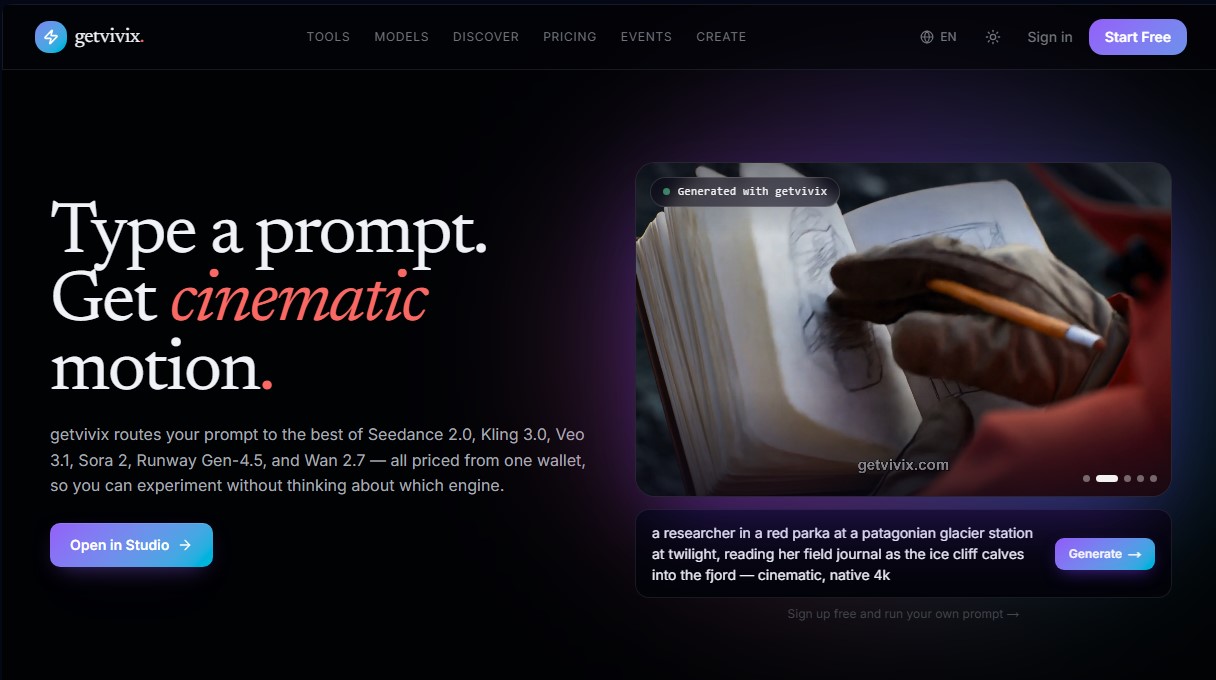
getvivix is an AI video creation studio that functions as an advanced aggregator for generative models. Its primary purpose is to centralize access to the market's most cutting-edge technologies, such as Sora 2 Pro, Kling 3.0, Veo 3.1, Runway Gen-4.5, and Wan 2.7, allowing users to generate cinematic content from a single platform using a unified credit system. This tool eliminates the need to manage multiple subscriptions, making it easy to experiment with different rendering engines based on the specific needs of each project, whether from a computer or any compatible device.
The workflow for getvivix is straightforward and optimized for professional use. Users enter a text prompt or a reference image, select the AI model that best fits their goal, and the system processes the request. The platform offers technical flexibility, allowing users to choose between speed-optimized models, like Seedance 2.0 Fast, or high-fidelity versions with 4K resolution, such as Kling VIDEO 3.0. Additionally, it integrates native synced audio capabilities, meaning generated clips can automatically include dialogue, ambient sound, and sound effects in supported models.
Key technical capabilities and benefits of getvivix include:
- Multimodal Generation: Transform text into video (text-to-video) and create high-quality animations from static images (image-to-video).
- Temporal Consistency: Utilizes next-generation models to maintain fluidity and coherence in complex camera movements, such as drone shots or morphing effects.
- Variety of Styles: The ability to switch between photorealism, anime aesthetics, Pixar-style 3D, or retro VHS and cyberpunk looks.
- Centralized Library: Every render is automatically saved to a personal library for later editing, downloading, or re-rendering.
This tool is especially useful for content creators, marketing agencies, and production studios looking to optimize their workflows. It enables the creation of storyboards before a live shoot, the generation of B-roll for advertisements, the production of cinematic teasers for project pitches, or the creation of multiple variants of the same shot in minutes. By unifying models from Google, OpenAI, Alibaba, and Kuaishou, getvivix positions itself as a versatile solution for those requiring premium visual fidelity without relying on a single provider.
For advanced users and enterprises, the platform offers API access, allowing these powerful AI video generation capabilities to be integrated into external workflows or proprietary applications. Final files are downloaded in MP4 format, and professional tiers include a commercial use license, ensuring that generated material is suitable for professional projects and social media distribution.
getvivix features and use cases
How to use getvivix
getvivix FAQ
Which AI models can I use on getvivix?
The platform provides access to over thirty-five video models, including Veo 3.1, Sora 2, Kling 3.0, Runway Gen-4.5, and Seedance 2.0, all from a single account.
Is it possible to try getvivix for free?
Yes, when you sign up, you receive thirty initial credits plus another thirty free credits every day to experiment with different generation engines without needing a credit card.
Do videos generated on getvivix have a commercial use license?
Commercial use is permitted for all users with any active paid plan, while creations made on the free plan are limited to personal evaluation.
Do the clips created with getvivix tools include audio?
Many advanced models, such as Veo 3.1 or Kling 3.0, generate native synchronized audio that includes high-quality dialogue and ambient sounds.
What happens to my monthly credits if I don't use them all?
Credits from subscription plans expire thirty days after the plan period ends and do not roll over to the following month.
How can I resolve technical questions or report a bug on getvivix?
You can join our community Discord server or use the integrated feedback system to receive quick assistance from our support team.
Will watermarks appear on my getvivix downloads?
No, videos are downloaded as clean MP4 files without any platform logos or watermarks embedded in the image.
How long does it take to generate videos on the platform?
Most clips are usually ready within thirty to ninety seconds, depending on the selected model and the complexity of the request.
What is the difference between credit packs and subscription plans?
Credit packs are one-time purchases to instantly top up your account, while subscription plans offer a recurring monthly allowance and additional features.
Can I create videos from simple text on getvivix?
Yes, just type a description of the scene in the studio and select your preferred model to get a cinematic result in a matter of seconds.
getvivix pricing and plans
Free
30 credits at sign-up and 30 additional free credits daily.
1 clip credit for captioning workflows.
Access to all available AI models.
Watermarked outputs.
License limited to personal use and evaluation.
Read-only access to Atlas.
Standard
$10 per month (50% off, previously $20)
10,000 monthly credits plus 60 free daily credits.
80 clip credits per month.
Access to all models (Sora 2, Kling 3.0, Veo 3.1, Runway Gen-4.5, etc.).
Watermark-free generations.
Commercial license included.
Credits do not roll over and expire 30 days after the plan cycle ends.
Pro
$15 per month (50% off, previously $30)
15,000 monthly credits plus 80 free daily credits.
120 clip credits per month.
Priority task processing.
API access with a limit of 240 requests per minute.
Access to all models without watermarks.
Commercial license included.
Ultimate
$50 per month (50% off, previously $100)
50,000 monthly credits plus 150 free daily credits.
400 clip credits per month.
Priority processing and access to high-quality rendering pipelines.
API access with a limit of 600 requests per minute.
Access to all models without watermarks.
Commercial license included.
Credit Packs (One-time payment)
Starting at $10
Small pack: 10,000 credits for $10.
Medium pack: 25,000 credits for $25.
Large pack: 50,000 credits for $50.
Ideal for one-time top-ups without changing your subscription tier; credits are added to your current plan.
getvivix Screenshots
getvivix alternatives


VideoWeb Video Generator
Generate professional AI videos from text or images. Features realistic avatars, automated scripts, and optimized formats for marketing and social media.

Motion Transfer AI Video Generator
Animate character photos using reference videos. Precisely transfer gestures, dances, and body movements from a clip to an image for realistic results.

AlreadyRan
AlreadyRan brings dozens of AI image, video and audio models into one web studio with a single credit balance and the cost shown before every generation.


Vidverse AI
Vidverse AI brings several AI video, image and voice models into one web and mobile app, so you can turn text or photos into clips, images and voiceovers.