Share
Hyperrealistic AI avatar video generator. Create content from text, clone voices, and translate videos with lip-sync in over 175 languages.
What is HeyGen?
HeyGen is a leading AI video generation platform designed for professional content creation without the need for traditional physical recording. Its primary function is to transform text scripts, images, or audio clips into complete audiovisual pieces using hyper-realistic avatars that serve as digital spokespersons. This tool is particularly useful for marketing departments, sales teams, and training specialists who need to quickly produce explainer videos or corporate presentations directly from their computer.
HeyGen's operation is powered by advanced deep learning models to achieve natural lip-syncing and fluid movement. The technology allows users to choose from over 1,000 stock avatars or create custom versions. A standout feature is the Avatar IV model, which can replicate authentic hand gestures and expressive facial dynamics from a single image, eliminating the need for the user to step in front of the camera.
Its functional capabilities are grouped into several key areas for the user:
- Text-to-Video Generator: Automates the production process, allowing a script to be converted into a high-resolution video (up to 4K) with integrated professional voiceover.
- AI Video Translation: Enables content localization into more than 175 languages and dialects, cloning the original voice to maintain the speaker's tone and personality across different international markets.
- Photo and Video Avatars: Offers the ability to generate your own digital twin from a previous recording or animate static photos to speak according to precise instructions.
- AI Studio Editor: A simplified editing interface where adjustments are made textually, facilitating the customization of backgrounds, music, and visual elements without prior technical knowledge.
From a practical standpoint, HeyGen streamlines content creation for social media, internal training, and product demonstrations. By integrating a Video API, organizations can automate large-scale production and incorporate the service into their own workflows. The platform also promotes team collaboration by allowing the management of brand kits with corporate logos and colors to ensure visual consistency. Thanks to its focus on voice cloning and intuitive editing, it drastically reduces post-production times, allowing users to go from an idea to a finished video in just minutes.
HeyGen features and use cases
How to use HeyGen
HeyGen FAQ
What is HeyGen, and what kind of content can I create with it?
It is an AI video generator that allows you to create professional content using realistic avatars based on text, images, or audio clips.
Does HeyGen offer a free option to try out the platform?
Yes, there is a free plan that allows you to generate up to three videos per month so users can test out the basic content creation features.
How many languages and dialects can the tool translate videos into?
The platform can translate videos into over 175 languages and dialects while maintaining lip-syncing and the original tone of voice.
Can I create an avatar in HeyGen that looks and sounds like me?
Yes, using the Video Avatar and voice cloning features, you can generate a digital twin that looks and sounds exactly like you.
Do I need prior video editing experience to use the tool?
No, the platform is designed to be intuitive and user-friendly, allowing anyone to create high-quality videos without any technical expertise.
Can I use HeyGen videos to promote my business?
Yes, users are free to use and distribute their videos for commercial purposes, provided the content complies with the terms of service.
What export resolutions are available with the different subscription plans?
Depending on your plan, you can export videos in resolutions ranging from 720p to 4K for professional-grade results.
How long does it take HeyGen to generate a full video?
The tool is very fast, and most videos are generated in less than a minute, though this may vary depending on the length and complexity of the project.
HeyGen pricing and plans
Free
$0/month
- 3 videos per month up to 3 minutes long.
- 1 custom "Digital Twin."
- 500+ stock photo avatars.
- 720p video export.
- Standard video processing.
- Trial access to Premium features: Avatar IV, Video Agent, and video translation with lip-sync in over 30 languages.
Creator
$29/month ($24/month billed annually)
- Unlimited videos up to 30 minutes long.
- 1 custom "Digital Twin."
- Unlimited photo avatars and 700+ stock video avatars.
- Voice cloning and support for over 175 languages and dialects.
- 1080p video export and fast processing.
- Brand Kit and watermark removal.
- Full access to Premium features (Avatar IV, Video Agent, and advanced AI models).
Pro
$99/month ($79/month billed annually)
- Everything included in the Creator plan.
- 10x Premium feature usage.
- 4K video export.
- Faster video processing.
- Ability to edit and proofread translation scripts.
- Early access to new features.
Business
$149/month ($119/month billed annually). Each additional seat is $20/month.
- Unlimited videos up to 60 minutes long.
- 5 custom "Digital Twins."
- 5x generative usage compared to the Creator plan.
- 4K export and high-speed processing.
- Team collaboration: workspaces, draft commenting, and guest management.
- Interactive features: quizzes, links, and video branching.
- Screen recorder, SCORM export, and LMS integrations.
- Zapier, HubSpot, n8n, and Make integrations.
- Advanced security with SSO (SAML) and centralized billing.
Enterprise
Custom pricing (Contact Sales)
- Unlimited videos with no maximum duration limit.
- Maximum priority video processing.
- Multi-workspace control and centralized role and access management.
- Enterprise-grade security and privacy (SCIM and MFA authentication).
- Priority customer support and a dedicated Customer Success Manager (CSM).
- Tailored onboarding and invoicing.
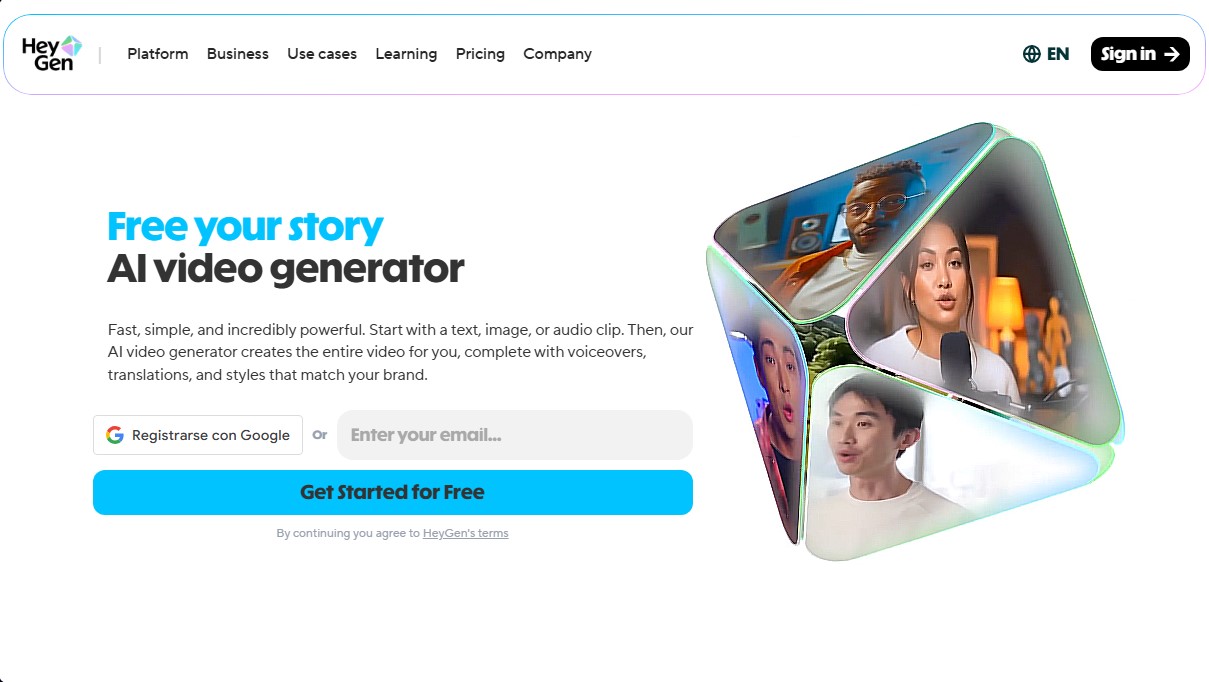
HeyGen Screenshots
HeyGen alternatives
VideoWeb Video Generator
Generate professional AI videos from text or images. Features realistic avatars, automated scripts, and optimized formats for marketing and social media.
Motion Transfer AI Video Generator
Animate character photos using reference videos. Precisely transfer gestures, dances, and body movements from a clip to an image for realistic results.
AlreadyRan
AlreadyRan brings dozens of AI image, video and audio models into one web studio with a single credit balance and the cost shown before every generation.

Vidverse AI
Vidverse AI brings several AI video, image and voice models into one web and mobile app, so you can turn text or photos into clips, images and voiceovers.