
Share
Convert images into dynamic videos with AI. Quickly and easily create professional clips for social media, marketing, and presentations.
What is Himedia?
Himedia is a comprehensive generative AI solution specializing in transforming static images into dynamic, professional video content. This tool allows users to convert any photograph or illustration into short clips optimized for visual platforms like YouTube, Instagram, and TikTok. Its core engine, based on the Seedance 2.0 Fast model, utilizes advanced AI-powered animation techniques to detect key elements in an image and apply natural movement without the need for complex manual intervention.
The platform offers remarkable versatility by integrating various style models, allowing users to generate content with an anime aesthetic, Pixar style, cinematic short films, or even digital humans (avatars). In addition to image-to-video conversion, Himedia includes AI music generation capabilities, making it easy to create complete multimedia content from a single interface accessible via desktop.
Its primary features and technical capabilities include:
- Smart Animation: Automatic application of zoom, pan, and smooth transition effects to fluidly bring static visuals to life.
- Prompt Control: The ability to provide detailed descriptions of the desired content and movement to guide video generation through text.
- Motion Imitation: A feature designed to replicate specific movement patterns onto a reference image.
- High Resolution: Support for video output in HD and 4K quality, ensuring a professional finish for advertising campaigns or high-level presentations.
In terms of practical applications, Himedia is especially useful in the e-commerce sector, where it transforms product photos into engaging virtual showcases that drive conversions. In digital marketing, it facilitates the creation of video ads that capture user attention (scroll-stopping content) on social media. It is also a valuable tool for educators looking to turn static diagrams into visual lessons and for artists who want to quickly animate their storyboards or concept art.
The workflow is intuitive and takes only a few minutes across four steps: file upload, AI image-to-video processing, style or audio customization, and final download. The system generates results in an estimated 30 to 60 seconds, depending on the complexity of the selected model. Thanks to this functional approach, Himedia removes the technical barriers of traditional editing, enabling any user to generate high-impact visual content efficiently and at scale.
Himedia features and use cases
How to use Himedia
Himedia FAQ
What is Himedia and how can it help me with my creative projects?
Himedia is an AI platform designed to transform static images into professional videos, as well as easily generate music and images.
How long does it take Himedia to generate a video from an image?
The generation process typically takes between thirty and sixty seconds, depending on the selected AI model and the complexity of the content.
Can I create content specifically for social media with Himedia?
Yes, the tool allows you to generate videos in vertical formats like 9:16, which are perfect for posting on TikTok, Instagram Reels, and YouTube Shorts.
What is the resolution of the videos generated on the platform?
Output quality varies depending on your subscription plan, offering 720p resolution on the Lite plan and up to 1080p on the Pro and Premium plans.
Do videos created with Himedia include watermarks?
Paid subscriptions remove watermarks from all your creations, allowing for fully professional use of the generated videos.
Is it possible to add music to AI-generated videos?
Yes, you can customize your videos by adding background music and adjusting other visual elements to ensure the final result matches your vision.
What file types can I upload to Himedia to convert into video?
The platform supports the most common image formats and automatically converts them to the optimal format for the AI to animate.
How can I contact the support team if I have any questions?
You can send an email to the official contact address and you will receive a response from the customer support team within twelve hours.
How many videos can I create per month with the Himedia Pro plan?
The Pro plan allows you to generate up to 135 videos per month, or the equivalent in images and music tracks based on available credits.
What features does the Seedance 2.0 model offer within the tool?
This advanced model allows you to apply cinematic, anime, or motion-mimicry styles to achieve smoother and more realistic animations in your projects.
Himedia pricing and plans
Free
Get started for free to explore basic generation features.
Access to image-to-video, AI image, and AI music tools.
Lite - $15/month (or $10/month billed annually at $120)
350 credits per month.
Up to 60 videos, 120 images, or 90 music tracks.
Access to all video and image models and the full toolkit.
720p video output.
Unlimited template access.
Faster generation speeds.
No watermarks.
Pro - $29/month (or $20/month billed annually at $240)
800 credits per month.
Up to 135 videos, 270 images, or 200 music tracks.
Access to all video and image models and the full toolkit.
1080p video output.
Unlimited template access.
Faster generation speeds.
No watermarks.
Premium - $139/month (or $109/month billed annually at $1,308)
5,000 credits per month.
Up to 830 videos, 1,660 images, or 1,250 music tracks.
Access to all video and image models and the full toolkit.
1080p video output.
Unlimited template access.
Faster generation speeds.
No watermarks.
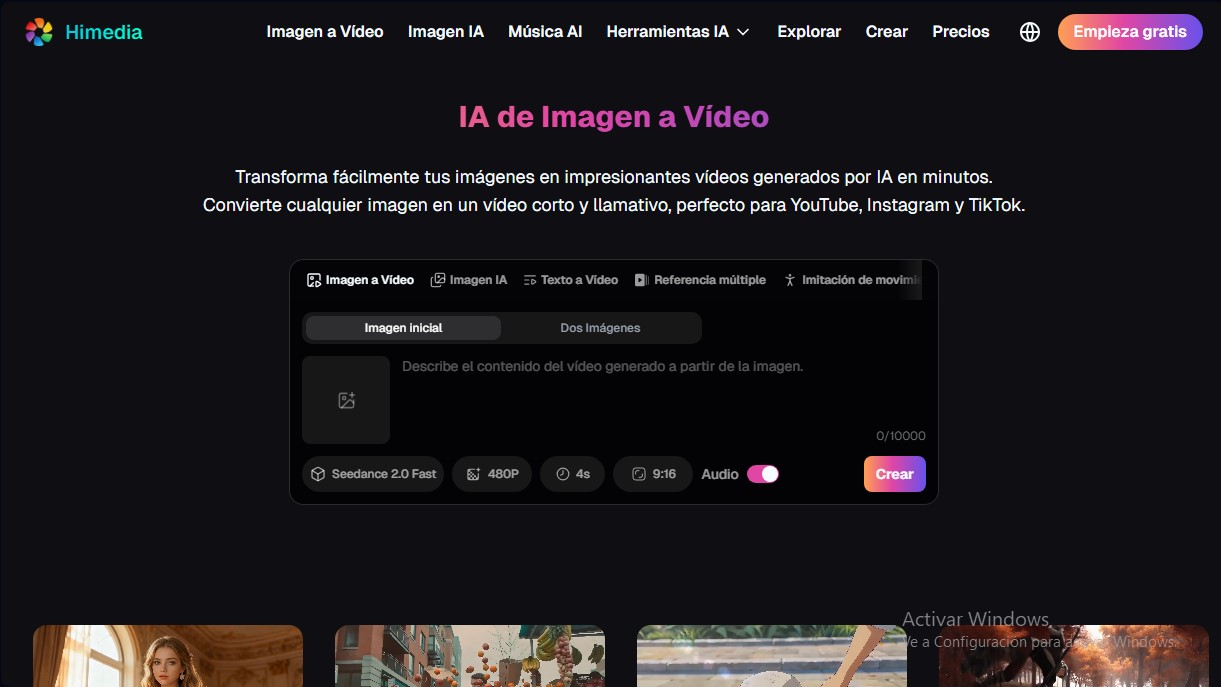
Himedia Screenshots
Himedia alternatives


Osmo Studio
AI animation studio for professional motion graphics and videos. Control every detail, collaborate with teams, and export with transparent backgrounds.

Victoria Secret Runway
Create fashion show videos by integrating your face into real scenes. Just upload a photo to replace professional models and walk the runway.


BurningBridgesAI.app
Turn a photo into Drake’s viral dance. AI automatically recreates the choreography and gestures so you can star in the trend without recording a thing.

VideoWeb Video Generator
Generate professional AI videos from text or images. Features realistic avatars, automated scripts, and optimized formats for marketing and social media.