Ideogram
Share
Ideogram
AI image generator specializing in typography and graphic design. Create logos, posters, and realistic scenes with high text accuracy and advanced editing tools.
General Information about Ideogram
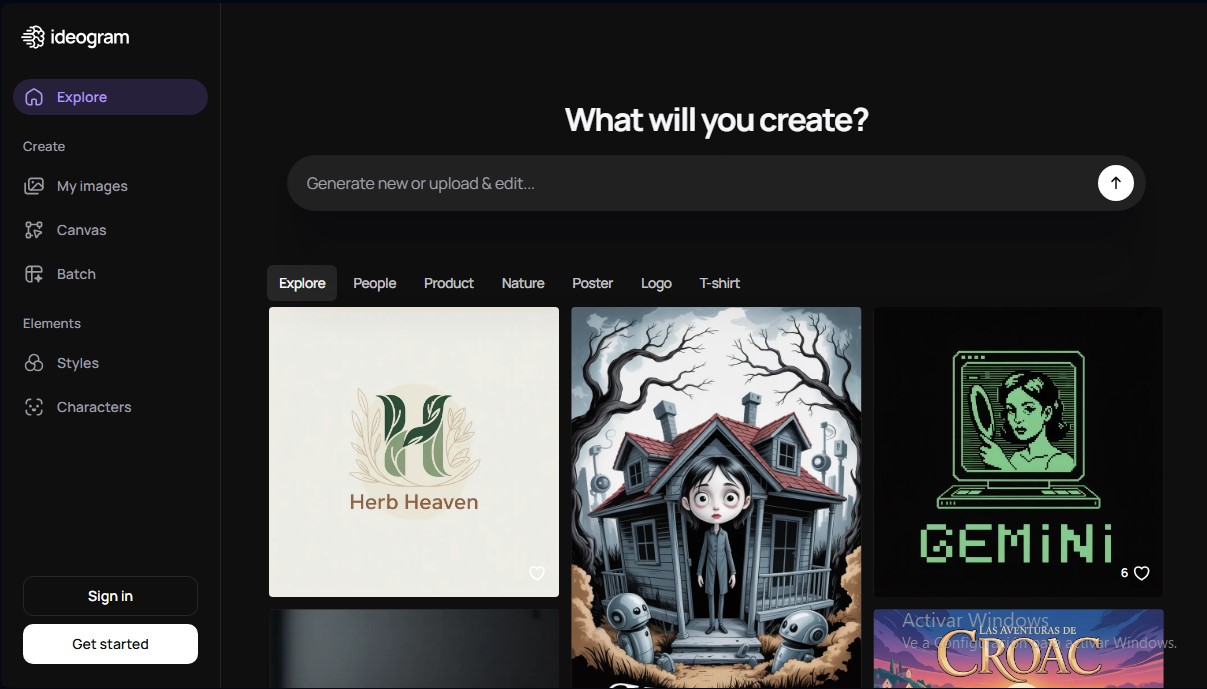
Ideogram is an advanced artificial intelligence tool designed for high-quality image generation from text descriptions. Its primary competitive advantage lies in its exceptional capacity for text rendering and typography, allowing for the creation of logos, posters, and graphic designs where letters appear sharp and precise, overcoming one of the most common limitations in other generative AI models.
The platform utilizes the Ideogram 3.0 model, which stands out for its high level of photorealism and strong adherence to the original prompt. This technology enables designers, marketing professionals, and content creators to obtain complex visual results in seconds, whether from a computer via its web version or a mobile device through its official iOS app.
Among its most relevant technical and functional capabilities are:
- Magic Prompt: A feature that automatically expands and enriches brief ideas to generate more visually detailed and aesthetic results.
- Canvas: An infinite workspace that facilitates project organization and allows for precise edits using Magic Fill (in-painting) to modify internal elements or expand image boundaries with the Extend (out-painting) function.
- Character Reference: A consistency model that uses a single reference image to maintain a character's visual identity across multiple generations.
- Background Control: Integrated tools for removing or replacing backgrounds, facilitating the creation of assets for branding or e-commerce.
- Batch Generation: The ability to process up to 500 prompts simultaneously using CSV files, optimizing professional workflows.
Ideogram's operation is straightforward and functional. The user enters a description and can customize technical parameters such as aspect ratio (with adjustments from 1:3 to 3:1), visual style (realistic, design, general), and a specific color palette. The platform also offers a Remix option, making it easy to iterate on existing images to perfect details or test new stylistic variations.
For business environments or developers, the tool offers API access, allowing its image generation engine to be integrated directly into third-party applications. Final files can be exported in high-quality JPEG and PNG formats. By not claiming ownership rights over creations, Ideogram provides flexibility for using images in various personal or commercial projects, provided they comply with its terms of service. It is a robust technical solution for transforming abstract concepts into visual assets with professional typographic control.
Features and Use Cases of Ideogram
How Ideogram Works
Frequently Asked Questions about Ideogram
What is Ideogram and what kind of designs can I create with this tool?
Ideogram is a free AI tool designed to turn text into stunning images, allowing you to create logos, posters, and realistic designs with flawless typography in just a few seconds.
How many free images can I generate on Ideogram each week?
Free account users receive ten weekly credits that allow for up to forty image generations; this balance resets every Saturday at midnight.
Do I legally own the images I generate with Ideogram?
The platform does not claim ownership rights over your creations and allows you to use them freely, though you are responsible for ensuring that the content does not infringe on any laws or third-party rights.
Can I change my username or email address after registering?
Both the username and the authentication method, including the associated email address, are permanent and cannot be changed once the account has been created.
Is it possible to generate images privately on Ideogram?
Generations are public by default to foster community, but you can create private content if you subscribe to the Plus or Pro paid plans.
What is the purpose of the Magic Prompt tool?
This feature automatically expands and enriches a brief idea into a detailed description, ensuring that the visual result is much more comprehensive and professional.
How can I download my creations in high-quality PNG format?
High-quality PNG downloads are reserved for paid plan subscribers, who can access this option through the download menu located in the image details panel.
Does Ideogram allow for downloading files in vector or SVG format?
Currently, the tool only generates images in bitmap formats and does not natively support vector files like SVG.
What happens if I run out of priority credits on a paid plan?
If you use up your priority credits, you will be moved to a slow generation queue with variable wait times, though you can purchase additional credits or wait for your next monthly renewal.
Can I use Ideogram on my mobile device?
You can use the tool directly through your mobile browser or download the official app designed specifically for iOS devices from the App Store.
Ideogram Pricing
Free
$0 per month.
- 10 weekly credits (up to 40 images per week).
- Credits reset every Saturday at 00:00 UTC.
- Limited public generation.
- Limited access to the Canvas tool.
- JPEG downloads (70% quality).
Plus
$20 per month ($15 per month billed annually).
- 1,000 priority credits per month.
- Unlimited slow credits once priority credits are exhausted.
- Private image generation.
- Unlimited character consistency.
- High-quality image exports (100% PNG).
- Larger generation queue.
- Option to purchase 150 additional priority credits for $4.
Pro
$60 per month ($42 per month billed annually).
- 3,500 priority credits per month.
- Unlimited slow credits.
- Private image generation.
- Unlimited character consistency.
- Batch generation (up to 500 simultaneous prompts via CSV).
- High-quality image exports (100% PNG).
- Highest generation queue available.
- Option to purchase 250 additional priority credits for $4.
Team
$30 per user per month ($20 per user per month billed annually).
- Includes all Plus plan features.
- 1,500 priority credits per user per month.
- Centralized billing and team management.
- Batch generation.
- Early access to collaboration features.
- Option to top up priority credits for $4.
Enterprise
Custom pricing (contact us via the official website).
- Includes all Pro plan features.
- Private custom models trained on organization visual data.
- Custom credit amounts based on your needs.
- Volume discounts on API access.
- Priority technical support.
Ideogram Screenshots