
Share
AI photo editor to modify images with text prompts. Restore photos, remove objects, swap backgrounds, and apply styles while keeping the original subject intact.
What is NanoPic?
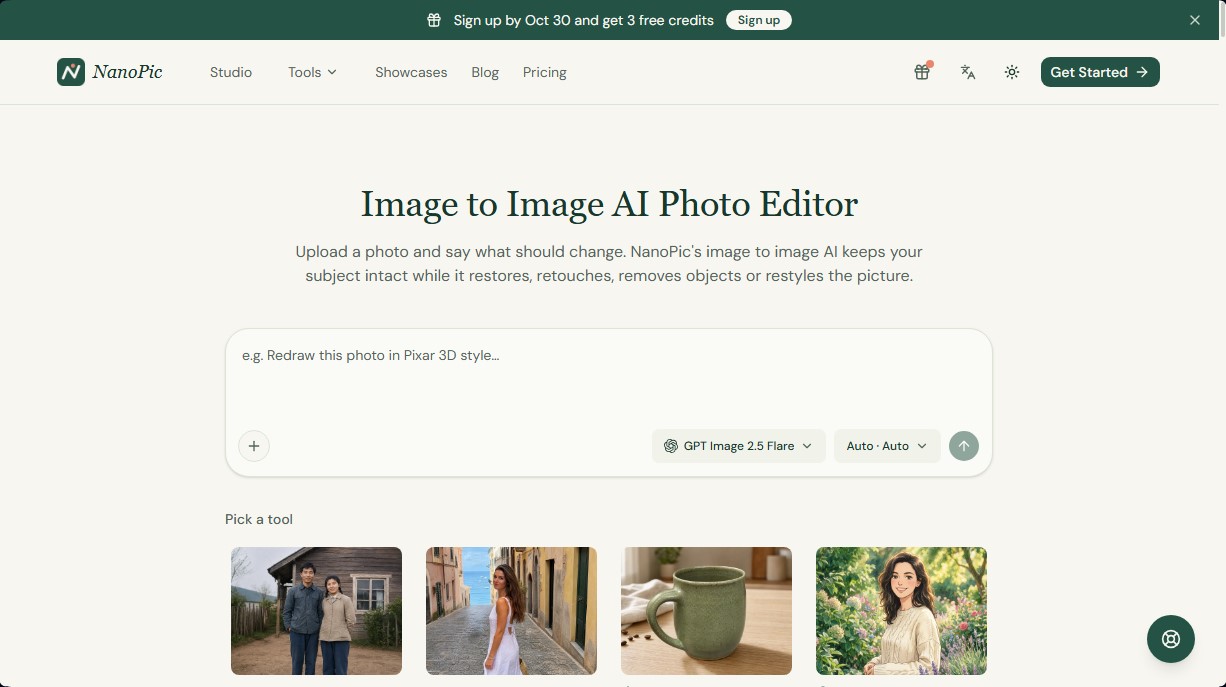
NanoPic is an image-to-image AI photo editor that allows you to modify images using text instructions. Unlike traditional text-to-image generators, this tool uses a base photograph to keep key elements—such as the subject, product, or original composition—intact while applying specific changes requested by the user. It is a practical solution for content creators, e-commerce sellers, and users looking for precise retouches without needing to master complex design tools on their computer.
NanoPic operates through a conversational AI agent that processes natural language requests. The process begins by uploading a JPG or PNG file (up to 10 MB) and describing the desired change. The platform integrates advanced models like GPT Image 2 and 2.5, as well as Nano Banana 2.1 and Pro, allowing users to select the processing engine based on their project's needs. A standout feature is its iterative editing capability within a single chat: the system remembers previous changes, allowing for consecutive modifications to be applied to the previous result.
The core capabilities of this AI photo editing tool include:
- Old Photo Restoration: Repairing scratches, removing stains, and automatically colorizing black-and-white images.
- Object Removal: Smartly erasing people, tourists, or unwanted background elements while naturally reconstructing the affected area.
- Product Photo Generation: Transforming home snapshots into professional catalog images by optimizing backgrounds and lighting.
- Personal Attribute Modification: Changing hairstyles, hair color, and clothing, or applying virtual makeup while maintaining facial features.
- Style Transfer: Converting real photographs into aesthetics like Studio Ghibli animation, Pixar 3D, manga, or retro styles.
- Background and Environment Management: Replacing landscapes and adjusting weather conditions, seasons, or the time of day.
From a practical standpoint, NanoPic eliminates the need for manual layers or brushes, as all control is handled through descriptive prompts. This allows users to achieve high-quality results with resolutions up to 4K quickly and efficiently. By preserving the original image's structure, the user ensures the main subject isn't redrawn from scratch, guaranteeing visual consistency. Every generated version is stored in the history, making it easy to compare results and perfect final details before the definitive download for use on social media, mobile, or professional projects.
NanoPic features and use cases
How to use NanoPic
NanoPic FAQ
What is NanoPic and how exactly does it work?
NanoPic is an AI-powered image editor that transforms your photos using text prompts while keeping the original subject intact.
Can I use NanoPic for free?
Yes, you receive free promotional credits when you sign up, and you can earn more by logging in to the platform daily.
Can I restore and colorize old photos with this tool?
Yes, simply upload a damaged image and ask the tool to repair scratches and add natural colors.
How do I remove watermarks from NanoPic downloads?
Watermarks are automatically removed from all your images as soon as you purchase credits or a subscription.
Does NanoPic offer a license for commercial use?
Yes, users who purchase any paid package receive a commercial license to use their creations for advertising or sales.
What file formats and sizes can I upload to the platform?
The tool supports JPG and PNG files with a maximum size of ten megabytes per photo.
Can I remove people or objects from a photo?
Yes, just describe the elements you want to remove, and the AI will realistically fill in the background while keeping the rest of the image intact.
Which AI models does NanoPic use?
The platform lets you choose from several advanced models, such as GPT Image 2 and 2.5 or Nano Banana 2.1 and Pro, depending on your needs.
NanoPic pricing and plans
Free Version
Price: 0 $
3 free limited-time welcome credits.
Additional daily credits via the "check-in" system.
Generated images include a NanoPic watermark.
Starter (Subscription)
Price: 9,9 $/mo (or 8,33 $/mo with 99,9 $ annual billing)
960 credits per year (approx. 960 images).
Access to all models: GPT Image 2 and 2.5, Nano Banana 2.1 and Pro.
Up to 4K resolution.
No watermark and commercial license included.
Standard (Subscription)
Price: 19,9 $/mo (or 16,66 $/mo with 199,9 $ annual billing)
2.400 credits per year (approx. 2.400 images).
Access to all models: GPT Image 2 and 2.5, Nano Banana 2.1 and Pro.
Up to 4K resolution.
No watermark and commercial license included.
Premium (Subscription)
Price: 39,9 $/mo (or 33,33 $/mo with 399,9 $ annual billing)
6.000 credits per year (approx. 6.000 images).
Access to all models: GPT Image 2 and 2.5, Nano Banana 2.1 and Pro.
Up to 4K resolution.
No watermark and commercial license included.
Starter Pack (Pay-as-you-go)
Price: 9,9 $ (one-time payment)
50 credits that never expire.
Access to all models and up to 4K resolution.
No watermark and commercial license included.
Basic Pack (Pay-as-you-go)
Price: 29,9 $ (one-time payment)
200 credits that never expire.
Access to all models and up to 4K resolution.
No watermark and commercial license included.
Pro Pack (Pay-as-you-go)
Price: 79,9 $ (one-time payment)
600 credits that never expire.
Access to all models and up to 4K resolution.
No watermark and commercial license included.
Credit Usage Details:
1 standard image (1K) consumes 1 credit on GPT Image 2 and 2.5 Flare models.
2K resolutions consume between 2 and 5 credits depending on the model.
4K resolutions consume between 3 and 7 credits depending on the model.
The Nano Banana Pro model consumes a minimum of 3 credits per image (2K by default).
NanoPic Screenshots
NanoPic user reviews
Write a review
Checking your session...
NanoPic Reviews
Loading reviews...
NanoPic alternatives


FaceTouchUp
AI-powered cosmetic surgery simulator to visualize facial and body enhancements. Streamline consultations and help patients preview their final look.

utilz Background Remover
Remove image backgrounds for free with total privacy in your browser. Create transparent or colored backgrounds without uploading files while maintaining original resolution.

ColorCraft
Create Amazon KDP books. Generate coloring pages, stories, puzzles, and print-ready full covers, plus promotional mockups in a single workflow.

