Share
Transform jewelry photos into realistic images with AI models. Quickly and easily create ring, necklace, and earring visuals for catalogs and advertising.
What is Jewelry Model AI?
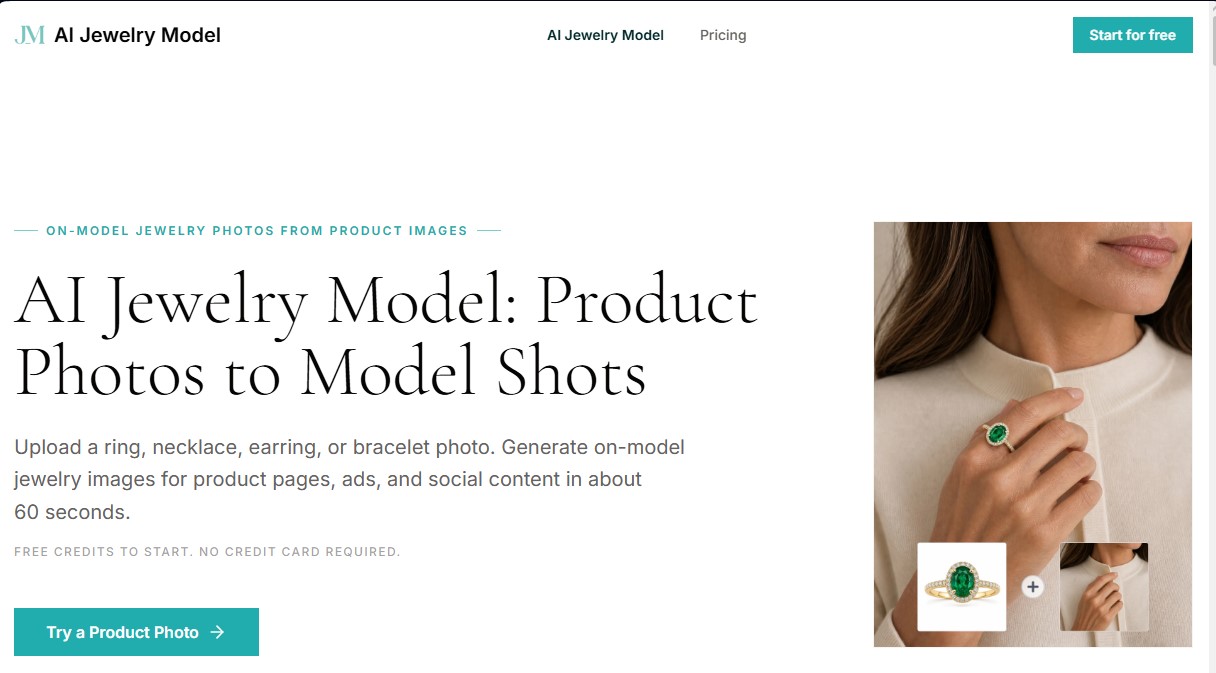
Jewelry Model AI is an advanced artificial intelligence platform specifically designed for the jewelry industry. Its primary function is to transform static product photos into realistic images featuring human models. This tool enables e-commerce sellers, marketing agencies, and independent designers to generate high-quality visual content for product listings, ads, and social media without the need for expensive traditional photo shoots. By utilizing this AI tool for jewelry, users can achieve professional results in just 60 seconds, drastically optimizing both production costs and time-to-market.
The operation of Jewelry Model AI is based on an intuitive three-step workflow: setup, generation, and download. Unlike generic image generators that often reinterpret or distort product details, this solution uses the original photograph as its core technical reference. Thanks to its computer vision algorithms, the AI maintains the integrity of materials, gemstones, settings, and metal tones. The system offers precise control over piece placement, allowing users to choose between an automatic mode or manual adjustment to ensure the jewelry fits the selected virtual model's anatomy perfectly.
The application stands out for its versatility, offering specific capabilities for the four main accessory categories:
- Rings: Allows for position control on specific fingers (index, middle, ring, or pinky) to show how the piece looks when worn.
- Necklaces: Accurately adjusts the chain and pendant drop according to the model's neckline and physiology.
- Earrings: Facilitates visualization on the left ear, right ear, or both, supporting studs, hoops, and drop earrings.
- Bracelets: Provides exact placement options on the left or right wrist, adapting to the arm's direction and pose.
This AI for jewelry e-commerce is essential for brands needing to scale their catalogs quickly and efficiently. By providing photorealistic on-model images, the tool helps boost buyer confidence and brand perception, which can lead to an increase in conversion rates of up to 94%. Final images are generated in high resolution and are ready for immediate commercial use on any computer or device, facilitating a professional workflow that eliminates the bottlenecks of conventional photography. It is the ideal solution for those seeking studio-quality results with the agility required by today's digital market.
Jewelry Model AI features and use cases
How to use Jewelry Model AI
Jewelry Model AI FAQ
What is Jewelry Model AI and how can it help my business?
It is an AI-powered tool that transforms static jewelry product photos into realistic lifestyle images featuring models, helping boost conversion rates across online stores and social media.
How long does it take Jewelry Model AI to generate an image?
The generation process is incredibly fast, typically taking about 60 seconds once you have uploaded your photo and positioned the piece.
What types of jewelry can I process with this tool?
The system is specifically designed to work with four main categories: rings, necklaces, earrings, and bracelets.
Will Jewelry Model AI alter the original design of my jewelry?
The tool uses your original photo as the primary reference to accurately preserve details such as gemstone type, settings, metal tones, and engravings.
Can I use the generated images for commercial purposes?
Yes, images generated through our paid plans include a commercial license for use on product pages, advertisements, and marketing materials.
Is photography experience necessary to use Jewelry Model AI?
No experience is necessary. The workflow is very intuitive, allowing you to place your jewelry on the selected model either automatically or manually.
Can I try the tool for free?
Yes, new users receive free credits upon registration to test the platform’s features—no credit card required.
What are the requirements for the photos I upload to Jewelry Model AI?
For the best results, we recommend uploading sharp, well-lit images where the jewelry is the focal point, such as white-background or still-life product photos.
How does using models help jewelry sales?
According to industry reports, using lifestyle images with real models can increase buyer confidence and boost conversion rates by up to ninety-four percent.
What advantages does it offer over traditional photography?
It can reduce production costs by up to ninety percent and eliminates the need to hire studios and models or wait weeks to receive your final assets.
Jewelry Model AI pricing and plans
Free Plan
Price: 0 € (no credit card required).
- Includes free starter credits to test the tool.
- Generate model images from product photos (rings, necklaces, earrings, or bracelets).
Starter
Price: 19 $ per month.
- 500 credits per month (equivalent to a maximum of 50 standard generations).
- Up to 4K output resolution.
- Basic support.
- Standard processing queue access.
- Commercial use license.
Pro
Price: 49 $ per month.
- 1,500 credits per month (equivalent to a maximum of 150 standard generations).
- Up to 4K output resolution.
- Priority support.
- Priority processing queue access.
- Commercial use license.
Studio
Price: 99 $ per month.
- 4,000 credits per month (equivalent to a maximum of 400 standard generations).
- Up to 4K output resolution.
- Fast-track support.
- Top-priority processing queue access.
- Commercial use license.
Jewelry Model AI Screenshots
Jewelry Model AI user reviews
Write a review
Checking your session...
Jewelry Model AI Reviews
Loading reviews...
Jewelry Model AI alternatives



utilz Background Remover
Remove image backgrounds for free with total privacy in your browser. Create transparent or colored backgrounds without uploading files while maintaining original resolution.