
Share
Create short social media videos from an idea. Automatically generate scripts, voiceovers, scenes, and captions for TikTok, Reels, and YouTube Shorts.
What is Kineo?
Kineo is an advanced platform designed for AI short-form video creation tailored for platforms like YouTube Shorts, TikTok, and Instagram Reels. Unlike other tools limited to clipping existing content, this application generates complete audiovisual pieces from scratch based on a single idea or a pre-written script. Its automated workflow delivers a final product that includes a script, voiceover, visual footage, and integrated captions without the need for a powerful computer or complex editing software.
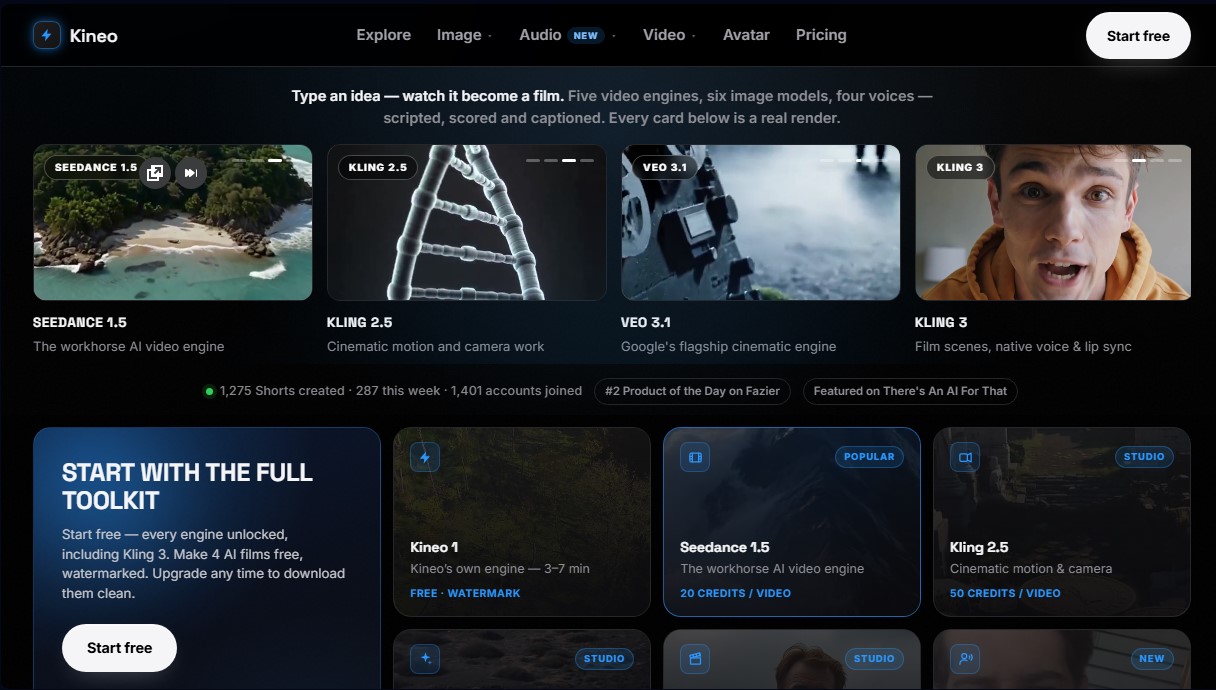
Kineo's functionality is built on the integration of several of the most powerful AI video engines on the market, allowing users to choose the style and quality that best fits their technical needs. Available technologies include Kling 3 for cinematic scenes and native lip-syncing, Veo 3.1 (Google’s flagship engine), and Seedance 1.5. Additionally, it features a proprietary engine optimized for fast results in just a few minutes. The process is simple: input a topic, let the AI structure the content to maximize audience retention, and download the ready-to-publish MP4 file.
Core Capabilities and Key Features:
- Comprehensive Shorts Generation: Automates scriptwriting, voiceover recording, footage selection, and caption insertion.
- Character Lock: This feature maintains the visual consistency of a specific character across all videos and thumbnails, which is essential for branding on faceless channels.
- AI Presenter: Transforms a static photo into a video featuring a virtual presenter who delivers any script with professional-grade lip-syncing.
- UGC Product Ads: Create 15 to 30-second "user-generated content" style ads simply by pasting a product link.
- Image and Voice Studio: Includes access to six image generation engines and four text-to-speech engines to customize every project detail.
- Transparent Clips: Generates gestures and presentations in WebM format with transparent backgrounds for overlaying onto other edits.
- HD Video Enhancement: Offers upscaling and footage restoration options to remove compression artifacts and add cinematic detail.
This tool is particularly useful for content creators, marketing agencies, and automated channel managers in niches like True Crime, history, finance, or psychology. By centralizing production, Kineo eliminates the need for external editing tools or stock image libraries, allowing any user—regardless of technical expertise—to scale their social media presence with high-quality AI-generated videos.
Kineo features and use cases
How to use Kineo
Kineo FAQ
What is Kineo and what is it for?
It is an AI platform that creates short-form videos for social media from a simple idea, automatically handling the script, voiceover, visuals, and captions.
Do I need editing skills to use Kineo?
No, the tool is designed so you don’t have to record or edit anything, as the AI generates all the content autonomously once you provide a description.
Can I monetize the videos created on the platform?
Yes, users retain ownership of the generated videos and can use them to monetize their channels on YouTube, TikTok, and Instagram Reels without paying any additional royalties.
Do Kineo videos have watermarks?
Videos created during the free trial include a small watermark, while paid plans allow you to download clean, high-definition MP4 files.
Which AI engines does the tool use?
Kineo integrates several advanced engines, such as Kling 3, Veo 3.1, and Seedance 1.5, allowing you to choose from various visual styles and levels of cinematic realism.
How long does it take to generate a full video?
Fast mode typically completes the process within three to seven minutes, depending on the complexity of the selected video engine.
Can I use my own scripts in Kineo?
Yes, the tool allows you to paste your own script and select the verbatim narration option so the AI voice follows your text word for word.
What happens if a video generation fails?
The system automatically refunds the credits used if a rendering error occurs, ensuring you only pay for the content you successfully receive.
Does Kineo allow me to use the same presenter across multiple videos?
Yes, the recurring character feature allows you to save a specific face and voice so that every episode on a channel maintains a consistent, professional aesthetic.
Can I improve the visual quality of the generated videos?
The platform offers a one-click enhancement option that uses restoration technology to remove compression artifacts and provide a sharper, cinematic finish.
Kineo pricing and plans
Free Plan
- 80 free trial credits with access to all engines (including Kling 3).
- Create up to 4 AI movies with watermarks.
- After the trial, get free access to 1 "Fast" video per month with a watermark.
Starter
$7.00 per month
- 40 monthly credits (approximately 2 finished videos or 16 AI scenes).
- Access to all engines, image generation, and voiceovers.
- Watermark-free MP4 downloads.
- 100 project storage for 90 days.
Creator
$15.00 per month
- 90 monthly credits (approximately 4 finished videos or 32 AI scenes).
- Includes voiceovers, karaoke-style captions, and soundtracks.
- 500 projects with permanent storage.
- 7-day money-back guarantee.
Studio
$29.00 per month
- 180 monthly credits (approximately 9 finished videos or 72 AI scenes).
- 2 free HD video upscales per month (Topaz technology).
- Unlimited permanent project storage.
- Includes all Creator plan features.
Kineo Screenshots
Kineo alternatives

AI Microdrama Generator by Picsart
Create vertical micro-drama series with consistent characters. Plan seasons, generate scripts, and produce AI-powered short episodes with cliffhangers.
DomoAI AI Drama Generator
Create AI vertical minidramas and short series. Use recurring characters and lip-synced dialogue to produce social media episodes in minutes.

AI Migos Video
Turn two photos into a Hotel Lobby-style music video. Automatically generate a rap performance with your faces, original choreography, and music in seconds.
Framia | Short Drama Maker
Turn scripts and ideas into short dramas for TikTok and Reels. Generate characters, scenes, and dialogue with AI—no filming, cameras, or professional actors required.