
Share
AI-powered screen and meeting recorder that generates step-by-step guides and process documentation. Includes transcription, video editing, and team management.
What is Kommodo?
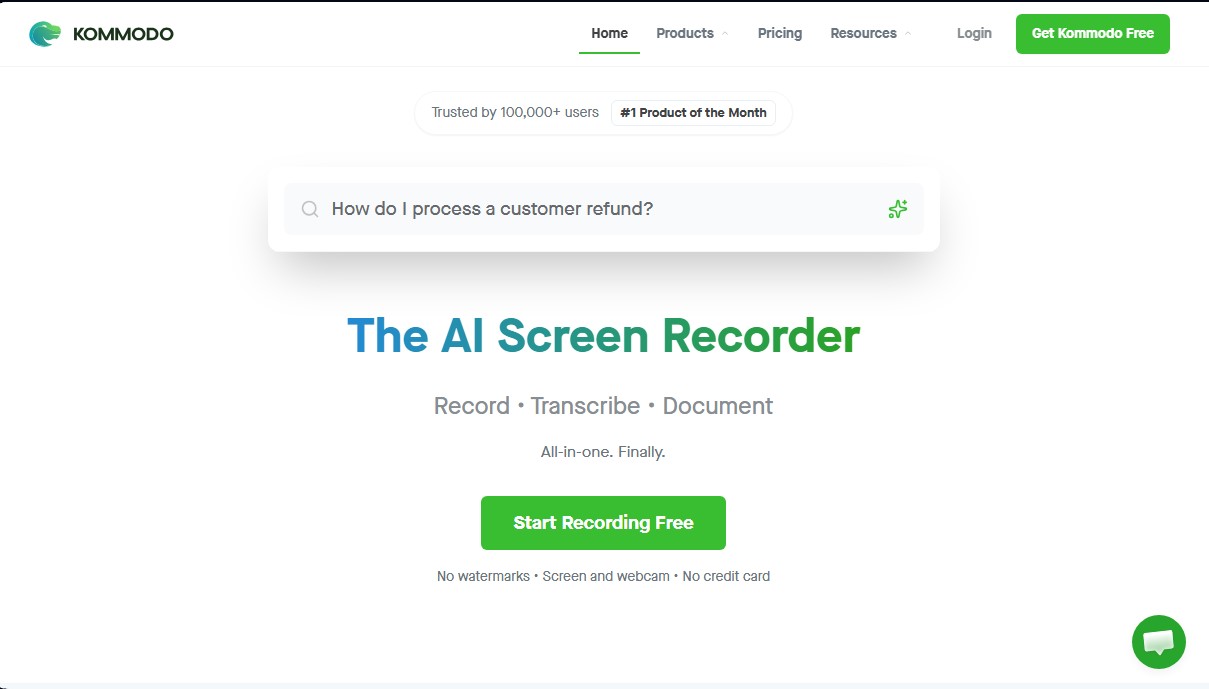
Kommodo positions itself as a comprehensive AI screen recording solution designed to optimize documentation creation and asynchronous communication for professional teams. This tool does more than just capture video; it functions as an intelligent knowledge base that allows users to automatically record, transcribe, and document technical processes. Its primary goal is to transform any screen capture into a standard operating procedure (SOP) or step-by-step guide, eliminating the need to draft manuals by hand.
The platform's core technology is powered by the CaptureFusion system, which facilitates editing, rerecording, and dubbing specific video segments directly from the browser. By integrating AI video management features, the application analyzes recorded content to generate accurate transcriptions, executive summaries, and detailed notes. Additionally, it features an AI assistant capable of searching for specific information across the entire recording library, allowing users to locate exact moments using natural language queries.
Its key capabilities and practical benefits include:
- Screen and webcam recording with up to 4K resolution, available for desktop (Windows and Mac), browser extensions, and mobile apps.
- Automatic guide generation, where the tool tracks every click and action to create documents with screenshots and instant text descriptions.
- AI meeting recorder that syncs with Google Calendar to record video calls, generate meeting minutes, and organize content into shared folders.
- Integrated video editor that allows for making changes, managing version control, and exporting files without the need for external post-production software.
- Custom landing pages with Markdown support, interactive elements, and corporate branding, including logos and custom subdomains.
This tool is especially valuable for sectors such as sales, customer success, and education, where clarity in communicating processes is critical. By centralizing functions that typically require several independent applications, Kommodo helps teams save hours each week on documentation tasks. Its architecture is designed for enterprise collaboration, allowing users to restrict video access, organize libraries by department, and protect sensitive information through passwords or expiring links, ensuring that the company’s technical knowledge remains accessible and structured.
Kommodo features and use cases
How to use Kommodo
Kommodo FAQ
What is Kommodo and what is it used for?
It is an AI-powered screen recording tool that allows you to create videos and automatically generate step-by-step procedural guides.
Can I use Kommodo for free?
Yes, there is a free plan that offers unlimited recordings with 60-day file access and a built-in meeting recorder.
How does Kommodo generate procedural guides or SOPs?
The tool tracks every action you take while recording your screen and converts those movements into a detailed document outlining every step of the process.
Which operating systems is the application compatible with?
The platform is compatible with Windows and Mac, has apps for iOS and Android, and also offers a Chrome browser extension.
How much does the Kommodo Premium subscription cost?
The paid plan costs fifteen dollars per month per user, or nine dollars per month if you choose annual billing.
Does the tool allow for recording work meetings?
Yes, you can sync the app with your Google Calendar to record your video calls and store meeting notes alongside your other videos.
What are the benefits of using AI in my recordings?
Kommodo’s AI allows you to transcribe videos, generate automatic summaries, analyze your library content, and answer questions about your recordings.
Can I customize videos with my own branding?
The Pro version allows you to add logos, use custom colors, and set up subdomains for a fully branded viewing experience.
What video resolution does Kommodo offer?
The tool allows for high-quality recordings that can reach up to 4K resolution on its premium plans.
Can I edit videos after recording them?
Yes, the platform includes a browser-based video editor that lets you make changes, export content, and manage different versions of the file.
Kommodo pricing and plans
Free Plan
0 $/month.
- 1 user.
- Unlimited recordings.
- 60-day access to recordings for both creators and viewers.
- Screen, webcam, and meeting recorder.
- Instant sharing via link.
- Google Calendar integration.
- View the first 10 steps of manual guides.
Premium Plan
Starting at 15 $/month per person (or 9 $/month per person billed annually).
- Permanent access to older recordings (remains available beyond 60 days).
- Up to 4K recording resolution.
- Video downloads and uploads.
- Personal folder organization and folder embedding.
- Track and share all guide steps (unlimited steps).
- Password-protected videos and link expiration settings.
- Integrated AI assistant with unlimited access.
- Instant in-video search.
- AI-powered summaries and analytics for any library content.
- Automated meeting note-taking.
- Team features: access management, shared folders, and domain-restricted links.
Kommodo Screenshots
Kommodo alternatives

VibrantSnap
Turn screen recordings into professional videos with AI auto-editing. Add dynamic zoom, captions, and action buttons to create high-converting demos.

Screen Story
Record your Mac screen to create professional demos with auto-zoom and cursor smoothing. Generate high-quality videos and GIFs with no editing skills required.

Screen Studio
macOS screen recorder that automates editing with smart zoom and cursor smoothing. Create professional demos, courses, and social media videos in minutes.
Notta Showcase
Generate AI-powered step-by-step guides and manuals. Record your screen or upload a video to automatically create subtitles, translations, and voiceovers.