Share
What is Kyukoma?
Kyukoma is an AI tool for making manga and comics from your own stories. You describe what happens in each scene and it generates finished pages with panels, keeping each character's look consistent from panel to panel. It also bundles a directory of utilities for everyday manga work, from colorizing black-and-white pages to upscaling anime clips.
What is Kyukoma used for?
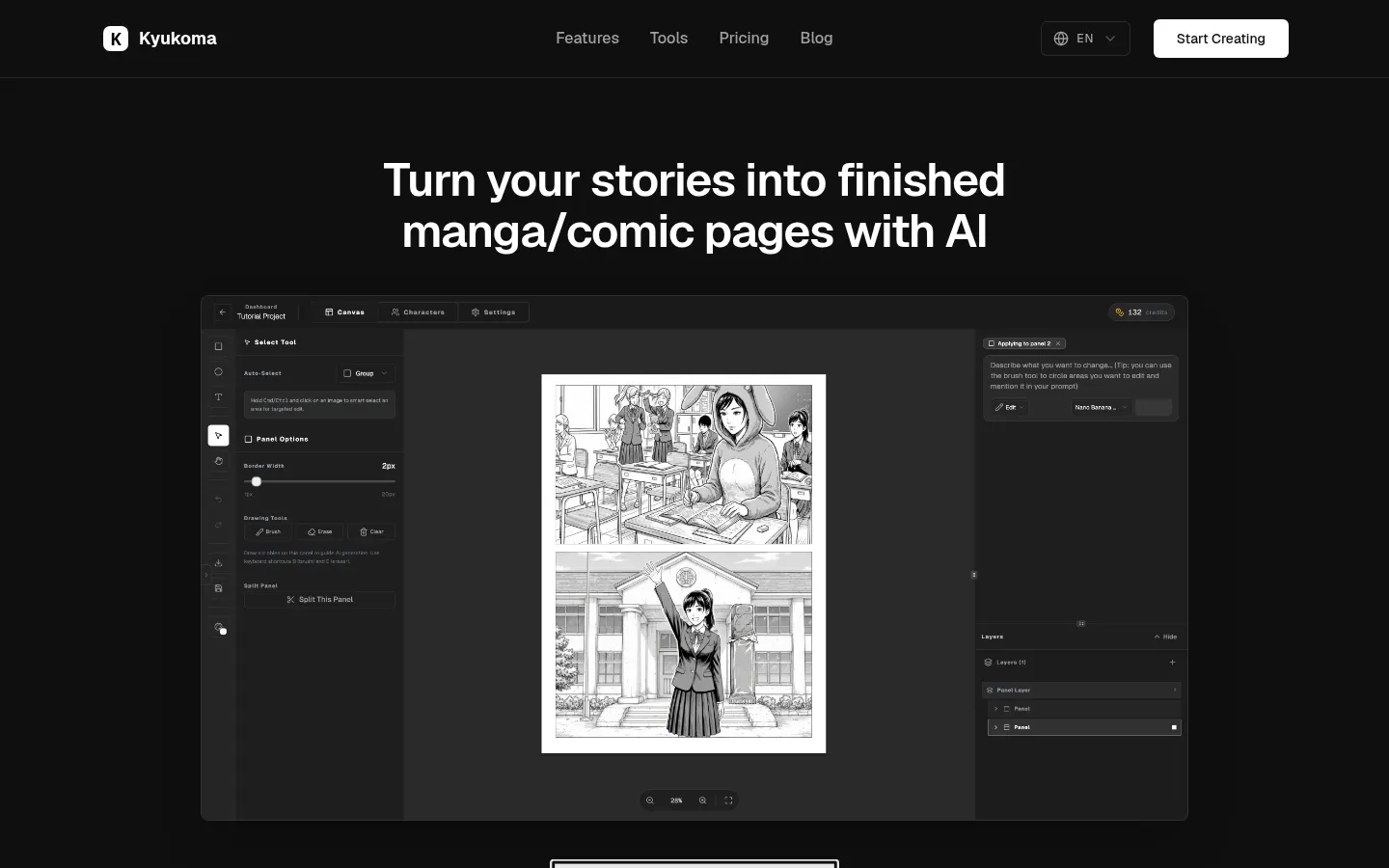
It takes you from script to page without drawing every panel from scratch. The key feature is character consistency: mention a character by name in your prompt and they keep their design across panels. With the smart select tool or inpainting you can fix one area without touching the rest of the image, and you can also describe a change in plain words and apply it to any picture.
Which manga tools does Kyukoma include?
The canvas editor lets you resize panels and add speech bubbles in a familiar manga workflow. Alongside it are standalone tools: a manga colorizer with color notes, a panel upscaler that keeps line art crisp, a text remover that clears lettering while preserving the artwork, point-guided masks for object removal, inbetween animation from a start and end frame, and an anime video upscaler for MP4 clips. Supported formats are JPG, PNG, WebP and MP4.
Who is Kyukoma for?
- Writers who want to see their story as manga.
- Artists speeding up coloring, cleanup or upscaling.
- Translators and scanlators who need to remove text from pages.
- Hobby animators who want quick inbetweens.
Kyukoma pros and cons
Its strength is putting page generation and post-production tools in one place, with batch mode for colorizing and text removal. The cleanup and upscaling tools also work on their own, without generating pages. On the downside, there is little technical documentation about the models behind it, and everything runs on credits, so long chapters need some budgeting.
Kyukoma features and use cases
How to use Kyukoma
Kyukoma FAQ
What is Kyukoma?
Kyukoma is an AI tool that turns stories into manga or comic pages and offers utilities to colorize, upscale and clean panels.
Is Kyukoma free?
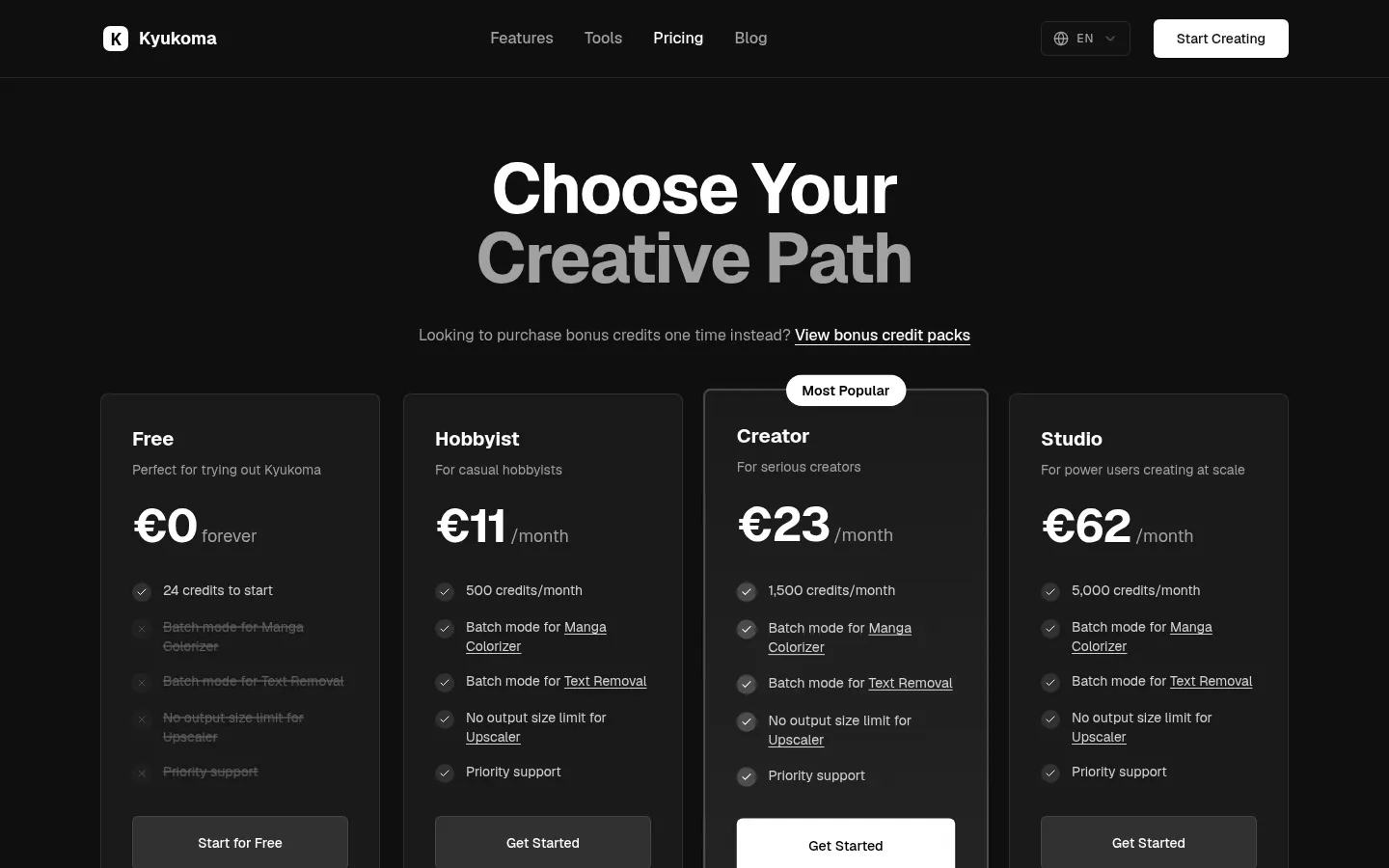
There is a free option with 24 starter credits and monthly tiers with more credits, listed in the pricing section.
How does it keep characters consistent?
Mention the character's name in your prompt and they keep their design across every panel on the page.
Can I edit just one part of an image?
Yes, smart select and inpainting let you change one area without altering the rest of the panel.
Can it colorize black-and-white manga?
Yes, it has a manga colorizer with optional color notes and batch mode on paid tiers.
Which formats does it support?
The tools work with JPG, PNG and WebP images and MP4 video clips.
Can I use Kyukoma commercially?
Its pricing FAQ covers commercial use and the site targets creators; check its terms before publishing.
Does Kyukoma have an API?
The site does not advertise a public API; the tools are used inside the platform.
Does Kyukoma work in Spanish?
The site is in English; you can try writing your story in Spanish, but other languages are not confirmed.
What are the alternatives to Kyukoma?
In our directory you can compare AI Comic Builder and MangaFusion for AI comics, and AI Manga Colorizer for coloring pages.
Kyukoma pricing and plans
Reference price: 11 EUR / month. Source · Verified: November 17, 2026
Prices in euros (EUR) from the official site, monthly billing. One-time bonus credit packs are also available. Checked on: 17/11/2026.
Free: €0 forever. 24 credits to start.
Hobbyist: €11/month. 500 credits a month.
Creator: €23/month. 1,500 credits a month.
Studio: €62/month. 5,000 credits a month.
- Paid tiers include batch mode for colorizing and text removal, no output size limit on the upscaler and priority support.
Kyukoma Screenshots
Kyukoma user reviews
Write a review
Checking your session...
Kyukoma Reviews
Loading reviews...
Kyukoma alternatives

AI Comic Builder
A platform to create comics and webtoons from text. Generate panels with consistent characters and diverse art styles—no drawing skills required.
Panel & Ink
Create comic series from an idea. Generate consistent characters, design panels in various styles, and get narrated episodes ready to publish. No drawing skills required.

AI Manga Colorizer
AI Manga Colorizer uses AI to color black-and-white manga pages and panels in 25+ styles, and adds video and anime tools on a credit system.

StarVeil AI
Generate AI comics and webtoons with consistent characters across every panel. Easily create serialized stories and visual narratives from text.