Share
Audit websites across various browsers and devices to detect security, performance, or accessibility flaws, offering reports with solutions to fix them.
What is LaunchProof?
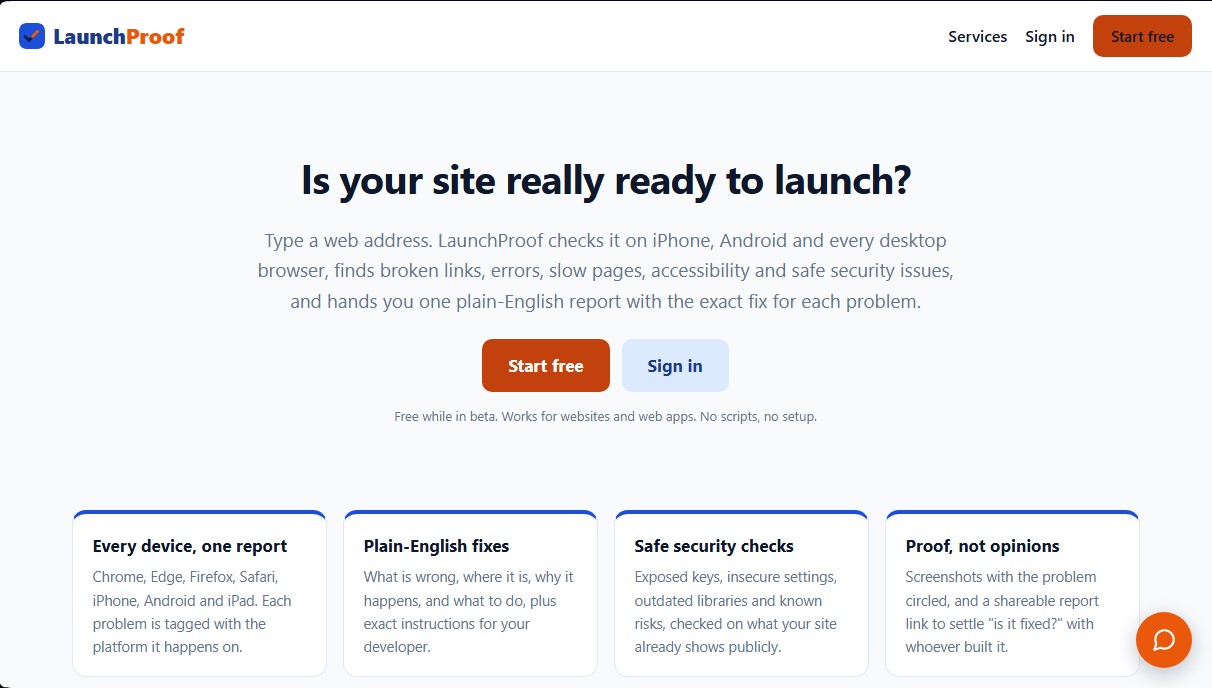
LaunchProof is a diagnostic and optimization tool designed to comprehensively verify if a website or web application is ready for launch. Its primary function is to perform an exhaustive multi-platform analysis covering iPhone, Android, iPad, and all major desktop browsers, including Chrome, Edge, Firefox, and Safari. Unlike other technical solutions, it requires no script installations or complex configurations; the user simply enters the URL to initiate a complete scan of the interface and performance.
The platform utilizes automated scanning technology to identify broken links, loading errors, slow pages, and web accessibility failures. In the realm of cybersecurity, LaunchProof conducts non-invasive security checks, detecting vulnerabilities such as exposed keys, insecure configurations, and outdated libraries based on the site's public information. This security audit capability allows business owners to mitigate critical risks before they impact the end-user experience or system integrity.
One of the tool's core pillars is delivering results through plain-language reports, avoiding unnecessary technical jargon. Each detected issue is presented with an explanation of what is failing, where it is located, and why it is happening, accompanied by precise instructions for developers. To facilitate validation, the system generates screenshots with the error highlighted and shareable links, streamlining communication between management teams and the technicians responsible for the fixes.
LaunchProof is specifically geared toward founders, freelancers, and small agencies who need to ensure the quality of their projects without the costs of enterprise-level tools. Its functional capabilities include:
- Rendering tests across seven different browsers to ensure visual consistency.
- Detection of technical SEO issues and loading speed optimization (Core Web Vitals).
- Uptime monitoring and continuous security through maintenance plans.
- Direct repair services, where a technical team can handle fixing the bugs found in the report.
- White-label options for agencies managing client portfolios.
The tool's technical approach is based on automated UI testing, allowing every incident to be tagged with the specific platform where it occurs. This ensures that website validation is a process based on visual evidence and objective data, eliminating guesswork during the quality control phase. With this system, users can keep their sites fast, secure, and fully functional on any computer or mobile device.
LaunchProof features and use cases
How to use LaunchProof
LaunchProof FAQ
Which devices and browsers does LaunchProof test?
The tool analyzes your website on iPhone, Android, iPad, and all major desktop browsers like Chrome, Edge, Firefox, and Safari to ensure everything works perfectly on any screen.
Do I need to install any code or scripts to use LaunchProof on my website?
No installation or technical setup is required. Simply enter your website URL, and the system will perform an external analysis automatically.
How much does a website analysis cost?
Quick scans for Chrome and Android are free. In-depth testing across all browsers is available on a pay-per-use basis, with pricing starting at 99 cents depending on the size of your site.
What happens if LaunchProof finds errors that I don't know how to fix myself?
We have a professional team that can handle any issues identified in the report—from broken links to security vulnerabilities—through one-time payments or monthly maintenance plans.
What do the reports generated by the platform look like?
You will receive a detailed report featuring screenshots that highlight specific errors, along with clear instructions in plain English so you or your developer know exactly what needs to be fixed.
Does the tool perform security checks on my website?
Yes, we check for exposed keys, insecure configurations, outdated libraries, and other known risks based on the public information visible on your site.
Does LaunchProof offer ongoing maintenance services?
We offer maintenance and security plans that include regular automated checks, uptime monitoring, and monthly support hours to keep your website fully optimized at all times.
Are there special options for agencies or freelancers who manage multiple clients?
Yes, we offer partner plans that feature bulk testing across multiple websites, volume discounts, and the ability to white-label reports with your own branding.
LaunchProof pricing and plans
Fast Test (Free Plan)
Price: Free (while in beta).
- Unlimited checks on Chrome and Android browsers.
- Detection of broken links, loading errors, slow pages, and accessibility or security issues.
- Detailed report with clear instructions for developers.
Quick in-depth
Price: From $0.99 (pay-as-you-go based on site size).
- Includes all Free Test features.
- Adds specific display and error testing for iPhone and Safari.
Full in-depth test
Price: From $5 (pay-as-you-go based on site size).
- Comprehensive testing across the 7 major browsers: Chrome, Edge, Firefox, Safari, iPhone, Android, and iPad.
- Platform-specific issue tagging.
- Screenshots with highlighted errors and a shareable report link.
Guard
Price: $29/mo (or $290/yr).
- Automated monthly website checks.
- Security and uptime monitoring.
- Results report for each cycle.
- Includes 30 minutes of monthly edits or adjustments by the technical team.
Guard+
Price: $79/mo (or $790/yr).
- Automated weekly checks.
- Security and uptime monitoring.
- Results report for each cycle.
- Includes 1 hour of monthly edits or adjustments.
- Standard priority for resolving detected issues.
Guard Pro
Price: $199/mo (or $1,990/yr).
- Automated daily checks.
- Enhanced security and uptime monitoring.
- Results report for each cycle.
- Includes 3 hours of monthly edits or adjustments.
- Guaranteed same-day priority fixes.
- Quarterly site improvement review.
Spot Fix (One-time Fix)
Price: $49.
- One-time fix for a specific issue identified in the report.
Quick Fix
Price: $129.
- Repair of up to 3 issues from the report (broken links, minor accessibility errors, or mobile display glitches).
Full Fix
Price: From $349.
- Triage and repair of the entire generated report.
- Limit of up to 8 issues fixed across devices, speed, accessibility, and security.
SEO and Speed Boost
Price: From $299 (Starter) to $699 (Deep).
- SEO and speed audit.
- Fixes for tags, titles, and descriptions, plus image optimization.
- The Deep plan includes structured data and Core Web Vitals metrics.
- Ongoing SEO maintenance option for an additional $79 to $179/mo.
Design Enhancements and Rebuilds
Price: From $249 (page/section) to over $3,500 (full rebuild).
- Optimization of specific sections, visual refreshes for multiple pages, or complete site rebuilds from scratch.
- Custom quotes for complex projects at a rate of $85/hr.
LaunchProof Screenshots
LaunchProof user reviews
Write a review
Checking your session...
LaunchProof Reviews
Loading reviews...
LaunchProof alternatives

Sitelemetry
AI-powered web audit tool for security, SEO, accessibility, and AI visibility. Provides detailed evidence and technical remediation guides.

localscreenshot
localscreenshot is a screenshot API and MCP server for AI agents, returning clean captures of any web page on phone or desktop from 227 countries.


Confident AI
LLM evaluation platform to test AI workflows, measure quality metrics, and automate testing in the development cycle without relying on engineering.