
Share
Generate and edit images or videos using AI. Transform photos with references, create content from text, and apply advanced visual effects.
What is Lucer?
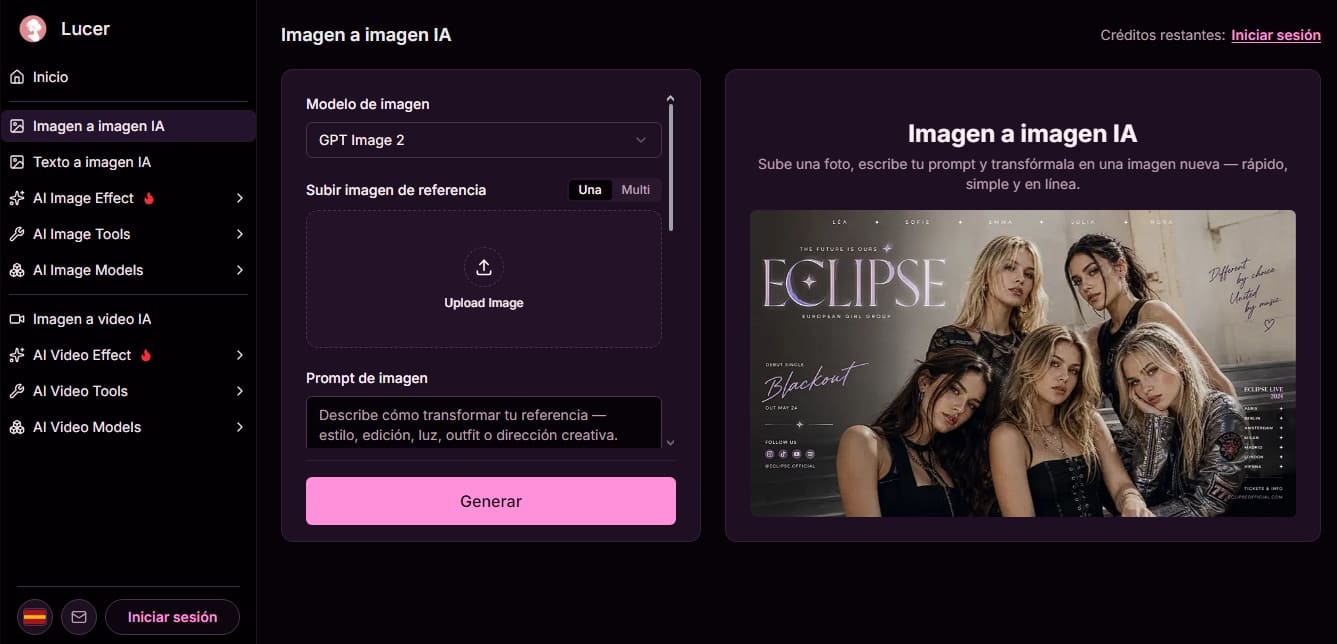
Lucer is an advanced multimedia content generation and editing platform that uses artificial intelligence models to transform ideas into high-quality visual assets. Its architecture allows users to work with AI image-to-image flows, text-to-image, and video generation, offering a versatile environment for both content creators and professionals seeking rapid iteration on their projects directly from their browser.
The tool stands out for its ability to use reference images as visual "anchors." Through the GPT Image 2 model, the system processes one or two source images to guide the creation of new files, allowing the user to direct changes using natural language. This reference-guided generation approach ensures that results maintain consistency with the original composition, pose, or style, facilitating creative editing tasks such as modifying lighting, backgrounds, or outfits without needing to start from scratch.
Among Lucer’s core capabilities are:
AI Image Effects: Specific tools for wardrobe changes (AI Clothes Changer), themed portrait creation, a baby generator, or celebrity look-alike searches.
AI Video Tools: AI image-to-video capabilities powered by the Seedance 2.0 model, which allows for adding movement and complex visual effects to static images.
Technical Editing: Functions to remove watermarks (Image Watermark Remover) and resolution optimizers (Image Enhancer) to improve file sharpness.
Custom Settings: Full control over aspect ratio (16:9, 9:16, 1:1, 4:3, 3:4), quality levels, and resolutions up to 4K in professional formats such as PNG, JPEG, or WebP.
The operation of this AI tool is straightforward and functional. The user uploads their material, defines a prompt detailing the desired transformation, and selects the model that best fits the task. The platform allows for real-time previews of the results, making it easy to adjust instructions until the desired creative vision is achieved. It is a solution designed for those who require polished image edits quickly and easily, without the need for heavy software installations on their computer.
By integrating technologies like GPT Image 2, Lucer positions itself as a comprehensive AI image and video generator. Its credit system ensures a predictable cost per execution, allowing users to transform photos online with precise control over the final pixels, obtaining results that are ready to download and use in professional environments or on social media.
Lucer features and use cases
How to use Lucer
Lucer FAQ
What is Lucer?
Lucer is an AI-powered image and video generator that allows you to easily create and edit visual content directly in your browser.
How does the credit system work in Lucer?
Each generation has a fixed credit cost, which you can check below the "Generate" button. Credits are purchased through one-time payment packages with no automatic renewals.
Can I use more than one reference image in image-to-image mode?
Yes, you have the option to select the two-image mode, allowing the AI to combine both visual sources into a single request.
What kind of changes can I ask Lucer to make to my photos?
You can describe style transformations, lighting edits, clothing changes, or creative direction using natural language, thanks to the GPT Image 2 model.
What file formats can I use to download my generated images?
The platform allows you to choose between PNG, JPEG, or WEBP file formats before downloading your creation.
Is a monthly subscription required to use Lucer?
No, Lucer offers credit packages that are valid for life through a one-time purchase, ensuring you only pay for what you actually need to generate.
What resolution options does the tool offer for my projects?
You can configure the resolution of your images by choosing between 1k, 2k, and 4k options to achieve the level of sharpness that best fits your work.
Do I need to stay on the page while my image or video is processing?
It is recommended to keep the tab open so you can review the preview in the workspace and download the final result as soon as the AI finishes its task.
What AI models does Lucer use to generate content?
The tool utilizes advanced models such as GPT Image 2 for editing and creating polished images, and Seedance 2.0 for video generation.
How can I adjust the aspect ratio of images generated in Lucer?
You can select your desired aspect ratio from several available options, such as 9:16 for mobile, 16:9 for widescreen, or the 1:1 square format.
Lucer pricing and plans
Free Version: Free. Provides access to image and video generation tools through a credit system.
Access to image-to-image, text-to-image, and AI effects tools.
Access to models such as GPT Image 2 and Seedance 2.0.
Login required to view your remaining credit balance.
Fixed credit cost per generation.
Starter: 7,99 $. One-time credit pack with no automatic renewal.
160 lifetime credits.
Up to 26 videos.
Up to 80 images.
Standard: 19,99 $. One-time credit pack (promotional price).
500 lifetime credits.
Up to 83 videos.
Up to 250 images.
Plus: 39,99 $. One-time credit pack with a bulk discount.
1,240 lifetime credits.
Up to 206 videos.
Up to 620 images.
Professional: 79,99 $. One-time credit pack for heavy usage.
3,200 lifetime credits.
Up to 533 videos.
Up to 1,600 images.
Lucer Screenshots
Lucer alternatives

ColorCraft
Create Amazon KDP books. Generate coloring pages, stories, puzzles, and print-ready full covers, plus promotional mockups in a single workflow.


Tesla Wrap Generator
Tesla Wrap Generator uses AI to paint designs onto the official UV template of each Tesla model for Paint Shop, with a 3D preview before you download.