

Share
What is LyricEdits?
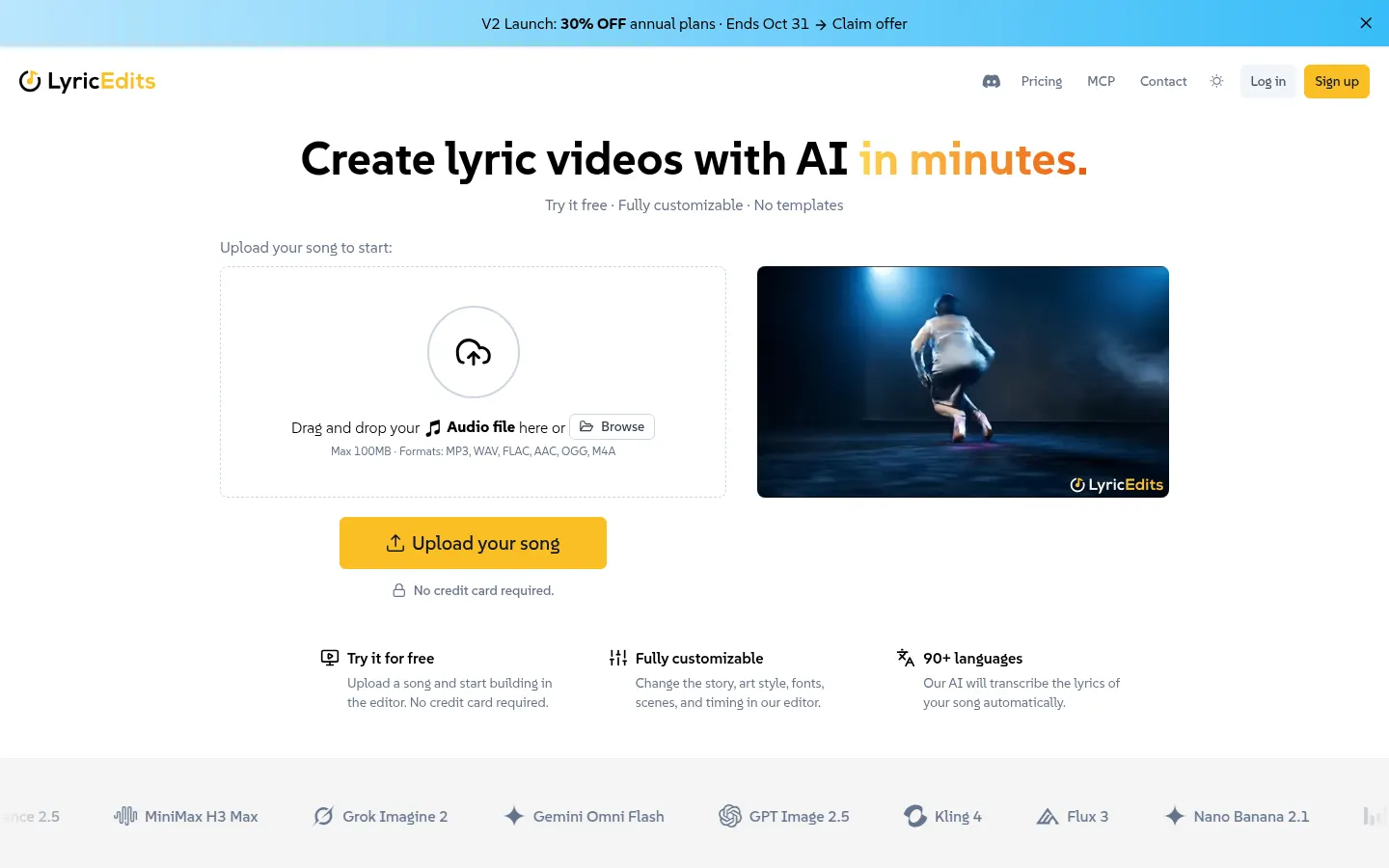
LyricEdits is an AI lyric video generator that turns a song into a video with synced lyrics, generated visuals and animation, built for musicians, producers and creators who publish on YouTube, TikTok or Instagram.
What is LyricEdits used for?
LyricEdits is used to make lyric videos without templates: you upload the audio and get a video ready to post. Besides the classic lyric video, it creates karaoke videos, visualizers, story videos and music videos with characters that keep the same look from one scene to the next. It works in landscape 16:9 and vertical 9:16, so one track can cover a YouTube premiere and a short clip for social media.
How does LyricEdits work?
You upload an MP3, WAV, FLAC, AAC, OGG or M4A file of up to 100 MB, and the AI transcribes and syncs the lyrics in more than 90 languages, with around 95% accuracy on clear vocals according to the site. From the lyrics it suggests a story, characters and scenes, rendered by image and video models such as Flux, Nano Banana, Seedance, Kling and Grok Imagine. Everything is then fine-tuned in a real-time editor: art style, 250+ fonts, text effects, colors, pacing and the timing of each line. You can also upload your own photos or clips, animate them and lip-sync the characters. Songs can run up to 20 minutes.
Who is LyricEdits for?
- Independent artists who need a video for every release without hiring an animation team.
- Producers and editors who want to finish the project in DaVinci Resolve, Premiere Pro or Final Cut Pro, or export SRT subtitles.
- Karaoke and lyrics channels that post often in both landscape and vertical formats.
- Claude, ChatGPT or Cursor users who would rather request videos from their assistant through the LyricEdits MCP server.
LyricEdits pros and cons
- Pro: covers the whole workflow, from lyric transcription to the finished video, in a single tool.
- Pro: the editor lets you change the story, characters and typography without starting over.
- Pro: includes extra utilities such as a vocal remover, audio-to-lyrics and a lip sync generator.
- Con: commercial use of the videos requires owning the rights to the song.
- Con: transcription accuracy depends on how clearly the vocals can be heard.
LyricEdits features and use cases
How to use LyricEdits
LyricEdits FAQ
What is LyricEdits?
It is an AI lyric video generator that transcribes and syncs your song's lyrics and creates editable lyric videos, karaoke videos, visualizers and music videos.
Is LyricEdits free?
Not entirely: you get trial credits on sign-up and can export one 720p watermarked video. After that you need a subscription or a credit pack, listed in the pricing section of this page.
Does LyricEdits have an API?
Yes. It provides an MCP server at lyricedits.ai/api/mcp with 27 tools for Claude, ChatGPT, Cursor, Codex and VS Code, and API access is part of the Enterprise option.
Does LyricEdits work with songs in other languages?
Yes. Automatic lyric transcription covers more than 90 languages, while the website itself is in English.
Which audio formats does LyricEdits accept?
MP3, WAV, FLAC, AAC, OGG and M4A files up to 100 MB, with songs up to 20 minutes long.
What kinds of videos can I make with LyricEdits?
Lyric videos, karaoke videos, visualizers, story videos and music videos, in landscape 16:9 or vertical 9:16.
Can I use LyricEdits videos commercially?
Yes, as long as you own the rights to the song; paid exports come without a watermark.
Can I finish the video in another editing app?
Yes. Higher tiers export the project to DaVinci Resolve, Premiere Pro and Final Cut Pro, and you can download the synced lyrics as an SRT file.
How accurate is the lyric syncing?
The site claims around 95% accuracy on clear vocals, and any line can be corrected by hand in the editor.
What are the alternatives to LyricEdits?
In the directory you can compare LyricMV, freebeat AI and Kaiber Superstudio, which also generate videos from music.
LyricEdits pricing and plans
Reference price: 39 USD / month. Source · Verified: October 28, 2026
Prices in US dollars (USD). Checked on: 28/10/2026.
Trial: free credits on sign-up and a single 720p watermarked export per account.
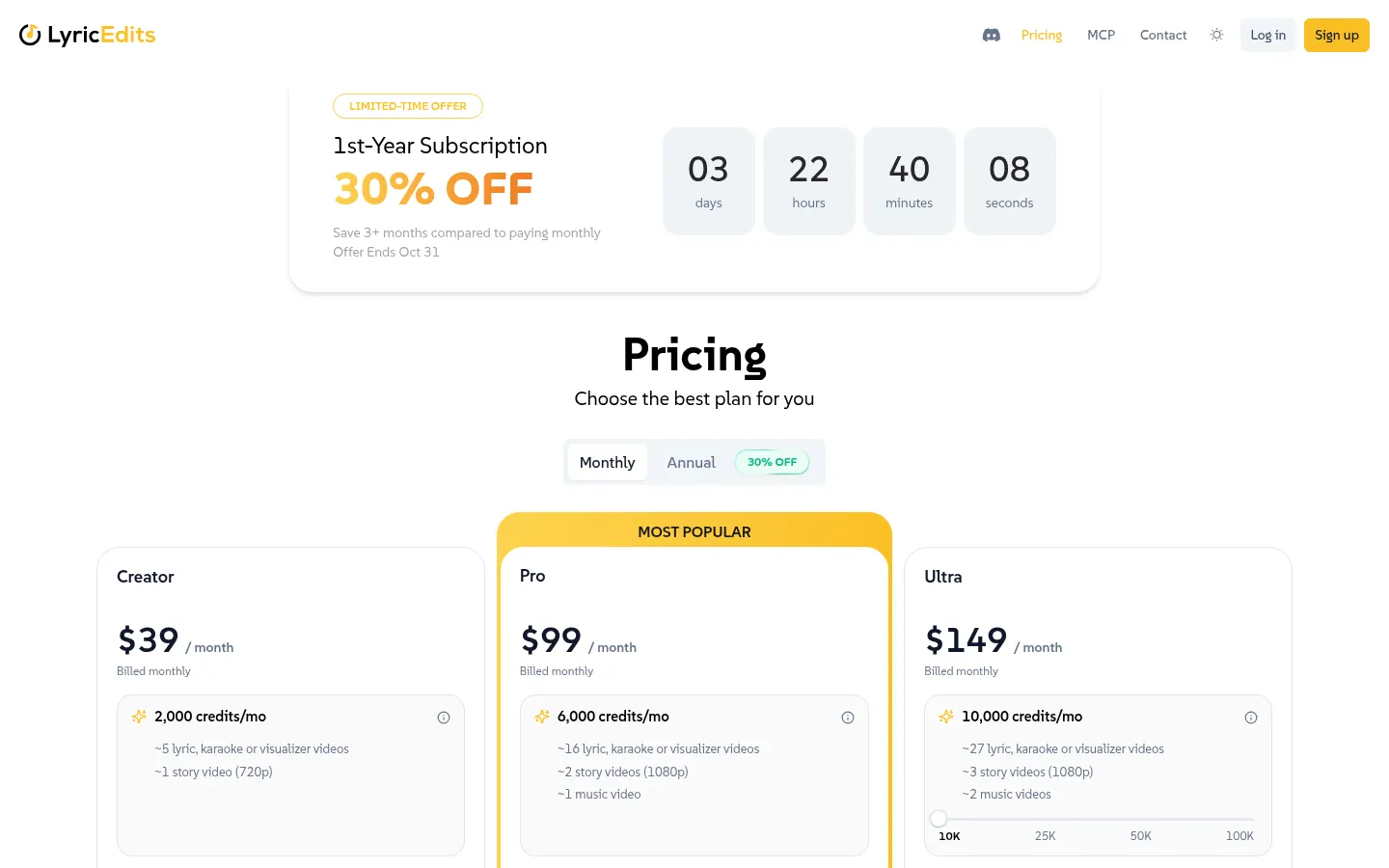
Creator: $39/month; 2,000 credits a month, watermark-free 720p and 1080p exports and 1 image variation at a time.
Pro: $99/month; 6,000 credits a month, up to 4K, export to Premiere Pro, DaVinci Resolve and Final Cut Pro and 2 variations at a time.
Ultra: from $149/month for 10,000 credits, scalable up to 100,000; priority queue and 4 variations at a time.
Annual billing: equivalent to two months free; until 31/10/2026 the first year is 30% off.
One-time credits (expire after one year and include Creator features): 500 for $15, 1,000 for $25, 2,500 for $50, 5,000 for $90, 10,000 for $170, 20,000 for $330 and 50,000 for $800.
Enterprise: custom quote, with API access.
Subscription credits roll over for 3 months. Refunds within 14 days of the first purchase if nothing has been exported or downloaded and fewer than 500 paid credits have been used.
LyricEdits Screenshots
LyricEdits user reviews
Write a review
Checking your session...
LyricEdits Reviews
Loading reviews...
LyricEdits alternatives



Lumina by ByteDance
Create cinematic videos, images, and music clips with AI. Design shots, edit with precision, and generate professional scenes from storyboards.