

Share
AI virtual assistant that manages your calendar, email, and tasks. Automates scheduling, drafts replies, and sends reminders via voice, Slack, WhatsApp, email, or calls.
What is Martin?
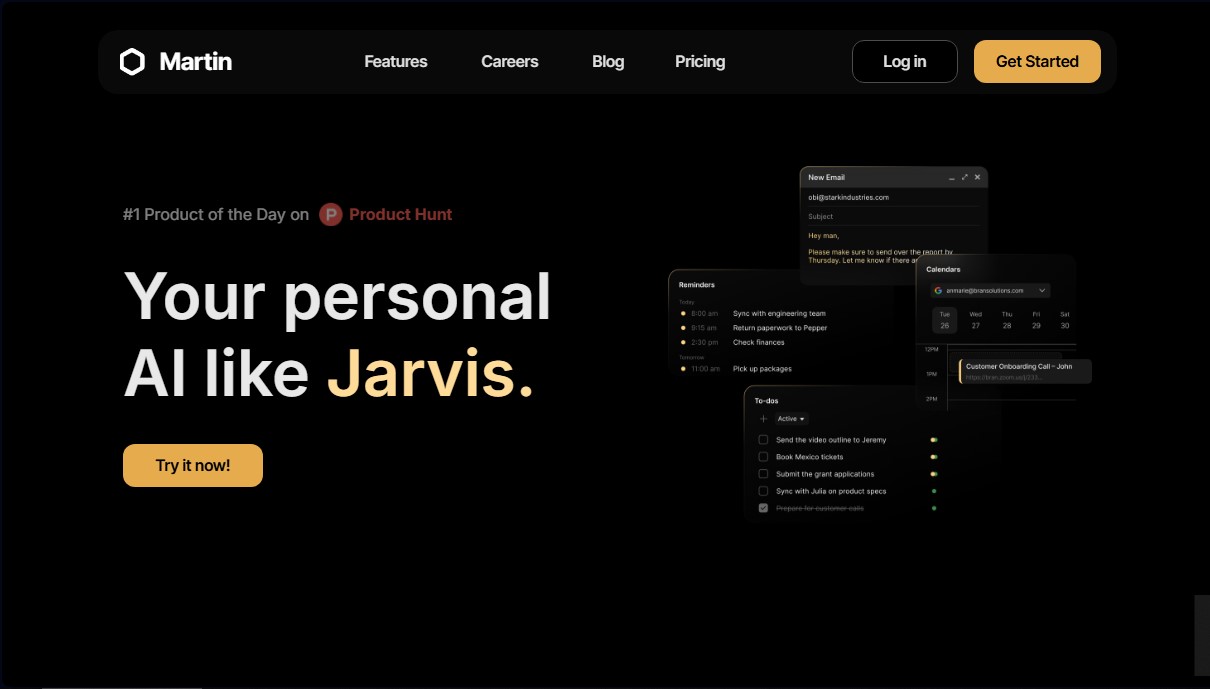
Martin is an AI-powered personal assistant designed to centralize and automate daily productivity management. Unlike other bots, this tool functions as an omnipresent virtual assistant accessible through various communication channels such as WhatsApp, SMS, phone calls, email, and Slack. Its primary goal is to act as an intelligent operations hub that manages the user's calendar, communications, and task lists, enabling much more agile process execution through workflow automation.
Martin's technology is based on deep integration with everyday tools. Users can link their Google Calendar, Outlook, or Apple Calendar accounts, allowing the AI to read, create, and modify events using natural language commands. Similarly, by connecting Gmail or Outlook inboxes, the system can draft responses, reply to emails, and organize communication autonomously. This calendar and inbox synchronization makes it easier for the assistant to understand the user's context to perform complex actions, such as scheduling meetings simply by copying it (Cc to schedule) on an email thread.
Key functional capabilities and practical benefits include:
- Advanced schedule management: Appointment scheduling, event rescheduling, and time blocking through direct text or voice instructions.
- Email triage: Automatic message classification and execution of follow-up tasks, such as adding items to the to-do list based on an email's content.
- Voice interaction and calls: Ability to make phone calls to manage reservations or wake the user up with a weather and daily agenda summary (Wake Up Calls).
- Slack automation: Reading and sending messages, managing channels, replying to threads, and using reactions on the user's behalf.
- Real-time information search: Integration with engines and platforms like Google, Perplexity, YouTube, and Twitter/X to obtain up-to-date data.
The system allows for the configuration of custom shortcuts to execute multi-step actions with a single command, such as generating unified summaries of tasks and unread emails. Additionally, its proactive drafts feature prepares automatic responses based on specific rules for different contact categories, such as clients or recruiters. It is an ideal solution for professionals and entrepreneurs who need a multi-device AI assistant, available on both desktop and mobile via its iOS app, optimizing personal organization without friction.
Martin features and use cases
How to use Martin
Martin FAQ
What is Martin and how can it help me as a personal assistant?
Martin is an AI assistant designed to manage your calendar, emails, and to-do lists with the goal of doubling your daily productivity.
How do I connect my calendar to Martin?
You can link up to five Google, Apple, or Outlook calendars from the dashboard or the mobile app by accessing the integrations section.
Can Martin answer emails for me?
Yes, Martin can read your messages, draft automatic replies, and respond to Gmail or Outlook emails based on the instructions and criteria you set.
What communication channels can I use to contact Martin?
You can reach out to it at any time via phone calls, SMS text messages, WhatsApp, email, or Slack direct messages.
What is Martin's wake-up call feature?
This feature allows Martin to call you every morning at a set time to wake you up while giving you a summary of the weather forecast and your schedule for the day.
How does Martin's Slack integration work?
Once you connect your workspace, Martin can read channel messages, send replies to your teammates, and even react with emojis on your behalf.
Can I use Martin on my iPhone?
Yes, there is a dedicated iOS app that includes voice mode, push notifications, and custom shortcuts so you can use the assistant from anywhere.
What is the "CC Martin" feature for scheduling appointments?
If you CC Martin’s email address on a message thread, it will handle suggesting open time slots to your contacts and confirming the meeting.
Does Martin offer a trial period for its subscription plans?
The tool offers a seven-day free trial for its professional plans, which you can cancel at any time with no commitment.
What kind of information can Martin search for on the web?
Martin has access to various search engines and platforms like Google, YouTube, Twitter, and GitHub to find the most relevant and up-to-date data for you.
Martin pricing and plans
Free Trial
7-day free trial to explore all features. Cancel at any time.
Basic Plan
$21/month (billed annually) or $35/month (billed monthly).
- Access to basic AI models.
- Limited proactive actions.
- Maximum of 2 concurrent tasks for Martin.
Pro Plan
$30/month (billed annually) or $49/month (billed monthly).
- Morning phone briefings with your daily agenda.
- Daily email digests.
- Daily morning SMS to-do list.
- Proactive email response drafts.
- Email triage: automatic labeling and follow-up action execution.
- Personalized wake-up calls with weather and calendar updates.
- "Cc to Schedule" feature to automatically book meetings by copying Martin on an email.
Business Plan
$36/month (billed annually) or $59/month (billed monthly).
- Includes all Pro plan features.
- Centralized billing for teams.
- Slack channel integration for Martin.
- Access to the most advanced AI models available.
- Unlimited proactive actions.
- Unlimited custom tasks.
Martin Screenshots
Martin alternatives

PortuguesePal
Practice Brazilian or European Portuguese with an AI tutor. Improve your fluency and pronunciation with real conversations and instant corrections.




rabbit OS3
Agentic OS that automates tasks and manages files, connecting your computers with AI models to run workflows using natural language.

Agentkit: AI Automations
Automate customer support on Instagram, WhatsApp, and the web with AI agents trained on your content to answer questions and capture leads 24/7.