
Share
Transform images into realistic videos with AI. Animate photos via text, choose the duration, and easily generate high-resolution results.
What is MojoMake?
MojoMake is an advanced generative AI platform designed to automatically transform static images into videos with realistic motion. This tool allows content creators, marketing professionals, and educators to convert photos into dynamic clips quickly and without the need for prior technical video editing knowledge. The system uses cutting-edge algorithms to interpret visual content and add fluidity to specific elements like hair, water, or facial expressions, ensuring a natural and professional result from a computer or mobile device.
The application stands out for integrating a wide variety of next-generation video AI models into a single interface, including technologies such as Veo 3.1, Sora 2, Kling 3.0, Runway, Wan, and Hailuo. This architecture allows users to choose the engine that best suits their creative needs. Additionally, for generating images from scratch, MojoMake offers access to powerful models like Flux, Ideogram, Qwen, and OpenAI, establishing itself as a central hub for computer-aided multimedia creation.
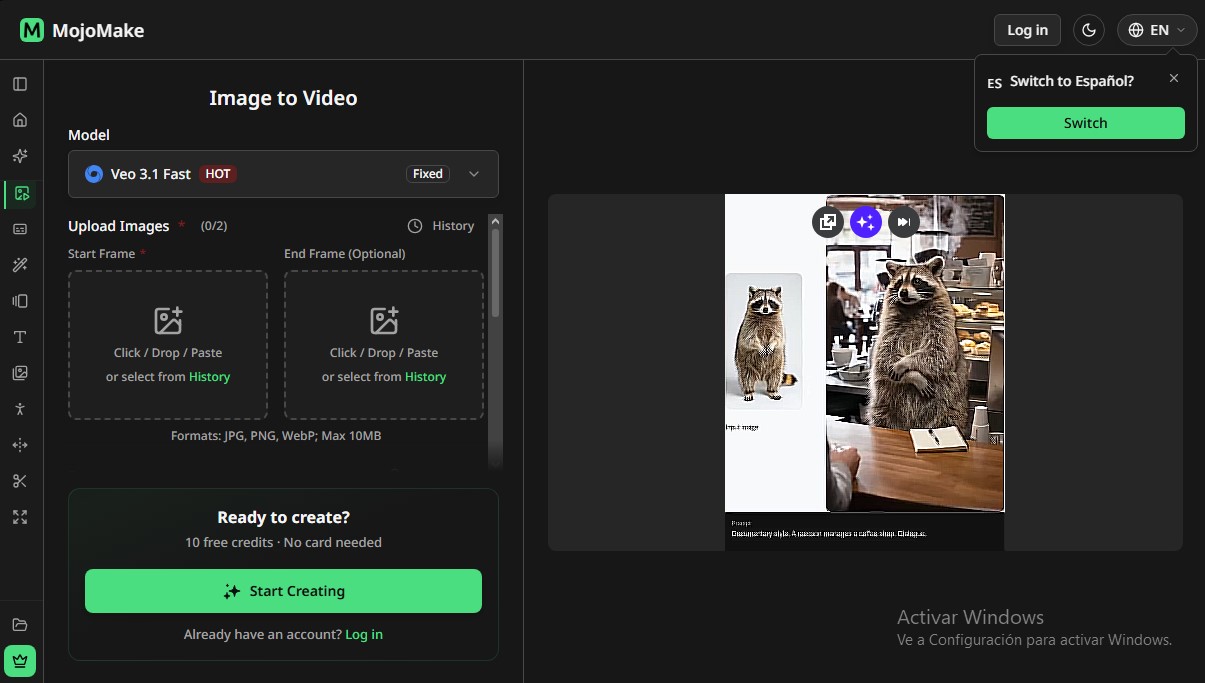
The process to convert image to video with AI is straightforward and functional. Users upload a file in JPG, PNG, JPEG, or WebP format and write a descriptive prompt indicating the desired type of motion. To optimize results, the platform includes an AI Optimize feature, which automatically improves text instructions for more precise animations. It is possible to define essential technical parameters such as aspect ratio (16:9, 9:16, or automatic) and adjust advanced settings for total control over the final production.
Key capabilities and benefits of MojoMake include:
- Custom Duration: Generate clips of 5, 8, 10, and up to 15 seconds.
- High Resolution: Supports video outputs in 540p, 720p, and 1080p HD, with a 4K option depending on the selected model.
- Frame Control: Specific First & Last Frame tools to define exactly how the animation starts and ends.
- Integrated Audio: Ability to add AI-generated sound layers to complement the visual atmosphere.
- Commercial Rights: Users have usage rights over their creations, facilitating their use in professional environments.
This photo animation tool is especially useful for brands looking to create video ads from product photos or to transform static logos into animated intros. By eliminating the need for complex filming processes, MojoMake optimizes workflows for social media platforms like TikTok, Instagram, or YouTube, allowing any image with good lighting and contrast to be converted into a high-quality piece of audiovisual content in just a few minutes.
MojoMake features and use cases
How to use MojoMake
MojoMake FAQ
What is MojoMake and how does its technology work?
MojoMake is an AI platform that allows you to transform static images into videos with realistic motion or generate new visual content from text descriptions.
How can I convert an image into a video with MojoMake?
Simply upload a photo in a compatible format, write a brief description of how you want the content to move, and click the generate button to process the file.
What file formats and sizes does the tool support?
The platform supports JPG, PNG, and WebP image uploads with a maximum file size of ten megabytes per file.
Can I try MojoMake for free?
Yes, the tool offers ten free welcome credits so new users can create their first projects without needing to register a credit card.
What customization options are available for the generated videos?
You can adjust the clip duration between five and fifteen seconds, select the output resolution, and add AI-generated audio tracks to set the scene.
Can I use videos created in MojoMake for commercial purposes?
Users with an active subscription have commercial use rights to use their creations on social media, in advertising, or for professional projects.
Which AI models are available on the platform?
MojoMake integrates the most advanced models on the market, such as Veo, Sora, Kling, and Runway for video, as well as Flux and Ideogram for image generation.
What are the advantages of paid plans compared to the free version?
Subscriptions remove watermarks, allow for simultaneous multitasking, offer higher output resolutions, and provide a higher number of monthly credits.
How can I improve the motion results in my videos?
We recommend using sharp images with good lighting and writing detailed prompts in the text optimizer so the AI can correctly interpret the desired action.
MojoMake pricing and plans
Free Plan: $0
- 10 free initial credits.
- No credit card required.
Starter: $9/month (or $6.33/mo billed annually)
- 200 credits per month.
- Limit of 40 videos and 200 images per month.
- Up to 2 simultaneous tasks.
- Commercial use rights and no watermarks.
- 4K/1080P HD output.
- Access to text-to-video, image-to-video, effects, and multiple models (Veo, Sora, Kling, Flux, etc.).
Standard: $19/month (or $13.33/mo billed annually)
- 500 credits per month.
- Limit of 100 videos and 500 images per month.
- Up to 5 simultaneous tasks.
- Commercial use rights and no watermarks.
- 4K/1080P HD output.
- Full access to all available video and image AI models.
Premium: $39/month (or $27.17/mo billed annually)
- 1,200 credits per month.
- Limit of 240 videos and 1,200 images per month.
- Up to 8 simultaneous tasks.
- Faster processing speeds.
- Priority email support.
- Includes all editing features and commercial rights.
Lite (One-time payment): $15
- 300 credits valid for 180 days.
- Limit of up to 60 videos and 300 images.
- Up to 3 simultaneous tasks.
Pro (One-time payment): $36
- 800 credits valid for 180 days.
- Limit of up to 160 videos and 800 images.
- Up to 3 simultaneous tasks.
Max (One-time payment): $60
- 1,500 credits valid for 180 days.
- Limit of up to 300 videos and 1,500 images.
- Up to 3 simultaneous tasks.
MojoMake Screenshots
MojoMake alternatives


Osmo Studio
AI animation studio for professional motion graphics and videos. Control every detail, collaborate with teams, and export with transparent backgrounds.

Victoria Secret Runway
Create fashion show videos by integrating your face into real scenes. Just upload a photo to replace professional models and walk the runway.

BurningBridgesAI.app
Turn a photo into Drake’s viral dance. AI automatically recreates the choreography and gestures so you can star in the trend without recording a thing.

VideoWeb Video Generator
Generate professional AI videos from text or images. Features realistic avatars, automated scripts, and optimized formats for marketing and social media.