Share
Transform static images into videos with natural motion and camera effects. Create professional HD social media content with no editing required.
What is Movmix AI Video Generator?
Movmix AI Video Generator is a cloud-based platform designed to transform static images into high-quality video clips using artificial intelligence. Its primary feature, the image-to-video system, enables content creators, designers, and photographers to convert photos, illustrations, or renders into fluid animations without the need for complex keyframe editing.
The technology behind this tool is built on AI motion generation with temporal frame alignment. This technical approach ensures robust visual consistency, maintaining the color palette, character features, and the original composition of the input image. By minimizing flickering and distortions common in generative AI, Movmix delivers realistic results suitable for professional and commercial use.
Key capabilities include:
- Flexible camera control: Apply pan, zoom, and rotation effects, as well as localized movement in specific elements like hair, smoke, or fluids.
- Cloud-based generation: Since it runs directly in the browser, it doesn't consume computer resources or require a dedicated GPU, making it easy to work from any device with an internet connection.
- Social media optimization: The resulting videos are tailored for vertical formats and resolutions optimized for TikTok, Instagram Reels, and YouTube Shorts.
- File reanimation: Breathe life into old photos and vintage portraits by adding natural movements that respect the original lighting and tone.
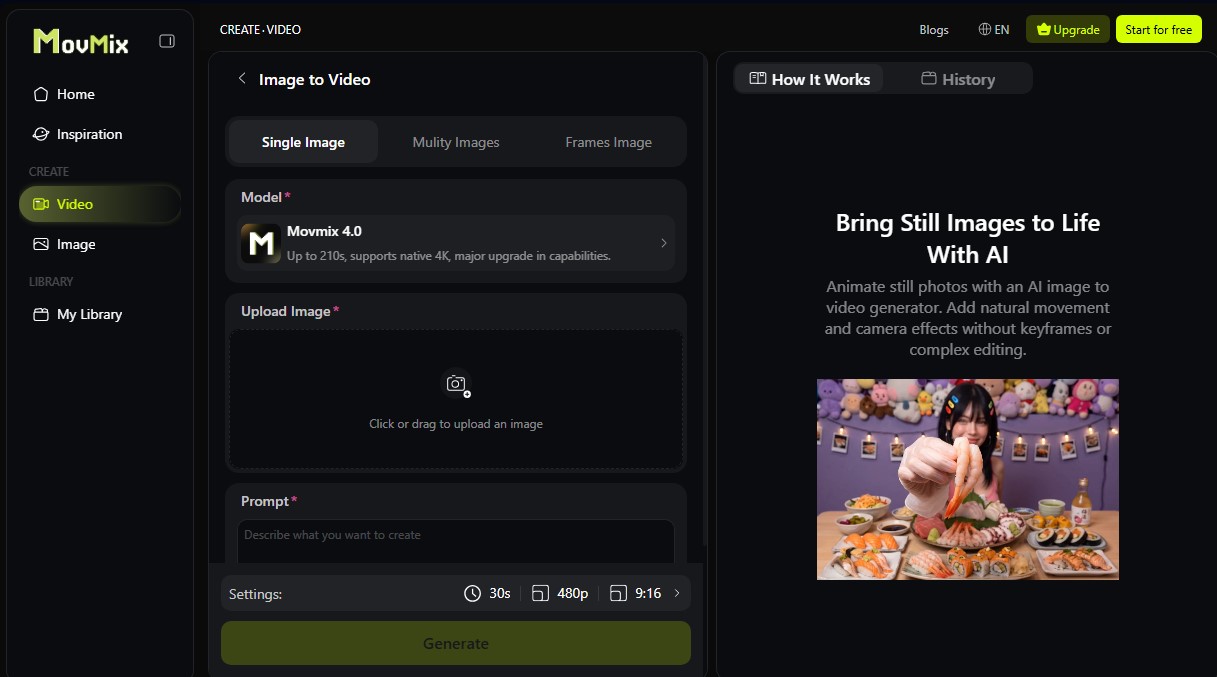
The workflow is intuitive and consists of three steps: upload the image, write a descriptive prompt detailing the desired action, and run the generation. The tool allows users to adjust motion intensity and duration to achieve everything from subtle atmospheric effects to dynamic cinematic sequences. Users have control over frame dynamics to fine-tune specific visual details based on the project’s needs.
Movmix AI Video Generator is especially useful in the e-commerce sector for creating dynamic product showcases from a single photograph, as well as for concept artists who need to quickly visualize the atmosphere of their work for clients. Beyond the image-to-video generator, the ecosystem includes features like AI Video Extend, AI Dance Generator, and assisted video editing, establishing itself as a comprehensive solution for rapid visual content production from a mobile device or desktop.
Movmix AI Video Generator features and use cases
How to use Movmix AI Video Generator
Movmix AI Video Generator FAQ
What is Movmix AI Video Generator and what are its main features?
It is an artificial intelligence tool designed to transform static images into videos with natural movement, while also allowing users to create animations from text and extend the duration of existing clips.
Do I need to install any software or have a powerful computer to use Movmix?
No installation or specialized hardware is required, as it runs entirely in the cloud through any modern web browser.
How can I convert a photo into an animated video?
Simply upload your image to the platform, enter a text description of the movement you want to achieve, and click the create button for the AI to process the result.
What happens if a video generation fails due to a technical issue?
If the system encounters an error during the process, the credits used for that task will be automatically refunded to your account.
Do videos downloaded with Movmix AI Video Generator have a watermark?
All paid subscription plans allow for high-definition content exports without any watermarks.
Do my subscription credits roll over to the next month if I don't use them?
Membership plan credits reset every month and do not carry over to the next cycle, whereas independently purchased credits do not expire.
Can I request a refund if I decide not to use the service after purchasing?
You can request a refund within the first seven days of purchase, provided that you have not used any credits from the purchased plan.
What customization options does the tool offer for camera movement?
It allows you to adjust parameters such as pan, zoom, and rotation, in addition to controlling movement intensity to achieve precise cinematic effects.
Movmix AI Video Generator pricing and plans
Free Trial
- Free trial credits for new users upon sign-up.
- Access to selected free templates.
- Test the tool and preview results.
Standard Plan
- Price: $15.99 per month (or $59.99 billed annually).
- 3,500 credits per month (unused credits do not roll over to the next month).
- Access to 20 AI models.
- Standard generation speed.
- Watermark-free downloads and HD quality.
- Dedicated support.
- Standard credit consumption rate for all features.
Pro Plan
- Price: $29.99 per month (or $99.99 billed annually).
- 8,000 credits per month (unused credits do not roll over to the next month).
- Access to 40 AI models.
- Faster video generation.
- 30% discount on credit costs for all features.
- Free access to specific models (GPT Image 2.0, Nano banana 2, and Pro) for 30 days.
- Watermark-free downloads, HD quality, and dedicated support.
Max Plan
- Price: $59.99 per month (or $199.99 billed annually).
- 18,000 credits per month (unused credits do not roll over to the next month).
- Access to over 60 AI models.
- Priority generation.
- 50% discount on credit costs for all features.
- Free access to selected models (including Grok Image 2.0 and Seedream 5.0) for 90 days.
- Watermark-free downloads, HD quality, and dedicated support.
Unlimited Plan
- Price: $250.00 per month (or $999.99 billed annually).
- 50,000 credits per month (unused credits do not roll over to the next month).
- Access to over 60 AI models.
- Highest priority in the generation queue.
- 70% discount on credit costs for all features.
- Free access to premium models (including Seedance 2.0 and Wan 2.7 for 7 days, and others for up to 365 days).
- Watermark-free downloads, HD quality, and dedicated support.
Credit Plans (One-time purchase)
- Check the official website for pricing on additional credit packs.
- Unlike subscriptions, these credits do not expire and remain in the account until used.
Movmix AI Video Generator Screenshots
Movmix AI Video Generator alternatives

VideoWeb Video Generator
Generate professional AI videos from text or images. Features realistic avatars, automated scripts, and optimized formats for marketing and social media.

Motion Transfer AI Video Generator
Animate character photos using reference videos. Precisely transfer gestures, dances, and body movements from a clip to an image for realistic results.

AlreadyRan
AlreadyRan brings dozens of AI image, video and audio models into one web studio with a single credit balance and the cost shown before every generation.


Vidverse AI
Vidverse AI brings several AI video, image and voice models into one web and mobile app, so you can turn text or photos into clips, images and voiceovers.