

Share
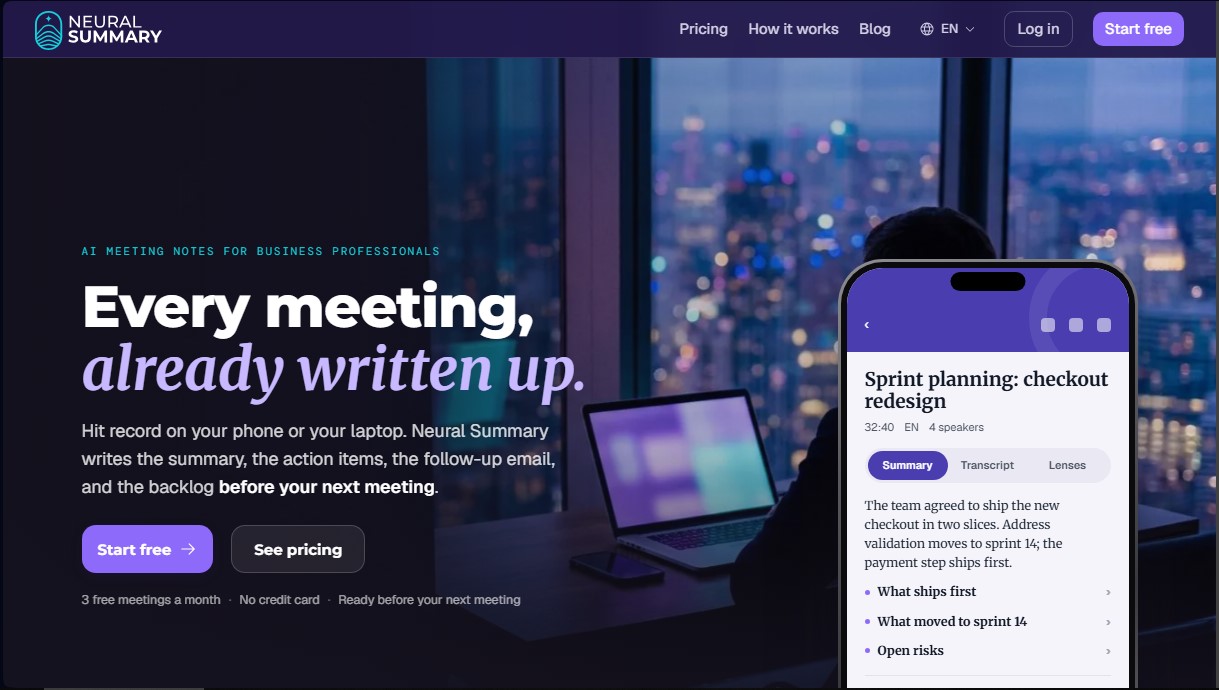
Automatically generate meeting summaries, tasks, and follow-up emails. Create professional documentation, diagrams, and backlogs without a bot joining the session.
What is Neural Summary?
Neural Summary is an advanced artificial intelligence tool designed to automatically transform business meetings, one-on-one sessions, and voice recordings into actionable documents. Unlike other virtual assistants, this application does not require a bot to join the video call, ensuring a more natural and professional experience. Its primary function is to capture audio from platforms like Teams, Zoom, and Meet directly from the browser or computer, while also allowing for the recording of in-person meetings via mobile—even with the screen locked—or the uploading of previously recorded audio files.
The operation of Neural Summary is based on transcription technology compatible with more than 99 languages. Once the capture is complete, the system processes the information in minutes to extract decisions, identify speakers by name, and organize content by key topics. It utilizes an approach based on Lenses, which are intelligent templates designed to structure information according to the professional context. This enables the automatic generation of an agile backlog with user stories and story points, flowcharts, or personalized follow-up emails.
Among its core capabilities and practical benefits, the tool allows for:
- Generation of action items with assigned owners and deadlines, automatically detecting tasks agreed upon during the discussion.
- Creation of process maps and technical diagrams (Mermaid) based on verbal descriptions or discussed outlines.
- Drafting of structured meeting minutes, executive summaries, and Product Requirement Documents (PRDs).
- Memory feature: a knowledge base that allows for cross-functional questions across the entire conversation history to retrieve specific data from past meetings.
- Translation of results into more than 50 languages, making it easier for international teams to work with the same information in their native tongue.
- Seamless integration via API and webhooks with platforms such as Slack, Notion, HubSpot, or Zapier to send results directly into existing workflows.
This solution is ideal for project managers who need to document retrospectives, sales teams looking to automate CRM logging, and developers who need to record architectural decisions or incidents. By eliminating the need for manual note-taking, Neural Summary ensures that decisions are immediately turned into tangible actions. The platform guarantees data privacy, as recordings are not used to train AI models and users maintain full control to permanently delete their information from the system. It is an execution-focused tool that converts conversations into structured, ready-to-use work assets.
Neural Summary features and use cases
How to use Neural Summary
Neural Summary FAQ
What is Neural Summary, and how can it help me with my professional meetings?
Neural Summary is an AI-powered tool that records and analyzes your conversations to automatically generate summaries, to-do lists, and follow-up emails so you don't have to take notes manually.
Does a bot need to join my video call for Neural Summary to work?
No, this tool does not require a bot to join as a participant, as it captures audio directly from your computer's browser or through the mobile app for in-person meetings.
Can I use Neural Summary for free?
Yes, the free plan allows you to process up to three 90-minute meetings per month and includes access to all templates and basic features without requiring a credit card.
What languages can this tool use to transcribe and translate my meetings?
Transcription is supported in over 99 languages, and advanced plans allow you to automatically translate the resulting documents into more than 50 different languages.
What specific types of documents can Neural Summary create after a work session?
Thanks to the Lenses feature, the tool can transform a single recording into over 50 different formats, such as meeting minutes, process maps, backlog user stories, or sales proposals.
Are my data and recordings safe and private with Neural Summary?
Your data is fully protected; recordings are never used to train AI models or sold to third parties, and they remain in your account until you decide to delete them.
How does the Memory feature work in the advanced plans?
The Memory feature allows you to ask complex questions to search for information across your entire meeting history, helping you recall specific agreements or details mentioned months ago.
Can Neural Summary be integrated with other tools like Slack or Notion?
Yes, using webhooks and Zapier, you can configure the tool to automatically send summaries and tasks to platforms like Slack, Notion, HubSpot, or Google Drive as soon as the meeting ends.
What happens if I record a meeting on my phone while I’m out of the office?
The mobile app allows you to record with your screen locked and processes information exactly like the desktop version, sending you a notification with the summary and action items within a few minutes.
What is the difference between the Neural Summary Pro plan and the free version?
The Pro plan removes the three-meeting monthly limit, offering 60 hours of recording, priority processing, document translation, and the ability to cross-reference information across multiple conversations.
Neural Summary pricing and plans
Starter
Free.
3 meetings per month.
Up to 90 minutes per meeting.
5 "Lenses" (output formats) per meeting with access to all templates.
3 questions per meeting to the AI assistant.
Permanent conversation history.
No credit card required.
Solo
10 $ per month (billed monthly; annual discount available).
10 hours of recording per month.
2-hour limit per file and 1 GB maximum size.
Unlimited "Lenses" and access to all templates.
Unlimited questions per conversation.
Export documents to PDF and Word.
Pro
25 $ per month (billed monthly; annual discount available). Includes a 7-day free trial.
60 hours of recording per month.
Unlimited conversations.
"Memory" feature to query across your entire meeting history.
Translate outputs into over 50 languages.
5 GB limit per file.
Priority processing for recordings.
Business
75 $ per month (billed monthly; annual discount available).
200 hours of recording per month.
Includes all Pro features.
Integrations API and webhooks.
Priority support and processing.
Early access to new features and "Lenses."
Enterprise
Custom pricing (Contact Sales).
Unlimited processing hours.
10 GB limit per file.
Team management and Single Sign-On (coming soon).
Integrations API and webhooks.
Dedicated support.
Neural Summary Screenshots
Neural Summary alternatives

OpenWhispr
OpenWhispr is open-source voice dictation for Mac, Windows and Linux: transcribe locally or in the cloud, type into any app and take meeting notes without a bot.

Bolt by Sparcle
Desktop assistant that automates tasks and manages data privately. Connect your tools and use AI models without exposing sensitive information.

BlaBlaScribe
Transcribe audio and video to text, generate subtitles, and translate into 50 languages. Includes speaker detection, AI summaries, and exports in SRT, VTT, or TXT formats.