Share
Visual workspace for planning React apps. Define structures, APIs, and themes to automatically generate boilerplate code and technical documentation.
What is Nodlume?
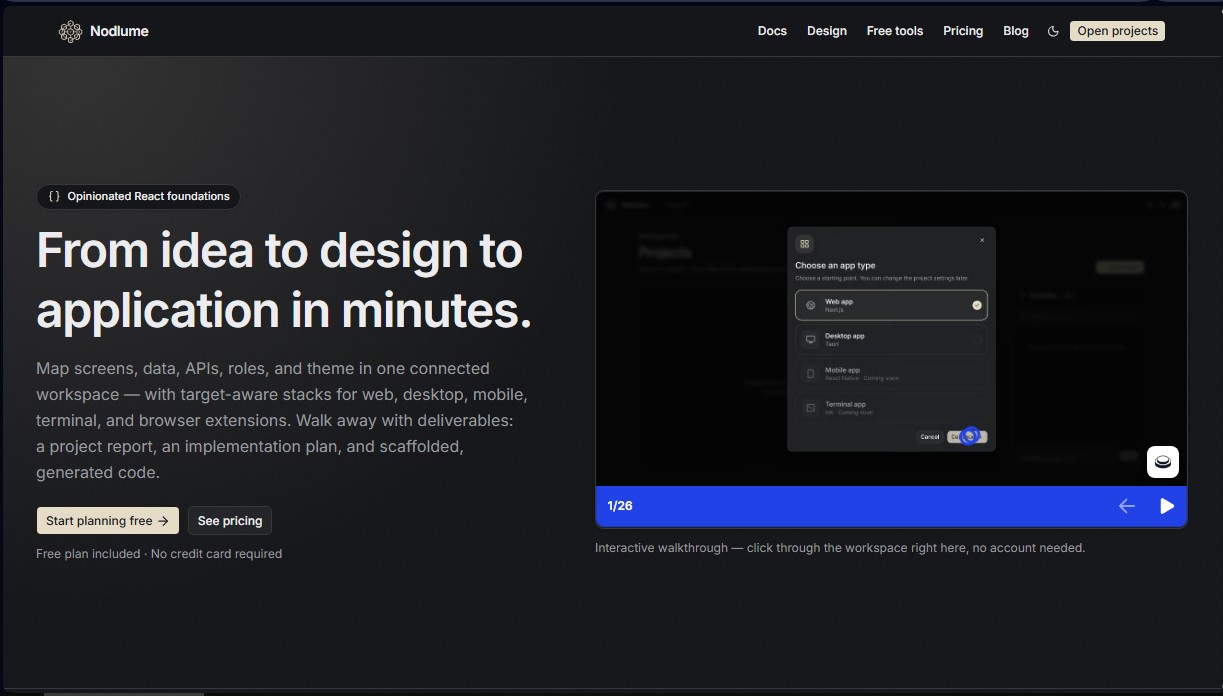
Nodlume is a visual workspace specializing in the planning and architecture of React applications. This tool allows you to transform initial concepts into technical designs and organized code structures in very little time. Its primary function is to provide a solid foundation for software development, integrating screen mapping, data models, APIs, and design systems into a single interactive canvas.
The platform's operation is powered by artificial intelligence to assist in architectural decision-making and the generation of technical documentation. Through a structured workflow, users define the product context, model information organization, and configure the API surface. Nodlume's technology allows for the selection of specific tech stacks, automatically adapting the component catalog and security rules based on the project's target: web applications with Next.js, desktop software via Tauri, mobile apps with Expo or React Native, terminal tools with Ink, or browser extensions under Manifest V3.
Its core capabilities include:
- Connected system modeling: Allows for the definition of screens, states, user roles, and permissions within a coherent and traceable system.
- Design reference and tokens: Facilitates the creation of semantic color palettes, typographic hierarchies, and spacing scales compatible with shadcn/ui and Tailwind v4.
- Code scaffolding generation: Produces a file structure (scaffolding) and a detailed implementation plan that the developer can download.
- AI Assistance: Uses AI credits to suggest improvements to the product plan, automate design tasks, and generate comprehensive technical reports.
This workspace is ideal for software engineers, solutions architects, and product designers who need to validate ideas quickly. As a visual planning tool, it does not require deep programming knowledge to design the initial flow, yet it maintains the technical precision necessary for the developers who will implement the system. It is important to note that Nodlume is not a hosting or deployment service; its goal is to provide technical deliverables (reports and codebase) for the user to manage on their own computer and preferred development environment.
Thanks to its focus on AI-driven productivity, the tool eliminates repetitive initial setup tasks. Users can create wireframes, define visual themes, and establish security architecture before starting the manual coding phase, ensuring that every design decision is documented and functional from the start. The result is an optimized workflow that reduces friction between the idea phase and technical execution.
Nodlume features and use cases
How to use Nodlume
Nodlume FAQ
What exactly is Nodlume?
Nodlume is a visual workspace designed for planning React applications, integrating data models, routes, components, and themes into a single, connected blueprint.
Do I need programming knowledge to use Nodlume?
Coding knowledge isn't required to design an app's blueprint, though familiarity with product flows helps in better organizing technical relationships.
What types of projects can I create with Nodlume?
The tool allows you to generate structures for Next.js web apps, Tauri desktop apps, Expo mobile apps, Ink terminal tools, and browser extensions.
Does Nodlume host my application once it’s finished?
No, the tool focuses on planning and boilerplate generation. You will need to download your files and deploy them to your own server or preferred platform.
How do the AI credits work in Nodlume?
Each plan includes a monthly credit allowance that is used when requesting suggestions or generating content via AI within the workspace.
Can I use Nodlume for free?
Yes, there is a free plan that requires no credit card and includes three documents, unlimited nodes, report generation, and fifty monthly AI credits.
What can I export once my design is complete?
You can generate detailed project reports, implementation plans, read-only links for collaborators, and a production-ready code file structure.
Nodlume pricing and plans
Free Plan
0 $
Explore the visual editor for designing React apps.
Up to 3 documents included.
Unlimited nodes per document.
Generate project reports.
Shareable read-only links.
Invite 1 collaborator per document (and join unlimited documents).
50 AI credits per month.
Option to purchase additional credit packs.
Starter Plan
10 $ per month
Includes all Free plan features.
Unlimited documents.
Cloud-synced version history.
Invite up to 3 collaborators per document.
500 AI credits per month.
Plus Plan
20 $ per month
Includes all Starter plan features.
Shared documents with unlimited collaborators.
2,000 AI credits per month.
Credit Packs
5 $ (one-time payment)
200 AI credit top-up.
No active subscription required.
Purchased credits never expire and are used once your plan's monthly allocation is exhausted.
Nodlume Screenshots
Nodlume alternatives




Agent-Native
Agent-Native is an open-source TypeScript framework for building AI agents with a proper UI, where the agent and the interface share actions, data and state.
StellarFirm
AI agents for founders to plan, build, and launch apps or websites. Automate technical and management tasks under your direct supervision and approval.