
Share
Automate e-commerce image editing. Remove backgrounds, add shadows, and bulk-format for multiple sales platforms.
What is Photopipe?
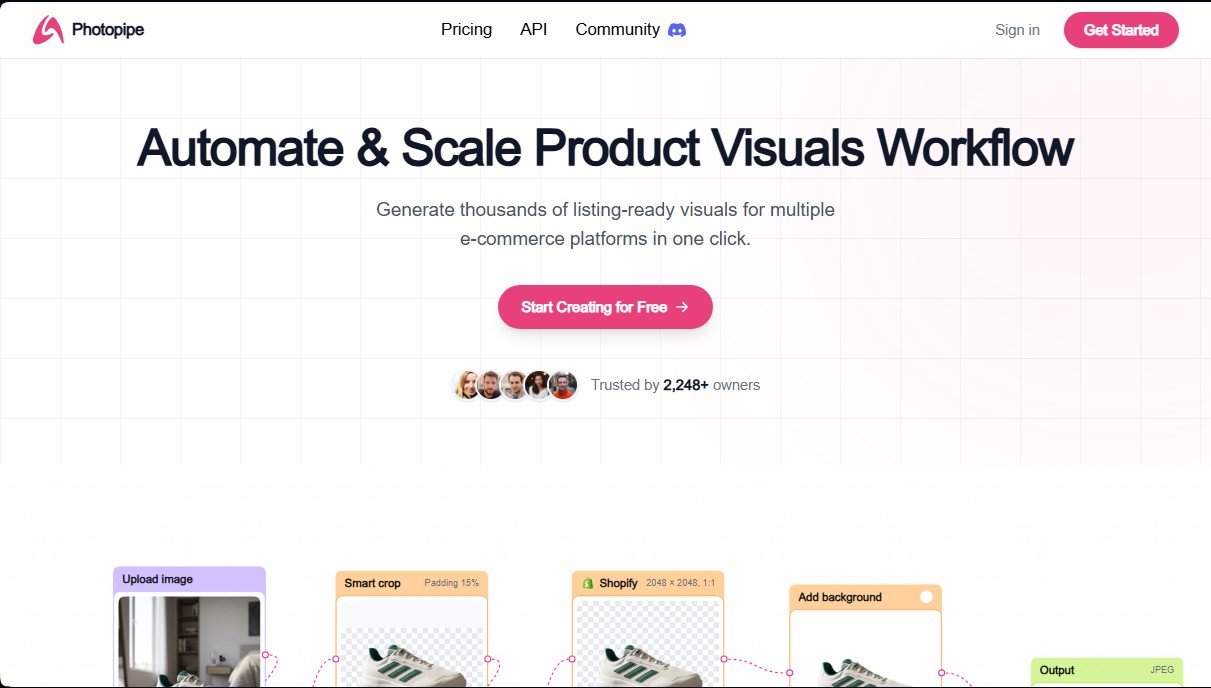
Photopipe is a visual workflow automation platform designed to optimize large-scale product image creation. Its primary goal is to help e-commerce sellers generate thousands of visual assets ready for publication on various platforms with just one click. This tool is ideal for business owners, catalog managers, and agencies that need to process high volumes of photographs efficiently and professionally, saving time on manual editing tasks.
Photopipe operates through custom workflows that allow multiple editing processes to be applied simultaneously. By leveraging artificial intelligence, the application can interpret image content to make precise adjustments without constant human intervention. Its key technical capabilities and features include:
- Background Removal: Automatically and cleanly detects and removes backgrounds from product images.
- Realistic Shadow Generation: Adds natural drop shadows to enhance the object's depth and aesthetics on the canvas.
- Smart Positioning: Automatically adjusts the product's placement and centering within a specific frame to maintain uniformity.
- Multichannel Resizing: Adapts image sizes to meet the technical standards of platforms such as Amazon, Shopify, eBay, Etsy, Vinted, Poshmark, and Mercado Libre.
- AI Upscaling: Increases file resolution using deep learning algorithms to achieve superior visual quality on any computer or mobile device.
- Background Swapping: Allows users to replace the original background with solid colors or specific images based on brand requirements.
The versatility of Photopipe ensures that generated content is fully compatible not only with marketplaces but also with strategic social networks like Instagram, TikTok, and Pinterest, as well as professional communication channels like LinkedIn and WhatsApp. This ensures that visual materials maintain total aesthetic consistency across all digital customer touchpoints.
In addition to its intuitive interface, the tool offers an API for companies and developers who require deeper integration of these bulk image editing capabilities into their own infrastructure or applications. By centralizing all post-production functions into a single automated workflow, Photopipe eliminates technical complexity and enables the immediate and professional scaling of any product catalog's visual presence.
Photopipe features and use cases
How to use Photopipe
Photopipe FAQ
What is Photopipe?
Photopipe is a platform designed to automate and scale the creation of marketplace-ready product images for various e-commerce sites.
Can I start using Photopipe for free?
Yes, the tool allows you to start creating for free so you can test its features before committing to a paid subscription.
What editing tools does Photopipe include?
It offers background removal, realistic shadow generation, background swapping, AI upscaling, and automatic resizing for online stores.
How can I cancel my subscription plan?
You can cancel at any time through your billing section, and you will retain access to the service until the end of your current billing cycle.
Do unused exports roll over to the next month?
No, any exports not used during the month do not roll over or transfer to the next billing cycle.
Does Photopipe have a refund policy?
Unfortunately, we do not offer refunds for payments made on any of the platform's plans.
What should I do if I need more exports than my plan allows?
You can top up your account balance and convert that credit into additional exports to keep working without interruption.
Which platforms can I optimize my images for using Photopipe?
You can generate optimized content for Amazon, eBay, Shopify, Etsy, Vinted, Instagram, TikTok, and many other social networks and digital marketplaces.
Photopipe pricing and plans
Free Version
Start creating product visuals at no upfront cost to test the platform's capabilities.
Starter
$29 per month.
3,000 exports per month (non-cumulative).
Background remover.
Realistic shadows.
Resizing for e-commerce platforms.
Smart cropping.
Background image or color replacement.
Custom workflow creation.
AI-powered editing and enhancement.
Pro
$49 per month.
8,000 exports per month (non-cumulative).
Background remover.
Realistic shadows.
Resizing for e-commerce platforms.
Smart cropping.
Background image or color replacement.
Custom workflow creation.
AI-powered editing and enhancement.
Premium
$99 per month.
20,000 exports per month (non-cumulative).
Background remover.
Realistic shadows.
Resizing for e-commerce platforms.
Smart cropping.
Background image or color replacement.
Custom workflow creation.
AI-powered editing and enhancement.
Photopipe Screenshots
Photopipe user reviews
Write a review
Checking your session...
Photopipe Reviews
Loading reviews...
Photopipe alternatives



utilz Background Remover
Remove image backgrounds for free with total privacy in your browser. Create transparent or colored backgrounds without uploading files while maintaining original resolution.