
Share
Generate AI images, illustrations, and digital art from text. Create visual content for social media and blogs in various styles.
What is PictureMaker?
PictureMaker is an AI image generation tool designed to transform text descriptions into detailed visual assets. Its primary function is to facilitate the creation of drafts, concept art, and final illustrations through a text-to-image system that processes natural language to generate files in common formats such as JPG or PNG. This application is especially useful for professionals who require efficiency in their creative workflow, such as content creators, digital marketing experts, and designers.
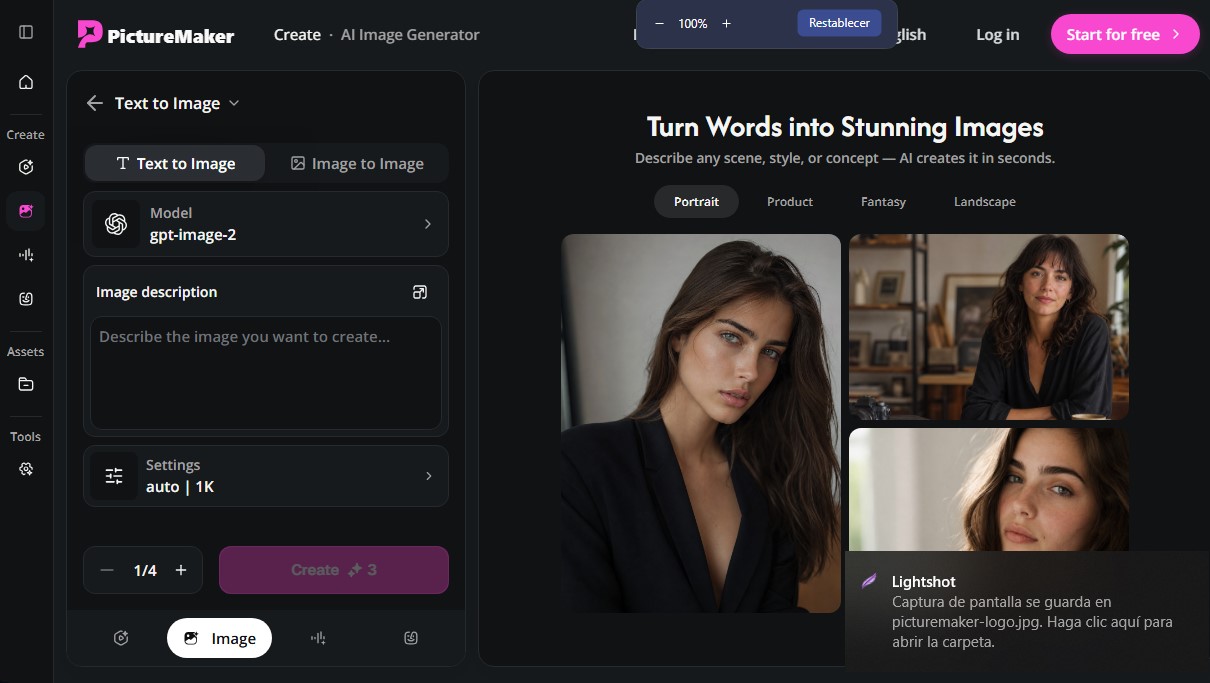
The operation of PictureMaker is based on a structured workflow that allows the user to maintain control over the final result. The process begins by entering a prompt or detailed description defining the subject, environment, and desired concept. The platform uses advanced models like gpt-image-2 to interpret these instructions with precision. After entering the text, the user can select from various predefined visual styles, including realistic photography, anime-style illustration, 3D renders, or watercolor finishes.
Among its core capabilities and practical benefits, the following stand out:
- Fast visual generation: Allows you to obtain images for social media, covers, or avatars in just a few seconds from a written idea.
- Style and composition control: The user can adjust the artistic direction before generation, ensuring the result matches the aesthetic of their brand or project.
- Preview system: Offers the ability to review visual drafts to compare ideas, allowing you to refine the prompt without needing to restart the entire design process on your computer.
- Format versatility: Direct export in JPG and PNG facilitates the integration of images into blogs, presentations, or mood boards.
This artificial intelligence tool is ideal for creators who manage daily channels and need to move from an abstract idea to a usable visual without using complex editing software. In the marketing field, PictureMaker works as a sketch generator for campaigns and ads, allowing teams to visualize proposals before allocating final design resources. For artists, it acts as a source of creative references and composition, helping to shape the lighting and structure of new works. By focusing on a functional approach, the tool optimizes visual content production for any digital platform or medium.
PictureMaker features and use cases
How to use PictureMaker
PictureMaker FAQ
What exactly is PictureMaker?
It is an artificial intelligence platform designed to generate high-quality images and visual content from text descriptions.
How does image creation work in PictureMaker?
Simply enter a detailed text description of the scene you imagine, and the system will generate a visual concept in just a few seconds.
What visual styles can I apply to my creations?
The tool allows you to choose from various styles, such as photorealistic photography, anime illustration, 3D rendering, or watercolor.
What file formats can I use to download the generated images?
You can export your final images in standard JPG or PNG formats to use them directly in your projects or on social media.
Does PictureMaker offer a free plan to try out the tool?
Yes, there is a free plan that includes ten monthly credits, allowing users to generate their first images at no cost.
Can I use PictureMaker to create social media content?
Absolutely. The tool is ideal for designing covers, avatars, and custom posts by adjusting the style and visual tone.
How many images can I generate with the PictureMaker Professional plan?
This subscription plan provides 4,000 credits per month, allowing you to create up to 4,000 different images.
Can I see a preview before exporting the final file?
The platform generates quick previews that allow you to compare ideas and refine your description before committing to the final download.
PictureMaker pricing and plans
Free Plan: $0 per month.
10 credits per month.
Limit of up to 10 images or 2 videos.
Download results.
Private generation.
Ad-free experience and unlimited storage.
Plus Plan: $29.90 per month ($8.30/mo billed annually at $100/year).
800 credits per month.
Limit of up to 800 images or 200 videos.
Access to gpt-image-2, nano-banana-pro, and various video models (seedance-2.0, kling-v3-omni).
Download results and private generation.
Ad-free experience and unlimited storage.
Pro Plan: $49.90 per month ($30/mo billed annually at $360/year).
1,800 credits per month.
Limit of up to 1,800 images or 450 videos.
Access to premium image and video models.
Download results and private generation.
Ad-free experience and unlimited storage.
Professional Plan: $99.90 per month ($49.90/mo billed annually at $599/year).
4,000 credits per month.
Limit of up to 4,000 images or 1,000 videos.
Full access to all available AI models.
Download results and private generation.
Ad-free experience and unlimited storage.
Starter Pack: $199.90 (One-time payment).
4,900 total credits.
Limit of up to 4,900 images or 1,225 videos.
Valid for 360 days.
Download results, private generation, and ad-free unlimited storage.
Creator Pack: $499.90 (One-time payment).
19,900 total credits.
Limit of up to 19,900 images or 4,975 videos.
Valid for 360 days.
Includes all premium download, privacy, and unlimited storage features.
PictureMaker Screenshots
PictureMaker alternatives

ColorCraft
Create Amazon KDP books. Generate coloring pages, stories, puzzles, and print-ready full covers, plus promotional mockups in a single workflow.


Tesla Wrap Generator
Tesla Wrap Generator uses AI to paint designs onto the official UV template of each Tesla model for Paint Shop, with a 3D preview before you download.