
Share
Batch generate product images for e-commerce with AI. Create realistic photos, remove backgrounds, and optimize catalogs from a CSV.
What is PixBulk?
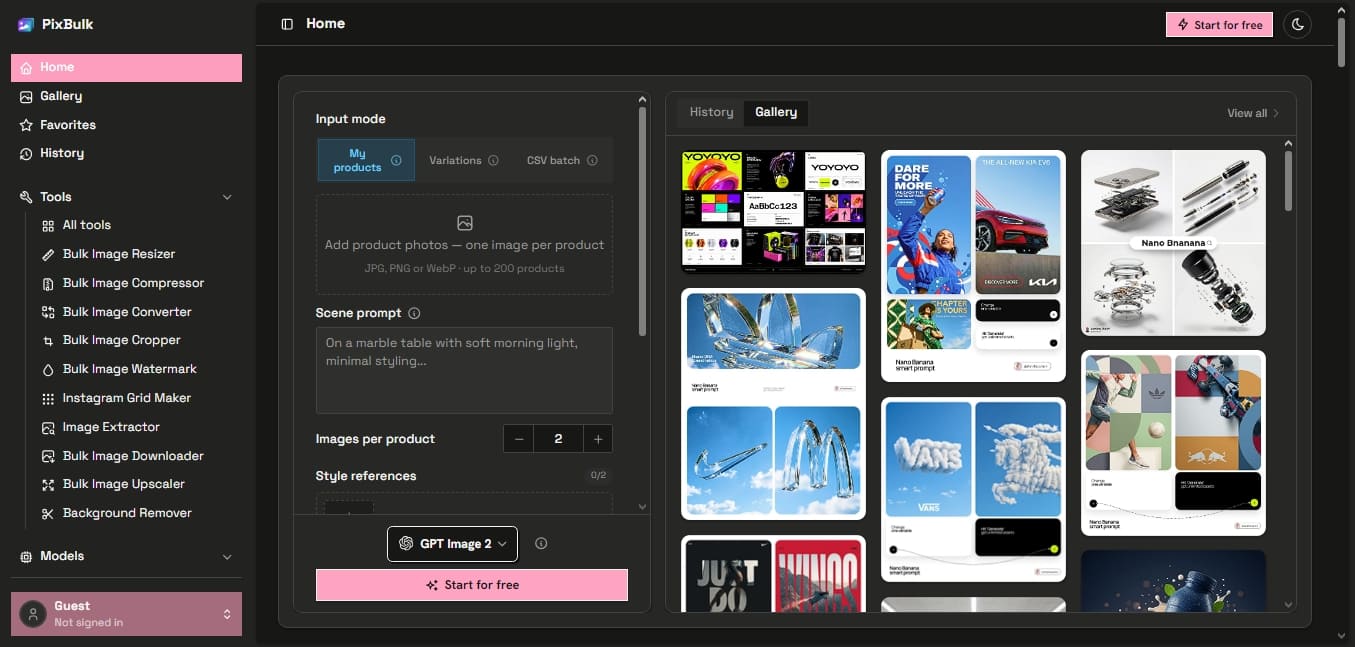
PixBulk is an advanced bulk AI image generation platform designed specifically for the e-commerce sector. Its primary function is to allow Shopify, Etsy, Amazon, and eBay sellers to create hundreds of product photos simultaneously, eliminating the need for traditional photo shoots or manual one-by-one image generation. This tool optimizes visual marketing workflows by transforming a simple CSV file or a list of prompts into a complete catalog of professional graphic assets ready for commercial use.
PixBulk’s operation is based on automation through specialized artificial intelligence models, such as Nano Banana and GPT Image. Unlike other generators that require constant interaction, this tool allows for bulk SKU uploads using spreadsheets. The user defines style parameters, aspect ratios, and the desired model once, and the system processes the entire batch in the background. The technology also enables the integration of reference images to ensure that the entire production maintains strict visual consistency in terms of lighting, composition, and brand aesthetics.
Among its most prominent capabilities for product photography automation are the following:
Bulk Generation via CSV: The ability to process up to 200 images per batch by importing a file with prompts and linked data columns.
Tailored Visual Styles: Creation of photos with white backgrounds for Amazon, lifestyle scenes, flat lays, and ghost mannequin effects for apparel.
Resolution and Export Formats: High-quality file output, reaching resolutions up to 4K and adjusting sizes to the specific requirements of each marketplace.
Complementary Tool Suite: Includes features such as an AI upscaler, background remover, compressor, resizer, and batch watermarking.
Brand Consistency: The option to upload multiple reference images to automatically replicate the visual identity of an existing catalog.
This solution is especially useful for Dropshipping businesses, Print-on-Demand services, and sellers managing dynamic inventories with hundreds of references. Upon completion, PixBulk facilitates the download of results in a single ZIP file, organizing the files so they can be uploaded directly from a computer to the online store. By automating design tasks that previously required hours of manual labor, it allows users to scale their visual presence efficiently and professionally.
PixBulk features and use cases
How to use PixBulk
PixBulk FAQ
What is PixBulk and what is it used for?
It is an AI tool designed to generate and edit product images in bulk for e-commerce sellers.
Can I use PixBulk images for commercial purposes?
Yes, all images generated under a paid plan include a commercial license for use in online stores and advertising.
What happens if an image generation fails?
PixBulk automatically refunds credits for any failed process so that you only pay for the results you actually receive.
How many images can I generate at once in PixBulk?
The system allows you to process up to 200 images per batch by uploading a CSV file.
How can I maintain a consistent visual style in my photos?
You can upload up to five reference images so the tool can mimic their style, composition, and colors across the entire generated batch.
Do credits purchased on the platform expire?
No, PixBulk credits have no expiration date and remain in your account until you decide to use them.
Is there a free version to try PixBulk?
Yes, new accounts receive free credits to test the bulk generation workflow with no commitment or credit card required.
What format are the generated images delivered in?
Once batch processing is complete, you can download all your high-resolution images in a single compressed ZIP file.
Is PixBulk compatible with platforms like Shopify or Amazon?
Yes, the tool allows you to adjust the resolution and aspect ratio to meet the specific requirements of each digital marketplace.
PixBulk pricing and plans
Free
0 $
10 free credits upon sign-up, no credit card required.
Access to all models and resolutions for testing.
Bulk generation capabilities via CSV.
Automatic credit refunds for failed generations.
Includes commercial use license.
Starter
9,9 $ (One-time payment)
1,000 credits (generate up to 500 images).
Access to all AI models: Nano Banana and GPT Image 2.
Support for all resolutions up to 4K.
Bulk generation via CSV with a limit of up to 200 images per batch.
Credits never expire.
Automatic credit refunds for failed generations.
Full commercial use license.
Pro
19,9 $ (One-time payment)
2,200 credits (generate up to 1,100 images).
Access to all AI models: Nano Banana and GPT Image 2.
Support for all resolutions up to 4K.
Bulk generation via CSV with a limit of up to 200 images per batch.
Credits never expire.
Automatic credit refunds for failed generations.
Full commercial use license.
Ultimate
49,9 $ (One-time payment)
6,000 credits (generate up to 3,000 images).
Access to all AI models: Nano Banana and GPT Image 2.
Support for all resolutions up to 4K.
Bulk generation via CSV with a limit of up to 200 images per batch.
Credits never expire.
Automatic credit refunds for failed generations.
Full commercial use license.
PixBulk Screenshots
PixBulk user reviews
Write a review
Checking your session...
PixBulk Reviews
Loading reviews...
PixBulk alternatives



utilz Background Remover
Remove image backgrounds for free with total privacy in your browser. Create transparent or colored backgrounds without uploading files while maintaining original resolution.