Share
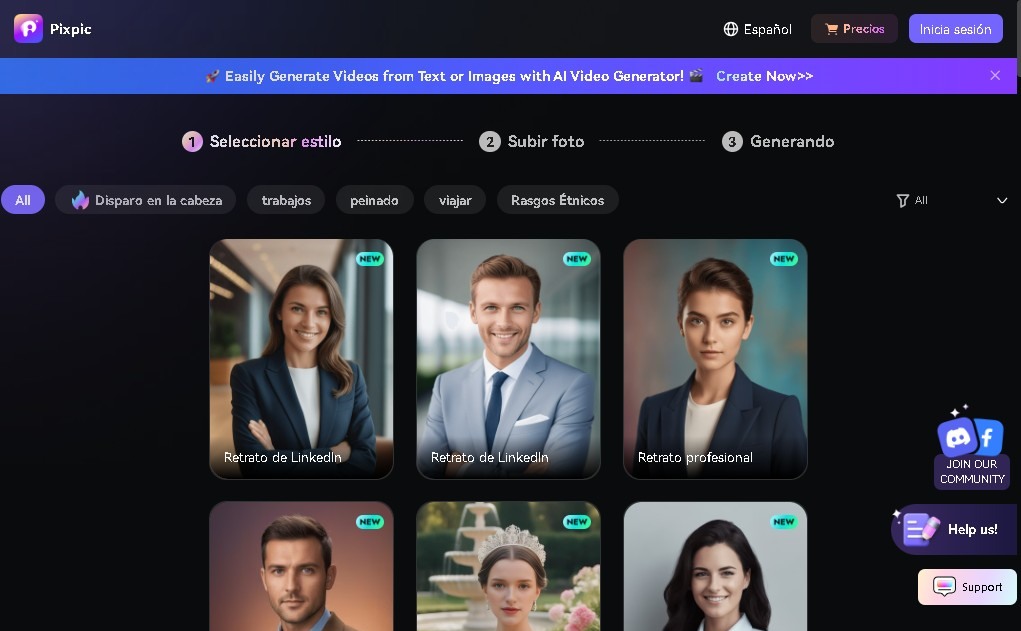
Generate professional and artistic AI portraits from your photos. Perfect for social media profiles, LinkedIn, and personal branding.
What is Pixpic?
Pixpic is an artificial intelligence application developed by Media.io that functions as a high-precision AI portrait generator. Its primary purpose is to convert everyday photographs or selfies into professional-quality images or artistic compositions through the use of advanced image processing algorithms. This tool allows users to obtain superior aesthetic results without the need to hire a photographer or possess advanced digital editing knowledge.
The functionality of Pixpic is based on uploading several reference images of the user. Once uploaded, the AI technology analyzes facial features and lighting to generate new versions in various scenarios and styles. The process is automated and extremely fast, allowing for the generation of multiple images in a matter of minutes. The technical approach focuses on visual consistency and realism, ensuring that the subject's features remain recognizable in every variation generated by the system.
Key capabilities of this tool include:
- Professional portraits: Generation of corporate photos ideal for resumes or LinkedIn profiles, conveying a polished and professional image.
- Variety of visual styles: Users can choose from aesthetics ranging from photographic realism to futuristic art, sci-fi, or purely creative and artistic styles.
- Personal branding: Facilitates the creation of a solid visual identity for entrepreneurs and professionals who need to refresh their image on social media.
- Profile photo optimization: Allows images to be adapted to the formats and aesthetics required by different digital platforms.
This application is especially useful for people who require high-quality visual content immediately. By using Pixpic, the barrier of physical production is eliminated, allowing for virtual photo shoots from a computer or mobile device. The tool positions itself as an efficient personal branding solution, aimed at improving online presence through AI-generated portraits that maintain a balance between creativity and professionalism.
Through its intuitive interface, Pixpic facilitates access to digital studio photography, offering a functional alternative for the creation of avatars and profile photos. Its ability to adapt the user's appearance to different visual contexts makes it a versatile option for professional profiles and creative projects that demand a polished and modern aesthetic.
Pixpic features and use cases
How to use Pixpic
Pixpic FAQ
What is Pixpic, and what exactly does it do?
It's an AI tool that transforms your photos and selfies into high-quality professional or artistic portraits.
How are images generated on Pixpic?
Just upload a few photos of yourself to the platform, and the system will automatically generate realistic new portraits in a few minutes.
What portrait styles does Pixpic offer?
You can choose from professional styles for LinkedIn, social media profile pictures, futuristic art, or creative portraits.
How much does it cost to use Pixpic?
There is a weekly plan for around $6.99 and an annual plan for approximately $29.99.
What are the benefits of Pixpic’s subscription plans?
They include unlimited image generation, access to all styles, watermark-free downloads, and flexible cancellation.
Is Pixpic suitable for creating professional profile pictures?
Yes, it's an excellent option for getting high-quality personal and professional branding headshots without having to visit a photo studio.
How long does it take for Pixpic to deliver results?
The process is very fast; the AI generates multiple variations of your portraits in just a few minutes after you upload your files.
Pixpic pricing and plans
Weekly Plan: approximately $6.99 USD per week.
- Unlimited portrait generation.
- Access to various image styles (professional, social media profile, sci-fi, artistic).
- Watermark-free images.
- Cancel anytime.
Annual Plan: approximately $29.99 USD per year.
- Unlimited portrait generation.
- Access to various image styles (professional, social media profile, sci-fi, artistic).
- Watermark-free images.
- Cancel anytime.
Pixpic Screenshots
Pixpic alternatives



InstantVisualizer
Visualize exterior paint colors with AI. Upload a photo to test real color schemes and see the final result with professional brand codes before painting your home.