
Share
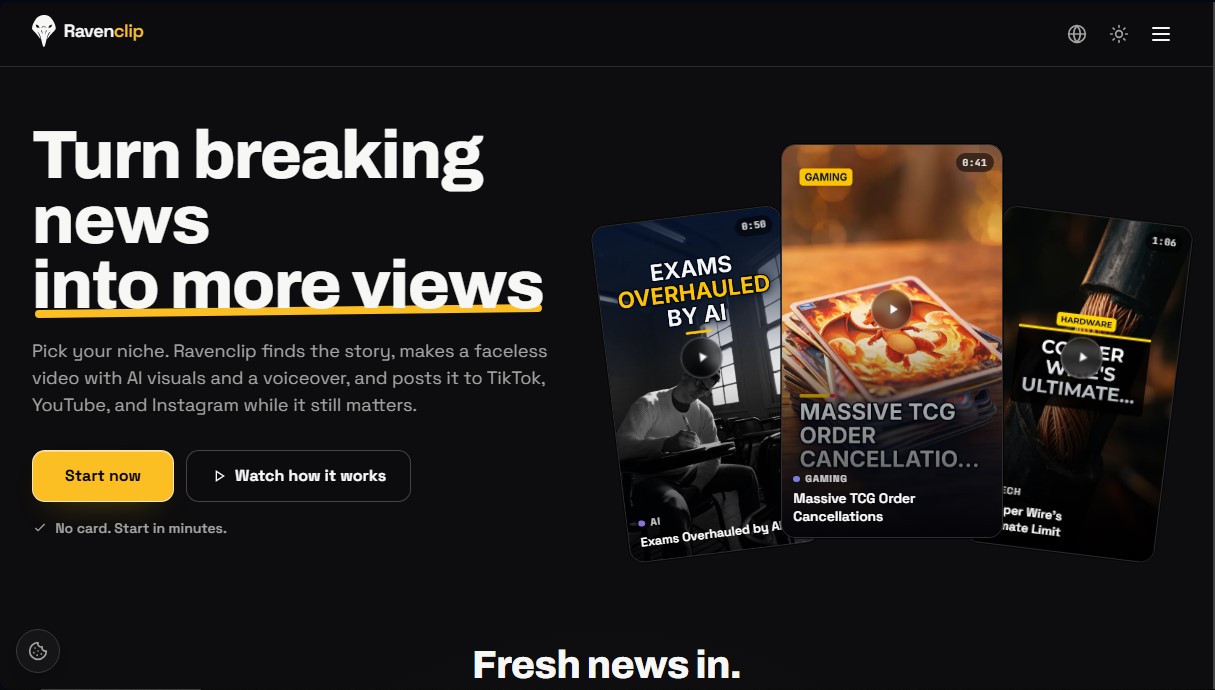
Automatically create and publish short breaking news videos. Generate AI scripts, voiceovers, and visuals to manage faceless social media channels.
What is Ravenclip?
Ravenclip is an artificial intelligence tool specialized in the automated creation and publication of faceless videos based on breaking news. Its main function is to transform current trends into visual content for short-form platforms like TikTok, YouTube Shorts, and Instagram, allowing creators to capitalize on the peak attention of a news story the exact moment it breaks.
Ravenclip's operation is based on a system of constant monitoring of trusted sources in various niches, such as technology, video games, sports, cryptocurrency, and artificial intelligence. Once the platform detects a relevant story, it uses generative AI models to write an original script, generate a narration with studio-quality voices, add automatic subtitles, and select visual assets or footage related to the news. This entire process is performed autonomously, eliminating the need for a camera, voice recording, or manual editing on a computer.
One of the competitive advantages of this tool is its processing speed. While traditional content creation usually takes hours, Ravenclip is capable of generating and publishing a video approximately five minutes after a news story emerges. This focus on breaking news makes it easier for channels to achieve greater organic reach and views by positioning themselves as a priority when search volume is at its highest.
Key functional capabilities and benefits include:
- Automated content generation: Comprehensively creates scripts, narrations, and visuals from a detected news story.
- Automated and scheduled posting: Directly integrates with social media accounts to upload content without manual intervention.
- Customizable niches: Users can choose specific topics and keywords so the AI filters only the news of interest.
- Advanced editing tools: Includes options for clip reframing, importing from YouTube, and using premium visual themes.
- Full commercial rights: The generated content belongs to the user, facilitating the management of professional automated channels.
This platform is ideal for content creators, digital entrepreneurs, and social media managers looking to scale their online presence without dedicating time to technical production. By automating the entire workflow—from news curation to final publication—Ravenclip allows users to keep channels active and constantly updated, optimizing audience retention through highly competitive AI-generated short videos.
Ravenclip features and use cases
How to use Ravenclip
Ravenclip FAQ
What is Ravenclip and how does it benefit my content channel?
Ravenclip is an AI tool that detects breaking news in your niche and automatically creates faceless videos to post on your social media channels.
Do I need to record my voice or appear on camera to use Ravenclip?
No, it isn't necessary because the tool automatically generates the script, studio-quality voiceovers, captions, and visual elements for you.
Which social media platforms can I post the videos to?
Depending on your plan, you can automatically publish your content to TikTok, Instagram, and YouTube Shorts to capitalize on current trends.
How quickly does Ravenclip publish a news story after an event occurs?
The tool is designed to publish approximately five minutes after a story breaks, allowing you to capture the audience's attention before other creators.
Do I have to pay to start setting up my Ravenclip channel?
You can start setting up your channel, choose your niche, and see how the design looks for free, with no credit card required.
What subscription options are available on Ravenclip?
There are three main plans—Starter, Studio, and Scale—which offer between 12 and 60 videos per month with different features tailored to your growth needs.
Do I legally own the videos generated by the platform?
Yes, all subscription plans include full commercial rights for the generated videos, so you can use and monetize them without any legal issues.
Can I customize my channel’s style and niche?
Yes, you can choose your specific niche and keywords so the AI can customize the look, voice, and posting schedule of your channel.
Ravenclip pricing and plans
Free Version (Initial Setup): Set up your niche and keywords, and preview your channel's design and schedule for free—no credit card required—before committing to a paid plan.
Starter Plan: $19 per month ($15 per month billed annually).
1 channel included (additional channels for $15/mo each).
12 videos per month with no credit system.
Video length up to 60 seconds.
Auto-posting to one platform.
Studio voiceovers included.
Standard themes.
Video scheduling.
Pro Creator Tools: watermark-free reframing, YouTube import, and AI clips.
Full commercial rights.
Studio Plan: $39 per month ($31 per month billed annually).
1 channel included (additional channels for $19/mo each).
30 videos per month with no credit system.
Video length up to 2 minutes.
Simultaneous posting to TikTok, YouTube, and Instagram.
Exact footage from the original news source.
Premium themes.
Breaking news triggers.
Includes all Starter plan features.
Scale Plan: $69 per month ($59 per month billed annually).
1 channel included (additional channels for $29/mo each).
60 videos per month with no credit system.
Video length up to 3 minutes.
Custom themes.
Custom captions and fonts.
Includes all Studio plan features.
Ravenclip Screenshots
Ravenclip alternatives

TubeGen AI
Automate viral video creation for YouTube and social media. Generate scripts, voiceovers, images, and thumbnails with AI to monetize your channels.

Kapwing Hinglish Subtitles Generator
Generate automatic Hinglish captions for videos in 100+ languages. Includes AI-powered editing and dubbing tools to reach bilingual audiences.

Auto Captioner
Generate automatic AI captions for videos. Customize design with templates, edit text, and translate into multiple languages to boost your visual content's impact.

Subtitle Generator
Generate AI subtitles, fix errors instantly, and apply styles. Works in-browser with no signup. Export videos or files in multiple formats.