

Share
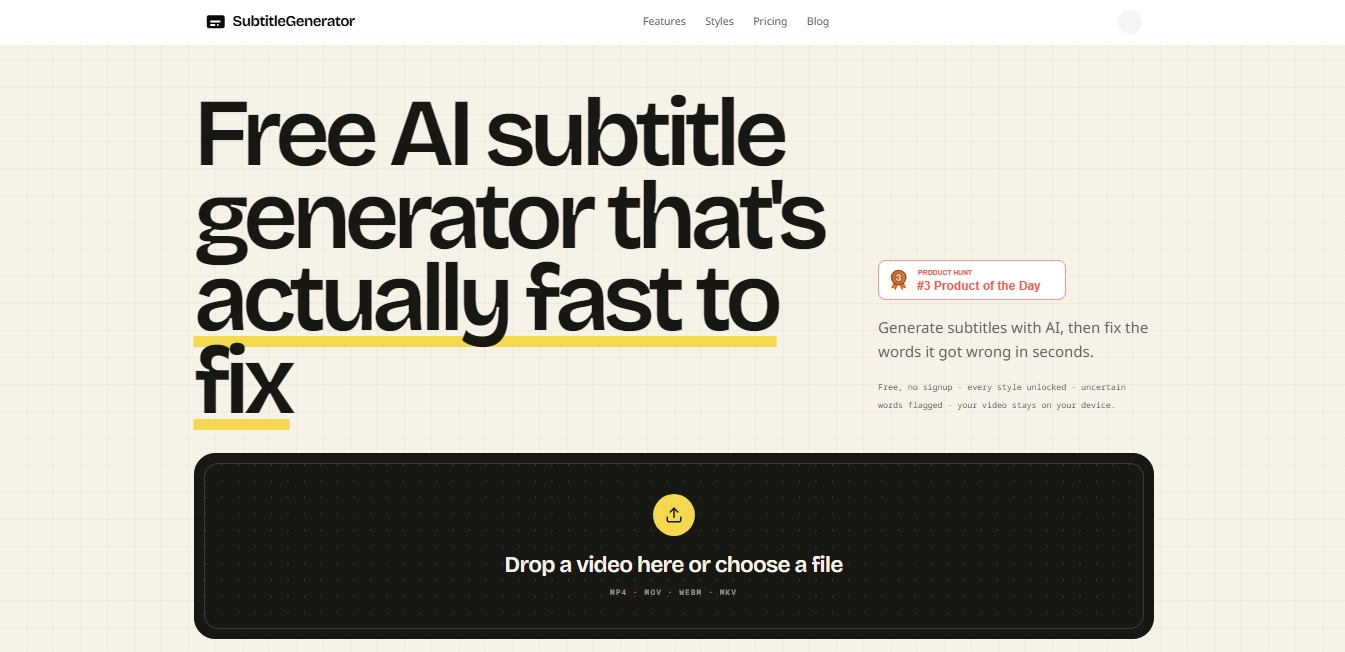
Generate AI subtitles, fix errors instantly, and apply styles. Works in-browser with no signup. Export videos or files in multiple formats.
What is Subtitle Generator?
Subtitle Generator is an artificial intelligence tool specializing in the creation, editing, and customization of subtitles directly from your browser. Its primary function is to quickly transform video audio into synchronized text, allowing for precise corrections in just a few seconds. It distinguishes itself from other solutions through its focus on user privacy, as the original video file never leaves your computer; the system only processes the audio for transcription, and the final rendering is executed locally.
The operation of Subtitle Generator is based on speech recognition algorithms that generate subtitles with word-level synchronization. One of its most prominent technical capabilities is the automatic flagging of uncertain words, where the AI highlights terms that might be incorrect due to accents, fast speech, or background noise. This allows users to review only the segments detected by the system instead of having to watch the entire footage, optimizing the post-production workflow.
The application offers total control over the final result through the following features:
Interactive editing: Allows you to adjust timing, correct AI-detected text, and manually add new subtitle blocks into any silent gaps in the timeline.
Style library: Features 33 subtitle styles organized into six families, ranging from minimalist and corporate aesthetics to dynamic "karaoke" formats or styles optimized for social media platforms like TikTok, Reels, and YouTube Shorts.
Format compatibility: Supports uploading MP4, MOV, WebM, and MKV files, with support for landscape, vertical, and square orientations.
Multi-format export: Users can download the video with burned-in subtitles or extract only the subtitle files in professional formats such as SRT, VTT, ASS, SSA, TXT, or JSON, compatible with editors like Premiere Pro and DaVinci Resolve.
Subtitle translation: Facilitates content localization by allowing full tracks to be translated into other languages directly within the editor.
This tool is especially useful for content creators, podcasters who need to generate clips with dynamic subtitles, educators looking to improve the accessibility of their lessons, and marketing agencies requiring a fast and secure subtitling process. As a web-based solution, it is accessible from any mobile device or desktop without the need for complex installations, while always keeping visual content protected on the user's device.
Subtitle Generator features and use cases
How to use Subtitle Generator
Subtitle Generator FAQ
Is Subtitle Generator really free to use?
Yes, you can generate and edit subtitles for free, although free exports include a small watermark and a 720p resolution.
Are my videos uploaded to your servers when I use the tool?
No, your video file always stays on your device; only the audio is sent for transcription, ensuring your privacy.
Can I correct errors made by the AI?
Yes, the system automatically flags uncertain words so you can edit them or re-transcribe specific segments in seconds.
What file formats does Subtitle Generator support for video uploads?
The tool accepts MP4, MOV, WebM, and MKV files in landscape, vertical, or square orientations.
Do videos exported with the free plan have a watermark?
Yes, free plan exports include a small watermark that you can remove by subscribing to any of the paid plans.
Does Subtitle Generator offer the option to translate subtitles into other languages?
Yes, Pro and Max plan users can translate entire subtitle tracks directly within the editor's workflow.
Do minutes purchased through the pay-as-you-go system expire?
No, any additional minutes you purchase do not have an expiration date and will remain available in your account until you decide to use them.
Is it possible to use the tool from a mobile phone?
Yes, you can generate and edit subtitles on modern mobile browsers, though using a computer is recommended for long or high-resolution exports.
What types of subtitle files can I download with the Pro plan?
By subscribing to the Pro plan, you can export your subtitles in eight different formats, including SRT, VTT, ASS, SSA, SBV, SMI, TXT, and JSON.
How does Subtitle Generator help save time on editing?
The tool automatically highlights parts of the text where the AI has low confidence, allowing you to go straight to the errors without having to review all the footage.
Subtitle Generator pricing and plans
Free
$0
60 minutes of subtitling per month.
720p export with a small watermark.
Videos up to 10 minutes long.
512 MB limit per file.
Access to all styles, animations, and flagging of uncertain words.
Pro
$9 per month or $90 per year
700 minutes of subtitling per month.
HD export without watermarks.
Videos up to 30 minutes long.
1.5 GB limit per file.
Download in 8 formats: SRT, VTT, ASS, SSA, SBV, SMI, TXT, and JSON.
Subtitle translation and high-precision transcription mode (uses double minutes).
Re-transcription of specific segments and word-level timestamp editing.
Use custom fonts and save brand styles.
Max
$15 per month or $150 per year
1,400 minutes of subtitling per month.
Videos up to 1 hour long.
3 GB limit per file.
Includes all Pro plan features and tools.
PAYG (Pay-As-You-Go)
Starting at $3
Add extra minutes ($1 for every 20 minutes).
Purchased minutes never expire.
Does not increase video duration limits, which are governed by the user's current plan.
Subtitle Generator Screenshots
Subtitle Generator alternatives

AI Video Text Remover
Use AI to remove subtitles, logos, and watermarks from your videos. Automatically reconstruct backgrounds for a clean, blur-free result.


KineMaster
Professional AI mobile video editor with auto captions, background removal, and object tracking. Features thousands of templates and 4K export.
Map Animation
Generate AI-powered animated route and map videos from text. Customize cinematic camera movements and export in high resolution and various formats.

Kapwing Hinglish Subtitles Generator
Generate automatic Hinglish captions for videos in 100+ languages. Includes AI-powered editing and dubbing tools to reach bilingual audiences.

Auto Captioner
Generate automatic AI captions for videos. Customize design with templates, edit text, and translate into multiple languages to boost your visual content's impact.