

Share
Generate realistic AI videos and images. Animate static photos, create clips from text, and apply high-quality visual effects.
What is Seavid AI?
Seavid AI is an advanced multimedia creation platform that utilizes generative artificial intelligence to transform text and images into high-quality, dynamic videos. Its primary function is to act as a professional photo animator, allowing any user to convert static images into video clips with realistic movement in a matter of seconds. This tool is designed for content creators, marketing professionals, and designers looking to streamline their workflow without requiring technical expertise in complex video editing.
The technology behind Seavid AI is based on a multi-model architecture that allows users to choose from the most powerful engines on the market. Available options include Seedance 2.0, Kling 3, Hailuo 2.3, Sora 2, and Veo 3.1, as well as specialized models like Grok Imagine. These algorithms perform intelligent motion analysis, identifying which elements of the image should be animated and applying the laws of physics to ensure the displacement, weight, and momentum of objects appear natural and believable.
The tool’s core capabilities include:
- Image to Video AI: Transforms JPG, PNG, or WebP photos into animated videos while maintaining the original file's sharpness and resolution.
- Camera Movement Control: Allows for the configuration of dynamic or fixed movements, offering total creative control over how the action is framed.
- Prompt-Based Generation: Users can guide the animation using text descriptions to define specific movement styles, such as smooth pans or dramatic zooms.
- Customizable Aspect Ratio: Offers formats tailored for different devices and platforms, including 16:9, 1:1, 4:3, and 3:2.
- Specialized AI Effects: Includes creative features such as the Y2K Style Filter, Earth Zoom Out, AI Hug, and utility tools like the Sora Watermark Remover.
- Reference to Video: The ability to generate new sequences while maintaining visual consistency based on a reference image.
Operating Seavid AI is intuitive and optimized for use on any computer. The process is completed in three steps: upload the image, configure quality parameters (from 480p to 1080p Premium) and duration (5 to 10 seconds), and generate the final file. The system processes requests in under 60 seconds, facilitating the mass production of visual assets. As a versatile tool, it enables both the creation of AI videos from scratch via text and the advanced editing of existing images, consistently ensuring professional visual consistency across all results.
Seavid AI features and use cases
How to use Seavid AI
Seavid AI FAQ
What is Seavid AI and what are its core features?
Seavid AI is an artificial intelligence platform designed to transform static photos into animated videos, generate images from text prompts, and automatically apply advanced visual effects.
Does Seavid AI offer a free trial?
Yes, the platform offers a free plan that includes five monthly credits, allowing new users to explore its animation and content creation features.
How long does it take Seavid AI to generate an animation from a photo?
Image-to-video processing is typically completed within thirty to sixty seconds, delivering professional results almost instantly.
Can I control the movement style in Seavid AI videos?
Yes, you can guide the animation using text descriptions to specify camera movements, such as zooms or pans, and adjust the intensity of the action.
What is the output resolution for videos created with Seavid AI?
The tool offers various export qualities, ranging from 480p to 1080p high definition on its premium plans.
Do videos generated with Seavid AI include watermarks?
Content created under any of the paid subscription plans is watermark-free, ensuring a clean and professional look for your projects.
Can I use Seavid AI animations for commercial purposes?
The platform grants a full commercial license to Premium plan subscribers, allowing creations to be used in advertising, social media, and corporate presentations.
Which AI models are available on Seavid AI?
The platform integrates cutting-edge technology, including models such as Seedance, Kling, Hailuo AI, Sora, and Gemini Omni, to ensure the highest quality for every generation.
How does the Seavid AI credit system work?
Every action performed within the tool consumes a specific number of credits, which varies based on the selected resolution, video duration, and the AI model used.
What image formats does the Seavid AI photo animator support?
The system supports the most common image formats, including JPG, PNG, and WebP, making it easy to upload your content.
Seavid AI pricing and plans
Free Plan
Price: Free
- 5 credits per month.
- Up to 1 concurrent task.
- 7-day file storage.
Basic Plan
Price: $29.99 per month ($23.99/mo billed annually)
- 600 credits.
- Up to 1 concurrent task.
- No watermark.
- 30-day file storage.
- Email support.
(All in annual plan)
Standard Plan
Price: $49.99 per month ($34.99/mo billed annually)
- 1,800 credits.
- Up to 2 concurrent tasks.
- No watermark.
- Access to advanced options.
- 60-day file storage.
- Community and priority email support.
(All in annual plan)
Premium Plan
Price: $99.99 per month ($59.99/mo billed annually)
- 6,000 credits.
- Up to 3 concurrent tasks.
- No watermark.
- Access to advanced options.
- 90-day file storage.
- Community and priority email support.
- Commercial license included.
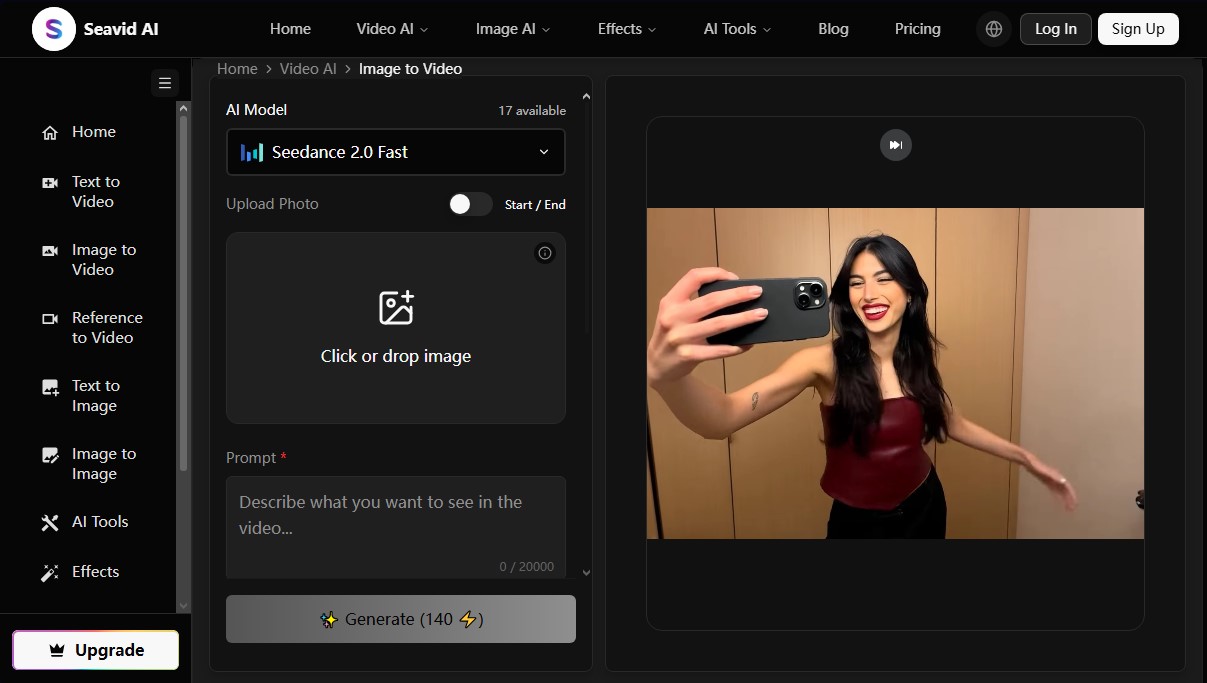
Seavid AI Screenshots
Seavid AI alternatives


Osmo Studio
AI animation studio for professional motion graphics and videos. Control every detail, collaborate with teams, and export with transparent backgrounds.

Victoria Secret Runway
Create fashion show videos by integrating your face into real scenes. Just upload a photo to replace professional models and walk the runway.


BurningBridgesAI.app
Turn a photo into Drake’s viral dance. AI automatically recreates the choreography and gestures so you can star in the trend without recording a thing.

VideoWeb Video Generator
Generate professional AI videos from text or images. Features realistic avatars, automated scripts, and optimized formats for marketing and social media.