
Share
Separate vocals and instruments from any song to create backing tracks. Isolate drums, bass, or vocals for practice, rehearsals, karaoke, and stems.
What is StemSplitterAI?
StemSplitterAI is an artificial intelligence-based audio processing tool designed specifically for stem separation. Its primary function is to allow users to extract or remove specific elements from a song—such as vocals, drums, or bass—to create custom backing tracks or high-quality study material. It is a technical solution geared toward musicians, DJs, producers, and teachers looking for a fast and efficient way to manipulate audio files without resorting to complex professional editing software.
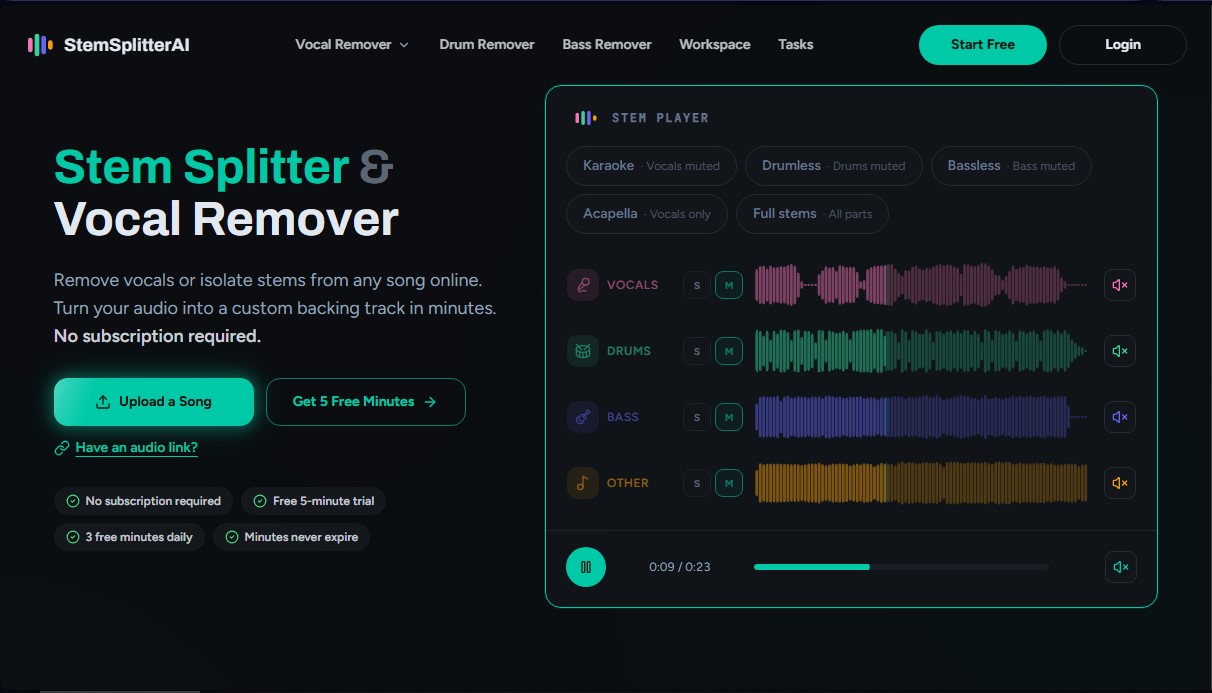
The technology behind StemSplitterAI uses advanced signal processing algorithms to break down any file into four fundamental components: vocals, drums, bass, and the rest of the instrumentation. The workflow is straightforward: the user uploads a file in compatible formats such as MP3, WAV, M4A, AIFF, or FLAC and selects the desired output type. The AI engine analyzes the sound structure and isolates the frequencies corresponding to each sound source, allowing for a preview through an integrated interactive stem player right in the browser.
This platform stands out by offering predefined configurations that optimize workflow based on the user's needs:
- Karaoke: Precisely mutes the lead vocal while keeping the instrumental base intact for rehearsals or performances.
- Drumless: Removes the percussion section, allowing drummers to practice over the original track from their computer or mobile device.
- Bassless: Suppresses the bass line, an essential feature for bassists learning songs by ear.
- Acapella: Isolates only the vocal track, making it easier to study melody and phrasing or to create remixes and mashups.
- Full Stems: Provides all separated parts individually for total control over the mix.
The practical value of StemSplitterAI lies in its interactive workspace, where users can adjust the volume of each component, mute tracks, or solo them before exporting. This allows for the generation of custom backing tracks that can be downloaded in high-fidelity formats. For educators, it is a key tool for dissecting complex songs and highlighting specific parts for their students.
Regarding data management and privacy, the tool ensures that uploaded files and generated results are automatically deleted after a brief retention period, guaranteeing a secure environment for original material. It requires no additional software installation, as the entire AI audio separation process takes place in the cloud, optimizing performance regardless of the user's hardware power.
StemSplitterAI features and use cases
How to use StemSplitterAI
StemSplitterAI FAQ
What is StemSplitterAI and what features does it offer?
It is an online tool designed to quickly separate audio tracks and remove specific vocals or instruments from any song.
Can I use StemSplitterAI for free?
Yes, you can perform a five-minute free trial without signing up, and registered users receive an additional three free minutes every day.
Do I need a monthly subscription to use StemSplitterAI?
It is not required, as the platform allows you to purchase minute packages via a one-time payment that never expires.
What file types can I upload to the platform?
The system supports uploading MP3, WAV, M4A, AIFF, AIF, and FLAC formats for processing.
Which musical elements can I isolate with this tool?
You can independently extract or mute vocals, drums, bass, and other instruments from any music track.
How long are my files kept on the server?
Guest files are deleted after forty-eight hours, while files from registered users are kept for fourteen days before being automatically deleted.
Can I create custom karaoke tracks with StemSplitterAI?
Yes, the tool allows you to mute the lead vocals while keeping the rest of the instrumentation to generate high-quality backing tracks.
What is the maximum song length allowed for processing?
Depending on your selected plan, you can process songs with a duration of anywhere between ten and thirty minutes.
How does the minute credit system work?
Minutes are deducted from your balance based on the length of the uploaded audio; if a process fails, the minutes are automatically refunded.
Is it possible to download instruments separately?
Yes, once the song has been processed, you can export each individual track or a custom mix in MP3, WAV, or FLAC format.
StemSplitterAI pricing and plans
Free Plan
Price: 0 $
- 5-minute trial; no registration or credit card required.
- 3 free minutes daily for registered users.
- Limits: Files up to 5 minutes and 150 MB in size.
- Access to high-quality separation and online stem controls.
One-time Starter Pack (New users only)
Price: 1,99 $ (one-time payment)
- 10 audio minutes for processing and exporting.
- Limits: Songs up to 10 minutes and 150 MB each.
- 4-track separation (vocals and instruments) and online controls.
- Export in MP3, WAV, and FLAC formats.
- Minutes never expire.
12-Minute Pack
Price: 6,99 $ (one-time payment)
- 12 audio minutes for processing and exporting.
- Limits: Songs up to 15 minutes and 150 MB each.
- High-quality separation and export of custom mixes or stems.
- Batch Mode and email support.
- Minutes never expire.
300-Minute Pack
Price: 39,99 $ (one-time payment)
- 300 audio minutes for processing and exporting.
- Limits: Songs up to 30 minutes and 300 MB each.
- Includes all export features and interactive controls.
- Priority support and Batch Mode.
- Minutes never expire.
1-Month Unlimited Plan
Price: 9,99 $ per month
- Unlimited processing and exports during the subscription period.
- Limits: Songs up to 30 minutes and 300 MB per file (subject to Fair Use Policy).
- Priority processing queue and priority support.
- Access to all customization tools and export formats.
1-Year Unlimited Plan
Price: 4,99 $ per month (billed annually)
- Unlimited processing and exports.
- Limits: Songs up to 30 minutes and 300 MB per file.
- Includes all features of the monthly plan at a 50% discount.
- Priority queue, priority support, and Batch Mode.
StemSplitterAI Screenshots
StemSplitterAI user reviews
Write a review
Checking your session...
StemSplitterAI Reviews
Loading reviews...
StemSplitterAI alternatives


Songscription AI
Convert audio files and video links into sheet music, MIDI, and tabs. Transcribe multiple instruments at once and export to PDF, MusicXML, or Guitar Pro.
FineVoice Aunio
AI agent for end-to-end audio production. Generate professional voiceovers, music, and effects. Clone voices, edit sound, and create high-quality podcasts.

MP3 to MIDI
Convert audio files to editable MIDI with AI. Supports MP3, WAV, and FLAC, making it easy to extract notes and melodies for music production.

Vocal Remover
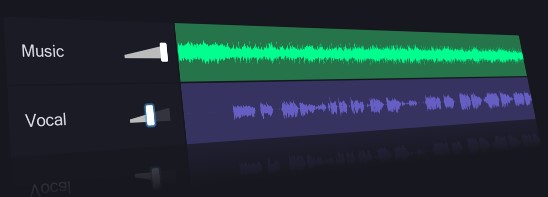
Separate vocals and instruments with AI. Split tracks, adjust pitch and tempo, detect key, and edit audio files easily and for free.