Share
Strut
AI workspace unifying notes, documents, and writing projects. Manage tasks, collaborate with your team, and refine text with intelligent assistance.
General Information about Strut
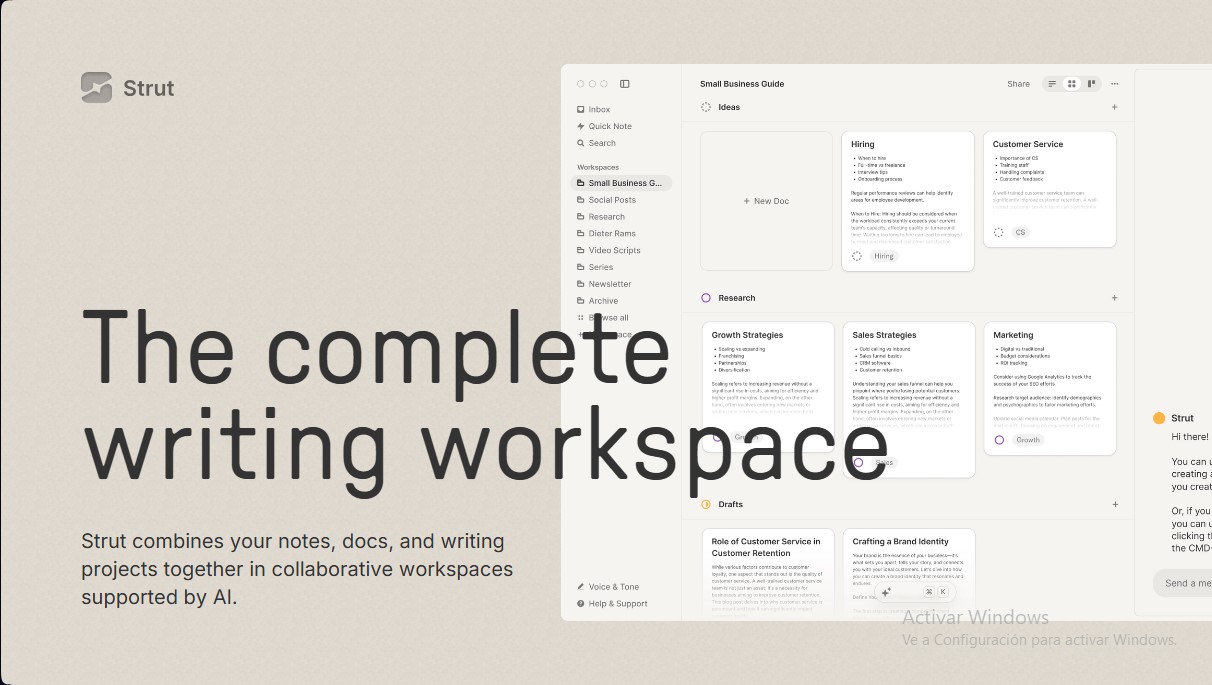
Strut is an all-in-one writing workspace designed to unify notes, documents, and project management in a collaborative environment powered by artificial intelligence. Unlike conventional text editors, this tool allows you to move from chaos to clarity by centralizing every phase of the creative process into a single desktop or web-based application. Its primary focus is to eliminate friction between initial idea capture and the final execution of writing projects.
The platform organizes work through fully customizable project workspaces that support list, grid, and Kanban board views. This flexibility allows users to adapt their workflow to their specific needs, whether they are drafting social media threads or long-form novels. One of its standout features is the Writing Inbox, an open space for capturing quick thoughts that are automatically organized into a daily timeline. Users can later move these items into specific projects using drag-and-drop functionality, facilitating a seamless transition between note-taking and structured writing.
On the technical side, Strut utilizes OpenAI's GPT-4o model to act as an active collaborator rather than a simple automation tool. The AI is integrated in a way that allows you to chat directly about specific documents or projects, making research and draft generation easier. Additionally, it includes pre-configured AI workflows for creating outlines and brainstorming without needing to learn complex prompts. Crucially, the tool guarantees privacy, as it does not use user data to train AI models.
Key functional capabilities and practical benefits include:
- Deep Focus Mode: A minimalist, typewriter-inspired environment designed to eliminate distractions during creation.
- Brand Voice: Allows you to customize the AI's tone by analyzing previous texts or websites so that generated content maintains a consistent identity.
- Inline Editing: Integrated tools for grammar correction and style improvements applied directly to the text.
- Real-time Collaboration: The ability to invite other users to work simultaneously within the same workspace.
- Document Mentions: The option to cite other files within the AI chat using "@" to work with multiple information sources at once.
The Strut interface is highly customizable, featuring a dark mode for late-night sessions and a wide variety of keyboard shortcuts to speed up navigation without reaching for the mouse. By integrating project management and focused writing into a single tool, the app positions itself as a robust solution for writers, content teams, and creators looking to optimize their workflow through the use of generative AI.
Features and Use Cases of Strut
How Strut Works
Frequently Asked Questions about Strut
What is Strut and what is it used for?
It’s an all-in-one workspace that combines notes, documents, and writing projects into a single, collaborative, AI-powered application.
Is my personal data used to train the AI?
No, your data is exclusively yours and is never used to train artificial intelligence models.
Which language model does Strut currently use?
The platform uses OpenAI’s GPT-4o model to provide suggestions, edits, research, and inspiration for all your writing.
Can I organize my projects in different ways?
Yes, the tool allows you to organize your workspaces using list, grid, or board views to suit your needs.
How does the brand voice feature in Strut work?
This feature allows the AI to learn your personal tone by analyzing your writing, so the generated content sounds exactly like you.
Is there a desktop app available?
Yes, there is a desktop app available that keeps the tool easily accessible and allows you to use quick shortcuts to jot down ideas.
Can I collaborate with others on the same document?
The platform supports real-time collaboration, allowing you to invite others to write and edit your projects simultaneously.
What is the writing inbox?
It is an open space designed to instantly capture ideas and quick notes before turning them into final projects.
Does the tool offer a distraction-free writing mode?
Yes, Strut includes a typewriter-inspired deep focus mode that removes any unnecessary visual elements while you work.
When will the platform stop being free?
The transition to paid subscription plans is scheduled to take place between May and June 2024.
Strut Pricing
Plus
8 $ per month (billed annually)
- Unlimited workspaces.
- Unlimited Brand Voice.
- 500 AI message limit per month.
- List, grid, and Kanban views.
- Real-time collaboration.
- Markdown export.
- Cloud sync.
- Web and desktop app access.
- Help and technical support.
Pro
20 $ per month (billed annually)
- Unlimited workspaces.
- Unlimited Brand Voice.
- Unlimited monthly AI messages.
- List, grid, and Kanban views.
- Real-time collaboration.
- Markdown export.
- Cloud sync.
- Web and desktop app access.
- Help and technical support.
Strut Screenshots